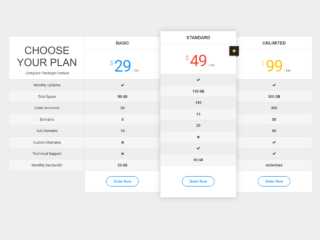
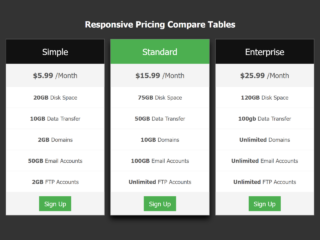
Are you looking to present different product or service plans clearly on your website? Creating elegant and functional Css3 Compare Pricing Tables can greatly improve how users understand your offerings. This tutorial will guide you through building a responsive and visually appealing comparison table using HTML and CSS. It helps your visitors easily see the differences and choose the best option for their needs.
How to Create CSS3 Compare Pricing Tables
Step 1: Include External Stylesheets
First, you need to add a link to an external stylesheet for icons. This stylesheet, usually Font Awesome, provides various icons. Place this line inside the `head` tag of your HTML document.
<link rel='stylesheet' href='https://maxcdn.bootstrapcdn.com/font-awesome/4.5.0/css/font-awesome.min.css'>
Step 2: Build the HTML Structure
Next, create the basic HTML structure for your comparison table. This structure defines the table, its headers, product information, pricing, and feature rows.
<div class="comparison">
  <table>
    <thead>
      <tr>
        <th class="tl tl2"></th>
        <th class="product" style="background:#69C7F1; border-top-left-radius: 5px; border-left:0px;">Product_1</th>
        <th class="product" style="background:#69C7F1;">Product_2</th>
        <th class="product" style="border-top-right-radius: 5px; border-right:0px; background:#69C7F1;">Product_3</th>
      </tr>
      <tr>
        <th></th>
        <th class="price-info">
          <div class="price-now"><span>$ Price</span>
            <p>  / year</p>
          </div>
        </th>
        <th class="price-info">
          <div class="price-now"><span>$ Price</span>
            <p>  / year</p>
          </div>
        </th>
        <th class="price-info">
          <div class="price-now"><span>$ Price</span>
            <p> / year</p>
          </div>
        </th>
      </tr>
    </thead>
    <tbody>
      <tr>
        <td></td>
        <td colspan="3">item_1</td>
      </tr>
      <tr class="compare-row">
        <td>item_1</td>
        <td><i class="fa fa-check"></i>
        </td>
        <td><span>–</span></td>
        <td><i class="fa fa-check"></i>
        </td>
      </tr>
      <tr>
        <td> </td>
        <td colspan="3">item_2</td>
      </tr>
      <tr>
        <td>item_2</td>
        <td><i class="fa fa-check"></i>
        </td>
        <td><span>–</span></td>
        <td><i class="fa fa-check"></i>
        </td>
      </tr>
      <tr>
        <td> </td>
        <td colspan="3">item_3</td>
      </tr>
      <tr class="compare-row">
        <td>item_3</td>
        <td><i class="fa fa-check"></i>
        </td>
        <td><span>–</span></td>
        <td><i class="fa fa-check"></i>
        </td>
      </tr>
      <tr>
        <td> </td>
        <td colspan="4">item_4</td>
      </tr>
      <tr>
        <td>item_4</td>
        <td><i class="fa fa-check"></i>
        </td>
        <td><span>–</span></td>
        <td><i class="fa fa-check"></i>
        </td>
      </tr>
      <tr>
        <td> </td>
        <td colspan="3">item_5</td>
      </tr>
      <tr class="compare-row">
        <td>item_5</td>
        <td><span>–</span></td>
        <td><span>–</span></td>
        <td><i class="fa fa-check"></i>
        </td>
      </tr>
      <tr>
        <td> </td>
        <td colspan="4">item_6</td>
      </tr>
      <tr>
        <td>item_6</td>
        <td><span>–</span></td>
        <td><span>–</span></td>
        <td><i class="fa fa-check"></i>
        </td>
      </tr>
      <tr>
        <td> </td>
        <td colspan="3">item_7</td>
      </tr>
      <tr class="compare-row">
        <td>item_7</td>
        <td><span>–</span></td>
        <td><span>–</span></td>
        <td><i class="fa fa-check"></i>
        </td>
      </tr>
      <tr>
        <td> </td>
        <td colspan="3">item_8</td>
      </tr>
      <tr>
        <td>item_8</td>
        <td><span>–</span></td>
        <td><i class="fa fa-check"></i>
        </td>
        <td><i class="fa fa-check"></i>
        </td>
      </tr>
      <tr>
        <td> </td>
        <td colspan="3">item_9</td>
      </tr>
      <tr class="compare-row">
        <td>item_9</td>
        <td><span>–</span></td>
        <td><i class="fa fa-check"></i>
        </td>
        <td><i class="fa fa-check"></i>
        </td>
      </tr>
      <tr>
        <td> </td>
        <td colspan="3">item_10</td>
      </tr>
      <tr>
        <td>item_10</td>
        <td colspan="3">description_union row</td>
      </tr>
      <tr>
        <td> </td>
      </tr>
      <tr>
        <td></td>
        <td><a href="https://idc.wis.com.tw/contactUs?service=o365-email-security-solution" class="price-buy">button<span class="hide-mobile"></span></a></td>
        <td><a href="https://idc.wis.com.tw/contactUs?service=o365-email-security-solution" class="price-buy">button<span class="hide-mobile"></span></a></td>
        <td><a href="https://idc.wis.com.tw/contactUs?service=o365-email-security-solution" class="price-buy">button<span class="hide-mobile"></span></a></td>
      </tr>
    </tbody>
  </table>

</div>
Step 3: Add CSS Styling
Finally, apply the CSS styles to make your pricing table visually appealing and responsive. This CSS will style the layout, colors, fonts, and ensure it looks good on different screen sizes.
.comparison {
  max-width: 960px;
  margin: 0 auto;
  margin-bottom: 20px;
  margin-top: 30px;
  font: 13px/1.4 "Helvetica Neue", Helvetica, Arial, sans-serif;
  text-align: center;
  padding: 10px;
}

.comparison table {
  width: 100%;
  border-collapse: collapse;
  border-spacing: 0;
  table-layout: auto;
}

.comparison td,
.comparison th {
  border-right: 1px solid #E8E8E8;
  empty-cells: show;
  padding: 10px;
  border-top: 1px solid #E8E8E8;
  border-bottom: 1px solid #E8E8E8;
  color: #808080;
  font-size: 15px;
}

.comparison tbody tr:nth-child(odd) {
  display: none;
}

.comparison .compare-row {
  background: #F7F7F7;
}

.fa-check {
  color: #69C7F1;
}

.comparison th {
  font-weight: normal;
  padding: 0;
  border-top: 0px solid #E8E8E8;
  border-bottom: 0px solid #E8E8E8;
}

.comparison tr td:first-child {
  text-align: left;
  padding: 15px;
  border-left: 1px solid #E8E8E8;
  border-top: 1px solid #E8E8E8;
}

.comparison .product,
.comparison .tl {
  color: #FFF;
  padding: 10px;
  font-size: 14px;
}

.comparison .tl2 {
  border-right: 0;
}

.comparison .product {
  background: #69C7F1;
  height: 40px;
  font-size: 1.6em;
}

.comparison .price-info {
  padding: 15px;
}

.comparison .price-now,
.comparison .price-now span {
  color: #808080;
}

.comparison .price-now span {
  font-size: 36px;
  color: #545454;
}

.comparison .price-now p {
  font-size: 14px;
  text-align: center;
  line-height: 16px;
  display: inline;
}

.comparison .price-buy {
  background: #EC671A;
  padding: 10px 20px;
  font-size: 14px;
  display: inline-block;
  color: #fff;
  text-decoration: none;
  border-radius: 3px;
  text-transform: uppercase;
  margin: 5px 0 10px 0;
  letter-spacing: 1px;
  cursor: pointer;
  -webkit-transition: .3s all ease;
  transition: .3s all ease;
}

.comparison .price-buy:hover {
  background: #E84D00;
}

@media screen and (min-width: 721px) and (max-width: 1000px) {
  .table_ul li {
    letter-spacing: 0px;
  }
  .comparison .price-now span {
    font-size: 32px;
  }
  .comparison .price-now p {
    display: block;
  }
}

@media screen and (max-width: 720px) {
  .table_ul {
    padding: 0px;
  }
  .table_ul li {
    font-size: 10px;
    line-height: 16px;
    padding: 3px 0;
  }
  .comparison {
    max-width: 100%;
  }
  .comparison td:first-child,
  .comparison th:first-child {
    display: none;
  }
  .comparison tbody tr:nth-child(odd) {
    display: table-row;
    background: #F7F7F7;
  }
  .comparison .row {
    background: #FFF;
  }
  .comparison td,
  .comparison th {
    border: 1px solid #CCC;
    border-top: none;
    padding: 10px;
  }
  .price-info {
    border-top: 0 !important;
    padding: 10px 0 !important;
  }
  .price-info p {
    line-height: 8px;
    font-size: 8px !important;
  }
  .comparison .compare-row {
    background: #ffffff;
  }
  .comparison .price-now p {
    display: block;
  }
  .comparison .price-now span {
    font-size: 24px;
  }
  .comparison .qbse {
    font-size: 1.2em;
  }
  .comparison td {
    font-size: 14px;
  }
  .comparison th {
    font-size: 14px;
  }
}
You have successfully created responsive Css3 Compare Pricing Tables using HTML and CSS.