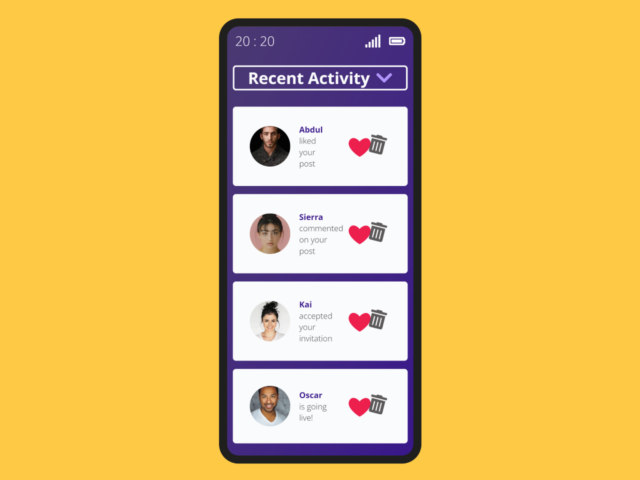
Here’s how to create an interactive notification center UI in Vanilla Js. This tutorial provides a step-by-step guide to building a sleek and functional notification system. This type of UI element greatly improves user experience by providing a centralized location for important updates and alerts, all without relying on external libraries.
Setting Up the Project
First, we’ll add the necessary assets to your HTML document’s <head> section. This includes linking to Google Fonts for styling.
<link rel="preconnect" href="https://fonts.googleapis.com" />
    <link rel="preconnect" href="https://fonts.gstatic.com" crossorigin />
    <link
      href="https://fonts.googleapis.com/css2?family=Open+Sans:ital,wght@0,300..800;1,300..800&display=swap"
      rel="stylesheet"
    />
Creating the HTML Structure
Next, you need to create the basic HTML structure for your notification center. This includes the container for the entire UI, indicators for time and battery, the notification center button, and the notification items themselves.
<div class="phone">
	<div class="phone__indicators">
		<div class="time">10:02</div>
		<div class="phone__icons">
			<div class="signal">
				<svg viewBox="0 0 640 512" width="20" title="signal">
					<path d="M216 288h-48c-8.84 0-16 7.16-16 16v192c0 8.84 7.16 16 16 16h48c8.84 0 16-7.16 16-16V304c0-8.84-7.16-16-16-16zM88 384H40c-8.84 0-16 7.16-16 16v96c0 8.84 7.16 16 16 16h48c8.84 0 16-7.16 16-16v-96c0-8.84-7.16-16-16-16zm256-192h-48c-8.84 0-16 7.16-16 16v288c0 8.84 7.16 16 16 16h48c8.84 0 16-7.16 16-16V208c0-8.84-7.16-16-16-16zm128-96h-48c-8.84 0-16 7.16-16 16v384c0 8.84 7.16 16 16 16h48c8.84 0 16-7.16 16-16V112c0-8.84-7.16-16-16-16zM600 0h-48c-8.84 0-16 7.16-16 16v480c0 8.84 7.16 16 16 16h48c8.84 0 16-7.16 16-16V16c0-8.84-7.16-16-16-16z" fill="white" />
				</svg>
			</div>
			<div class="battery">
				<svg viewBox="0 0 640 512" width="20" title="battery-full">
					<path d="M544 160v64h32v64h-32v64H64V160h480m16-64H48c-26.51 0-48 21.49-48 48v224c0 26.51 21.49 48 48 48h512c26.51 0 48-21.49 48-48v-16h8c13.255 0 24-10.745 24-24V184c0-13.255-10.745-24-24-24h-8v-16c0-26.51-21.49-48-48-48zm-48 96H96v128h416V192z" fill="white" />
				</svg>
			</div>
		</div>
	</div>

	<div class="notification__center">
		<button>
			<p>Recent Activity</p>
			<svg viewBox="0 0 448 512" width="20" title="chevron-down">
				<path d="M207.029 381.476L12.686 187.132c-9.373-9.373-9.373-24.569 0-33.941l22.667-22.667c9.357-9.357 24.522-9.375 33.901-.04L224 284.505l154.745-154.021c9.379-9.335 24.544-9.317 33.901.04l22.667 22.667c9.373 9.373 9.373 24.569 0 33.941L240.971 381.476c-9.373 9.372-24.569 9.372-33.942 0z" fill="#B197FC" />
			</svg>
		</button>
		<div class="notifications__container hidden">
			<div class="notification__item">
				<div class="notification__image">
					<img src="https://images.unsplash.com/photo-1506794778202-cad84cf45f1d?w=500&auto=format&fit=crop&q=60&ixlib=rb-4.0.3&ixid=M3wxMjA3fDB8MHxzZWFyY2h8M3x8cG9ydHJhaXR8ZW58MHx8MHx8fDI%3D" alt="man standing with dark background" />
				</div>
				<div class="notification__content">
					<p class="user__name">Abdul</p>
					<p class="message">liked your post</p>
				</div>
				<div class="actions">
					<button class="like"></button>
					<button class="delete">
						<svg viewBox="0 0 448 512" width="20" title="trash-alt">
							<path d="M32 464a48 48 0 0 0 48 48h288a48 48 0 0 0 48-48V128H32zm272-256a16 16 0 0 1 32 0v224a16 16 0 0 1-32 0zm-96 0a16 16 0 0 1 32 0v224a16 16 0 0 1-32 0zm-96 0a16 16 0 0 1 32 0v224a16 16 0 0 1-32 0zM432 32H312l-9.4-18.7A24 24 0 0 0 281.1 0H166.8a23.72 23.72 0 0 0-21.4 13.3L136 32H16A16 16 0 0 0 0 48v32a16 16 0 0 0 16 16h416a16 16 0 0 0 16-16V48a16 16 0 0 0-16-16z" fill="#5c595a" />
						</svg>
					</button>
				</div>
			</div>

			<div class="notification__item">
				<div class="notification__image">
					<img src="https://images.unsplash.com/photo-1531746020798-e6953c6e8e04?w=500&auto=format&fit=crop&q=60&ixlib=rb-4.0.3&ixid=M3wxMjA3fDB8MHxzZWFyY2h8NHx8cG9ydHJhaXR8ZW58MHx8MHx8fDI%3D" alt="woman standing in front of a pink wall" />
				</div>
				<div class="notification__content">
					<p class="user__name">Sierra</p>
					<p class="message">commented on your post</p>
				</div>
				<div class="actions">
					<button class="like"></button>
					<button class="delete">
						<svg viewBox="0 0 448 512" width="20" title="trash-alt">
							<path d="M32 464a48 48 0 0 0 48 48h288a48 48 0 0 0 48-48V128H32zm272-256a16 16 0 0 1 32 0v224a16 16 0 0 1-32 0zm-96 0a16 16 0 0 1 32 0v224a16 16 0 0 1-32 0zm-96 0a16 16 0 0 1 32 0v224a16 16 0 0 1-32 0zM432 32H312l-9.4-18.7A24 24 0 0 0 281.1 0H166.8a23.72 23.72 0 0 0-21.4 13.3L136 32H16A16 16 0 0 0 0 48v32a16 16 0 0 0 16 16h416a16 16 0 0 0 16-16V48a16 16 0 0 0-16-16z" fill="#5c595a" />
						</svg>
					</button>
				</div>
			</div>

			<div class="notification__item">
				<div class="notification__image">
					<img src="https://images.unsplash.com/photo-1580489944761-15a19d654956?w=500&auto=format&fit=crop&q=60&ixlib=rb-4.0.3&ixid=M3wxMjA3fDB8MHxzZWFyY2h8Nnx8cG9ydHJhaXR8ZW58MHx8MHx8fDI%3D" alt="woman smiling wearing a white blouse " />
				</div>
				<div class="notification__content">
					<p class="user__name">Kai</p>
					<p class="message">accepted your invitation</p>
				</div>
				<div class="actions">
					<button class="like"></button>
					<button class="delete">
						<svg viewBox="0 0 448 512" width="20" title="trash-alt">
							<path d="M32 464a48 48 0 0 0 48 48h288a48 48 0 0 0 48-48V128H32zm272-256a16 16 0 0 1 32 0v224a16 16 0 0 1-32 0zm-96 0a16 16 0 0 1 32 0v224a16 16 0 0 1-32 0zm-96 0a16 16 0 0 1 32 0v224a16 16 0 0 1-32 0zM432 32H312l-9.4-18.7A24 24 0 0 0 281.1 0H166.8a23.72 23.72 0 0 0-21.4 13.3L136 32H16A16 16 0 0 0 0 48v32a16 16 0 0 0 16 16h416a16 16 0 0 0 16-16V48a16 16 0 0 0-16-16z" fill="#5c595a" />
						</svg>
					</button>
				</div>
			</div>

			<div class="notification__item">
				<div class="notification__image">
					<img src="https://images.unsplash.com/photo-1507003211169-0a1dd7228f2d?w=500&auto=format&fit=crop&q=60&ixlib=rb-4.0.3&ixid=M3wxMjA3fDB8MHxzZWFyY2h8OXx8cG9ydHJhaXR8ZW58MHx8MHx8fDI%3D" alt="man smiling wearing a white shirt" />
				</div>
				<div class="notification__content">
					<p class="user__name">Oscar</p>
					<p class="message">is going live!</p>
				</div>
				<div class="actions">
					<button class="like"></button>
					<button class="delete">
						<svg viewBox="0 0 448 512" width="20" title="trash-alt">
							<path d="M32 464a48 48 0 0 0 48 48h288a48 48 0 0 0 48-48V128H32zm272-256a16 16 0 0 1 32 0v224a16 16 0 0 1-32 0zm-96 0a16 16 0 0 1 32 0v224a16 16 0 0 1-32 0zm-96 0a16 16 0 0 1 32 0v224a16 16 0 0 1-32 0zM432 32H312l-9.4-18.7A24 24 0 0 0 281.1 0H166.8a23.72 23.72 0 0 0-21.4 13.3L136 32H16A16 16 0 0 0 0 48v32a16 16 0 0 0 16 16h416a16 16 0 0 0 16-16V48a16 16 0 0 0-16-16z" fill="#5c595a" />
						</svg>
					</button>
				</div>
			</div>
		</div>
	</div>
</div>
    <script  src="./script.js"></script>
Styling with CSS
Now, let’s style the notification center using CSS to make it visually appealing. This involves setting colors, fonts, and layout properties to create a user-friendly interface.
:root {
	margin: 0;
	padding: 0;
	box-sizing: border-box;

	--color-black: #1f1f1e;
	--color-white: #fafbfc;
	--color-yellow: #feca45;
	--color-gray: #5c595a;
	--phone-background: linear-gradient(
		to right bottom,
		#4a3972,
		#473279,
		#432a7f,
		#3e2185,
		#39178b
	);
	--color-accent: #39178b;
	--color-red: #ed054e;
}

body {
	font-family: "Open Sans", sans-serif;
	font-size: 1rem;
	color: var(--color-black);
	background-color: var(--color-yellow);
}

.phone {
	max-width: 250px;
	height: 550px;
	margin: 1rem auto;
	border: 10px solid var(--color-black);
	border-radius: 24px;
	background-image: var(--phone-background);
}

.phone__indicators {
	display: flex;
	justify-content: space-between;
	align-items: center;
	padding: 0 10px;
	margin: 5px auto;
	color: var(--color-white);
}

.phone__icons {
	display: flex;
	gap: 10px;
}

.time {
	font-size: 0.8rem;
}

.notification__center {
	max-width: 200px;
	margin: 0 auto;
	padding: 5% 3%;

	> button {
		display: flex;
		justify-content: center;
		align-items: center;
		gap: 8px;
		font: inherit;
		width: 100%;
		border-radius: 4px;
		cursor: pointer;
		font-weight: bold;
		color: var(--color-accent);
		border: 2px solid var(--color-accent);
		background-color: var(--color-white);
	}
	> button:hover {
		color: var(--color-white);
		border: 2px solid var(--color-white);
		background-color: var(--phone-background);
	}
}

.notifications__container {
	width: 100%;
	margin: 1rem auto;
	animation: bounce 0.5s linear forwards;
}

.notification__item {
	padding: 1rem;
	margin-bottom: 10px;
	display: grid;
	grid-template-columns: repeat(3, 1fr);
	align-items: center;
	font-size: 0.5rem;
	border: 1px solid transparent;
	border-radius: 4px;
	background-color: var(--color-white);
}

.notification__image {
	width: 50px;
	height: 50px;
	border: none;
	border-radius: 50%;
	overflow: hidden;
	margin-right: 11px;

	> img {
		height: 100%;
		width: 100%;
		object-fit: cover;
	}
}

.notification__content {
	width: 40px;
}

.user__name {
	font-weight: bold;
	color: var(--color-accent);
}

.actions {
	display: flex;
	align-items: center;
	justify-content: center;

	> button {
		border: none;
		background-color: transparent;
		cursor: pointer;
		font-size: 1.2rem;
	}
}

.hidden {
	display: none;
}

.delete {
	animation: shake 0.5s infinite;
}

@keyframes bounce {
	0%,
	40%,
	75%,
	95% {
		transform: translateY(0);
	}

	15% {
		transform: translateY(-20px);
	}

	65% {
		transform: translateY(-15px);
	}

	85% {
		transform: translateY(-5px);
	}

	100% {
		transform: translateY(0);
	}
}

@keyframes slideout {
	0% {
		transform: translateX(0);
	}

	50% {
		opacity: 0;
	}

	100% {
		transform: translateX(-200px);
		opacity: 0;
	}
}

@keyframes heartbeat {
	from {
		transform: scale(1);
	}

	to {
		transform: scale(1.3);
	}
}

@keyframes shake {
	0% {
		transform: rotateZ(0);
	}

	34% {
		transform: rotateZ(-15deg);
	}

	68% {
		transform: rotateZ(15deg);
	}

	100% {
		transform: rotateZ(0);
	}
}
Adding JavaScript Functionality
Finally, we’ll add JavaScript to make the notification center interactive. This includes toggling the visibility of the notification container, handling delete and like actions, and updating the current time.
const dropdownButton = document.querySelector(".notification__center > button");
const notificationsContainer = document.querySelector(
	".notifications__container"
);
const notifications = document.querySelectorAll(".notification__item");
const deleteButton = document.getElementsByClassName("delete");
const likeButton = document.getElementsByClassName("like");
const timeElement = document.querySelector(".time");

let i = 0;

for (i = 0; i < deleteButton.length; i++) {
	deleteButton[i].addEventListener("click", function () {
		this.parentElement.parentElement.style.animation = "slideout 1s forwards";
	});
}

for (i = 0; i < likeButton.length; i++) {
	likeButton[i].addEventListener("click", function () {
		this.style.animation = "none";
		this.textContent = "✔";
		this.style.color = "#60c91a";
		this.style.fontSize = "24px";
	});
}

dropdownButton.addEventListener("click", function () {
	for (const notification of notifications) {
		notification.style.animation = "none";
	}

	for (const like of likeButton) {
		like.textContent = "❤︎";
		like.style.color = "#ed054e";
		like.style.animation = "heartbeat 1s infinite forwards";
	}

	if (dropdownButton.getAttribute("aria-expanded") === "true") {
		dropdownButton.setAttribute("aria-expanded", "false");
	} else {
		dropdownButton.setAttribute("aria-expanded", "true");
	}

	notificationsContainer.classList.toggle("hidden");
});

setCurrentTime();
setInterval(setCurrentTime, 60 * 1000);

function setCurrentTime() {
	const currentDate = new Date();
	let hours = currentDate.getHours() + "";
	if (hours.length <= 1) {
		hours = 0 + hours;
	}
	let minutes = currentDate.getMinutes() + "";
	if (minutes.length <= 1) {
		minutes = 0 + minutes;
	}

	timeElement.textContent = `${hours} : ${minutes}`;
}
Conclusion
You’ve successfully created an interactive notification center UI in Vanilla JavaScript! You can further customize this by adding more features, such as different types of notifications or integrating with a backend to fetch real-time updates.