

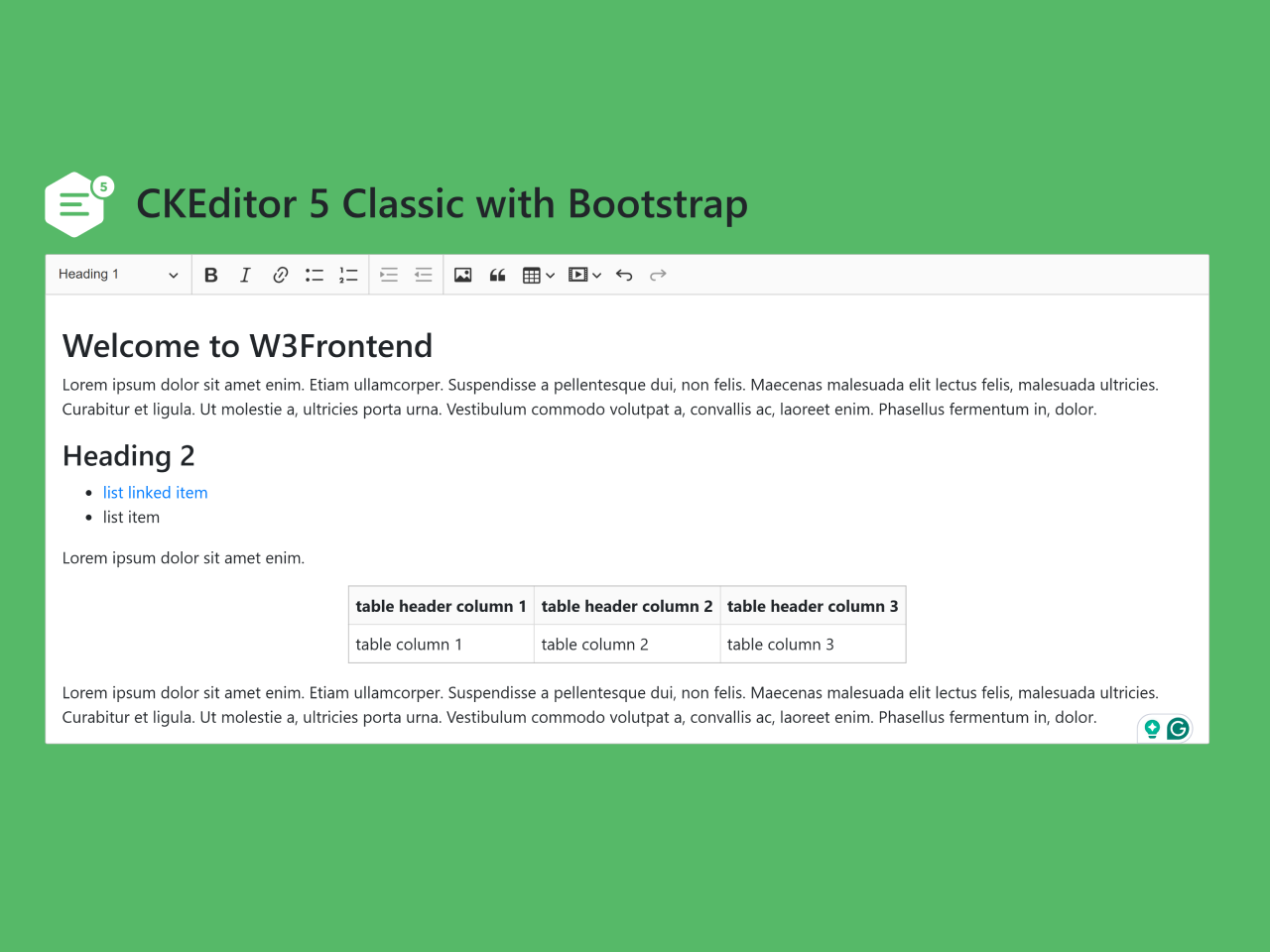
If you’re looking to integrate a powerful and user-friendly rich text editor into your web applications built with the popular Bootstrap 5 framework, this tutorial on CKEditor in Bootstrap 5 Code with Example is exactly what you need. Modern web development often requires robust text editing capabilities, allowing users to create rich content effortlessly. By combining CKEditor 5, a leading rich text editor, with Bootstrap 5, a responsive and mobile-first frontend toolkit, you can provide a seamless and visually consistent editing experience that looks great on any device. This guide will walk you through the necessary steps to implement CKEditor 5 within your Bootstrap 5 project, making content creation intuitive and efficient.
Adding Required Assets
To begin, you’ll need to include the necessary CSS stylesheets for Bootstrap 5 and any styling customizations into the `<head>` section of your HTML document.
<link rel='stylesheet' href='https://maxcdn.bootstrapcdn.com/bootstrap/4.0.0/css/bootstrap.min.css'>
Crafting the HTML Structure
Next, set up the basic HTML layout. This includes a container for your content and a specific `<div>` element where the CKEditor instance will be initialized. We’ll include some placeholder content within this `<div>` to demonstrate CKEditor’s capabilities.
<div class="container">
	<div class="row" style="margin-bottom: 20px">
		<h1><svg width="68" height="65" viewBox="0 0 68 65" xmlns="http://www.w3.org/2000/svg"><path d="M45.586 9.267a12.604 12.604 0 0 0-1.329 5.65c0 7.032 5.744 12.733 12.83 12.733l.273-.003V45.48a5.987 5.987 0 0 1-3.019 5.19L31.65 63.673a6.076 6.076 0 0 1-6.037 0L2.922 50.67a5.984 5.984 0 0 1-3.02-5.19V19.474c0-2.14 1.15-4.12 3.02-5.19L25.611 1.28a6.076 6.076 0 0 1 6.037 0l13.937 7.986zm-29.44 11.89c-.834 0-1.51.67-1.51 1.498v.715c0 .828.676 1.498 1.51 1.498h25.49c.832 0 1.51-.67 1.51-1.498v-.715c0-.827-.678-1.498-1.51-1.498h-25.49zm0 18.454c-.834 0-1.51.67-1.51 1.498v.715c0 .828.676 1.498 1.51 1.498h25.49c.832 0 1.51-.67 1.51-1.498v-.715c0-.827-.678-1.498-1.51-1.498h-25.49zm0-9.227c-.834 0-1.51.67-1.51 1.498v.715c0 .828.676 1.498 1.51 1.498h18.48c.832 0 1.508-.67 1.508-1.498v-.715c0-.827-.676-1.498-1.51-1.498H16.146zm41.191-5.232c-5.835 0-10.565-4.695-10.565-10.486 0-5.792 4.73-10.487 10.565-10.487 5.835 0 10.565 4.696 10.565 10.488 0 5.79-4.73 10.486-10.565 10.486v-.001zm3.422-8.68c0-.467-.084-.875-.25-1.225a2.547 2.547 0 0 0-.687-.88 2.888 2.888 0 0 0-1.026-.531 4.418 4.418 0 0 0-1.259-.175c-.134 0-.283.006-.447.018-.15.01-.3.034-.446.07l.075-1.4h3.587v-1.8h-5.462l-.214 5.06c.32-.116.682-.21 1.09-.28.405-.071.77-.107 1.087-.107.218 0 .437.02.655.063.218.04.413.114.585.218s.313.244.422.419c.11.175.163.39.163.65 0 .424-.132.745-.396.96a1.434 1.434 0 0 1-.938.326c-.352 0-.656-.1-.912-.3-.256-.2-.43-.453-.523-.762l-1.925.588c.1.35.258.664.472.943.214.279.47.514.767.706.298.19.63.339.995.443.365.104.75.156 1.151.156.437 0 .86-.064 1.272-.193.41-.13.778-.323 1.1-.581a2.8 2.8 0 0 0 .775-.981c.193-.396.29-.864.29-1.405z" fill="#FFF" fill-rule="evenodd"/></svg> CKEditor 5 Classic with Bootstrap</h1>
	</div>

	<div class="row">
		<div id="editor">
			<h2>Heading 1</h2>
			<p>Lorem ipsum dolor sit amet enim. Etiam ullamcorper. Suspendisse a pellentesque dui, non felis. Maecenas malesuada elit lectus felis, malesuada ultricies. Curabitur et ligula. Ut molestie a, ultricies porta urna. Vestibulum commodo volutpat a, convallis ac, laoreet enim. Phasellus fermentum in, dolor. </p>
			<h3>Heading 2</h3>
			<ul>
				<li><a href="https://ckeditor.com">list linked item</a></li>
				<li>list item</li>
			</ul>
			<p>Lorem ipsum dolor sit amet enim.</p>
			<table>
				<thead>
					<tr>
						<th>table header column 1</th>
						<th>table header column 2</th>
						<th>table header column 3</th>
					</tr>
				</thead>
				<tbody>
					<tr>
						<td>table  column 1</td>
						<td>table  column 2</td>
						<td>table  column 3</td>
					</tr>
				</tbody>
			</table>
			<p>Lorem ipsum dolor sit amet enim. Etiam ullamcorper. Suspendisse a pellentesque dui, non felis. Maecenas malesuada elit lectus felis, malesuada ultricies. Curabitur et ligula. Ut molestie a, ultricies porta urna. Vestibulum commodo volutpat a, convallis ac, laoreet enim. Phasellus fermentum in, dolor. </p>
	</div>
	</div>

</div>
    <script src='https://cdn.ckeditor.com/ckeditor5/17.0.0/classic/ckeditor.js'></script><script  src="./script.js"></script>
Applying Custom Styles (CSS)
To ensure proper rendering and integration with Bootstrap 5, apply the following CSS styles. These styles help manage z-index conflicts, table display within CKEditor, and general layout aesthetics to match the overall design.
body {
	/* We need to assaign this CSS Custom property to the body instead of :root, because of CSS Specificity and codepen stylesheet placement before loaded CKE5 content. */
	--ck-z-default: 100;
	--ck-z-modal: calc( var(--ck-z-default) + 999 );
}

/* https://github.com/ckeditor/ckeditor5-table/issues/154. */

.ck-content .table {
	width: unset;
}

/* Visual improvements. */
body, html {
	margin: 20px 0;
	width: 100%;
	height: 100%;
	background: #56b968;
}

.container {
	max-width: 700px;
	margin-bottom: 100px;
}

h1 {
	color: #fff;
}

h1 svg {
	position: relative;
	top: 20px;
	margin-right: 10px;
}

.container .ck.ck-content {
	padding: 0 1em;
}
Initializing CKEditor (JavaScript)
Finally, you’ll initialize CKEditor 5 using JavaScript. This script will target the `<div>` element we defined earlier and transform it into a fully functional rich text editor.
ClassicEditor
	.create( document.querySelector( '#editor' ) )
	.catch( error => {
		console.error( error );
	} );
Including Footer Assets
Place the CKEditor 5 JavaScript library and a reference to your custom script file (where the initialization code above would typically reside) just before the closing `</body>` tag.
That’s all! Hopefully, you have successfully integrated Ckeditor in Bootstrap 5 Code with Example into your project.


