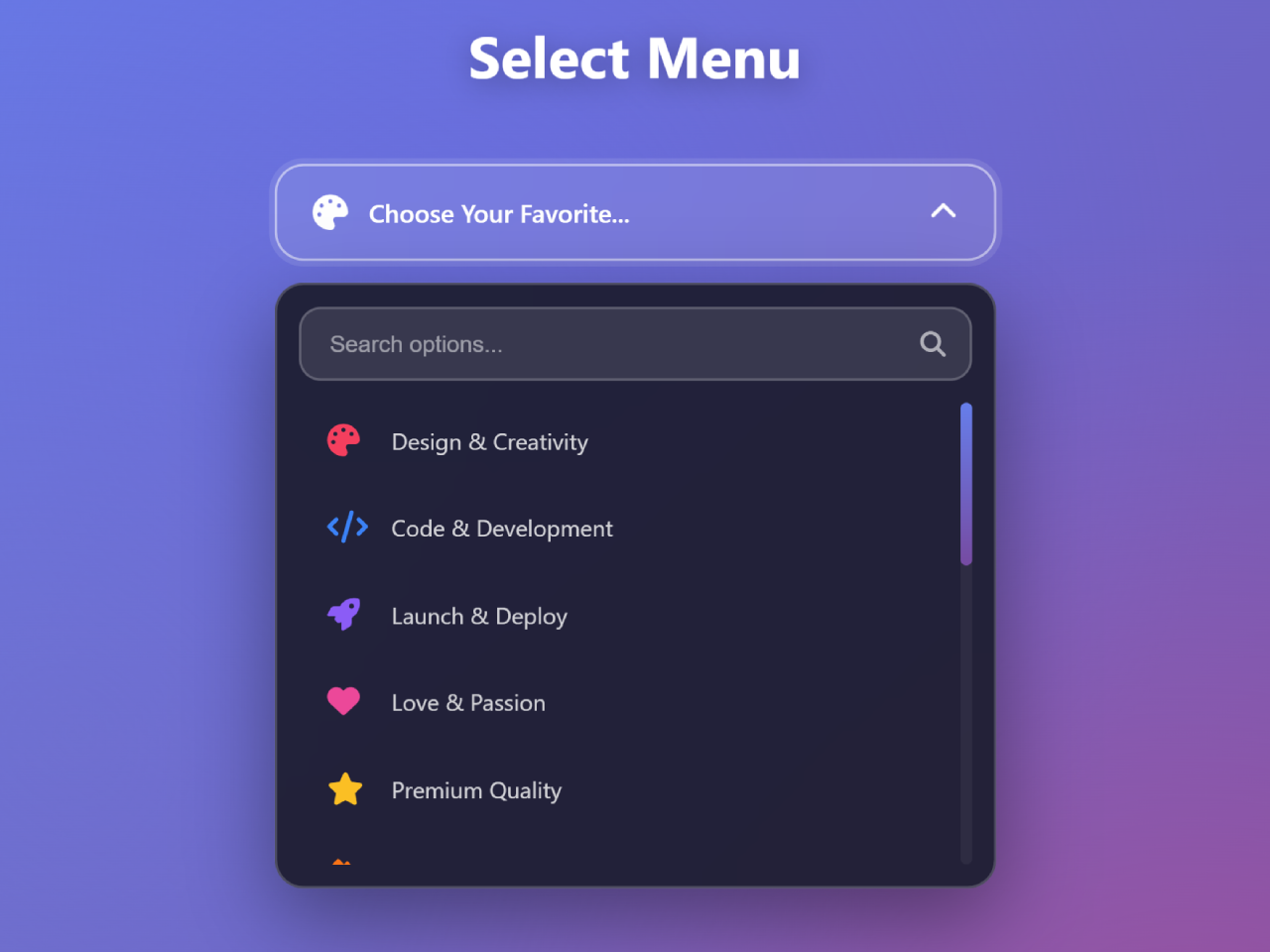
Are you looking to enhance your website’s user experience with a highly functional and visually appealing selection component? A custom HTML dropdown menu with search bar is an excellent solution for organizing numerous options while keeping your interface clean and intuitive. This tutorial will guide you through creating a dynamic dropdown that not only allows users to select items but also enables them to quickly find specific options using an integrated search feature. This improves navigation and accessibility, especially when dealing with long lists, making your forms or interactive elements much more efficient and user-friendly.
Building Your Interactive Dropdown Menu
1. Link Necessary Stylesheets
To begin, you need to include an external stylesheet. This will provide icons for your dropdown menu. Add the following link inside the <head> section of your HTML document.
<link rel="stylesheet" href="https://cdnjs.cloudflare.com/ajax/libs/font-awesome/6.4.0/css/all.min.css">
2. Structure the HTML
Next, create the basic HTML framework for your dropdown menu. This code includes the main container, the dropdown trigger, the search box, and the list of selectable options. It also adds some decorative floating particles for visual appeal.
<!-- Floating Particles -->
<div class="particle" style="left: 10%; animation-delay: 0s;"></div>
<div class="particle" style="left: 20%; animation-delay: 1s;"></div>
<div class="particle" style="left: 30%; animation-delay: 2s;"></div>
<div class="particle" style="left: 40%; animation-delay: 3s;"></div>
<div class="particle" style="left: 50%; animation-delay: 4s;"></div>
<div class="particle" style="left: 60%; animation-delay: 5s;"></div>
<div class="particle" style="left: 70%; animation-delay: 2.5s;"></div>
<div class="particle" style="left: 80%; animation-delay: 3.5s;"></div>
<div class="particle" style="left: 90%; animation-delay: 4.5s;"></div>

<div class="container">
  <h1 class="title">Select Menu </h1>

  <div class="custom-select">
    <!-- Select Trigger -->
    <div class="select-trigger">
      <div class="selected-option">
        <i class="fas fa-palette"></i>
        <span>Choose Your Favorite...</span>
      </div>
      <i class="fas fa-chevron-down arrow"></i>
    </div>

    <!-- Dropdown -->
    <div class="dropdown">
      <!-- Search Box -->
      <div class="search-box">
        <input type="text" placeholder="Search options..." id="searchInput">
        <i class="fas fa-search"></i>
      </div>

      <!-- Options Container -->
      <div class="options-container">
        <div class="option" data-value="design" data-icon="fa-palette">
          <i class="fas fa-palette" style="color: #f43f5e;"></i>
          <span>Design & Creativity</span>
        </div>
        <div class="option" data-value="code" data-icon="fa-code">
          <i class="fas fa-code" style="color: #3b82f6;"></i>
          <span>Code & Development</span>
        </div>
        <div class="option" data-value="rocket" data-icon="fa-rocket">
          <i class="fas fa-rocket" style="color: #8b5cf6;"></i>
          <span>Launch & Deploy</span>
        </div>
        <div class="option" data-value="heart" data-icon="fa-heart">
          <i class="fas fa-heart" style="color: #ec4899;"></i>
          <span>Love & Passion</span>
        </div>
        <div class="option" data-value="star" data-icon="fa-star">
          <i class="fas fa-star" style="color: #fbbf24;"></i>
          <span>Premium Quality</span>
        </div>
        <div class="option" data-value="fire" data-icon="fa-fire">
          <i class="fas fa-fire" style="color: #f97316;"></i>
          <span>Hot & Trending</span>
        </div>
        <div class="option" data-value="crown" data-icon="fa-crown">
          <i class="fas fa-crown" style="color: #eab308;"></i>
          <span>Premium Elite</span>
        </div>
        <div class="option" data-value="gem" data-icon="fa-gem">
          <i class="fas fa-gem" style="color: #06b6d4;"></i>
          <span>Precious Gems</span>
        </div>
        <div class="option" data-value="bolt" data-icon="fa-bolt">
          <i class="fas fa-bolt" style="color: #eab308;"></i>
          <span>Lightning Fast</span>
        </div>
        <div class="option" data-value="music" data-icon="fa-music">
          <i class="fas fa-music" style="color: #a855f7;"></i>
          <span>Music & Sound</span>
        </div>
        <div class="option" data-value="camera" data-icon="fa-camera">
          <i class="fas fa-camera" style="color: #14b8a6;"></i>
          <span>Photo & Video</span>
        </div>
        <div class="option" data-value="gamepad" data-icon="fa-gamepad">
          <i class="fas fa-gamepad" style="color: #6366f1;"></i>
          <span>Gaming Zone</span>
        </div>
        <div class="option" data-value="coffee" data-icon="fa-coffee">
          <i class="fas fa-coffee" style="color: #92400e;"></i>
          <span>Coffee & Chill</span>
        </div>
        <div class="option" data-value="plane" data-icon="fa-plane">
          <i class="fas fa-plane" style="color: #0ea5e9;"></i>
          <span>Travel & Adventure</span>
        </div>
        <div class="option" data-value="shield" data-icon="fa-shield-alt">
          <i class="fas fa-shield-alt" style="color: #10b981;"></i>
          <span>Security & Protection</span>
        </div>
      </div>

      <!-- No Results Message -->
      <div class="no-results">
        <i class="fas fa-search"></i>
        <p>No results found!</p>
      </div>
    </div>
  </div>
</div>
    <script  src="./script.js"></script>
3. Apply CSS Styling
Now, let’s style the dropdown menu and its elements using CSS. This code creates a modern glassmorphism effect, defines the layout, and adds smooth animations for a polished look.
* {
  margin: 0;
  padding: 0;
  box-sizing: border-box;
}

body {
  font-family: "Segoe UI", Tahoma, Geneva, Verdana, sans-serif;
  min-height: 100vh;
  display: flex;
  justify-content: center;
  align-items: center;
  background: linear-gradient(135deg, #667eea 0%, #764ba2 100%);
  padding: 20px;
  overflow-x: hidden;
}

/* Animated Background */
body::before {
  content: "";
  position: fixed;
  top: 0;
  left: 0;
  width: 100%;
  height: 100%;
  background: radial-gradient(
      circle at 20% 50%,
      rgba(120, 119, 198, 0.3),
      transparent 50%
    ),
    radial-gradient(circle at 80% 80%, rgba(252, 70, 107, 0.3), transparent 50%),
    radial-gradient(circle at 40% 20%, rgba(99, 102, 241, 0.3), transparent 50%);
  animation: backgroundShift 15s ease infinite;
  z-index: -1;
}

@keyframes backgroundShift {
  0%,
  100% {
    transform: scale(1) rotate(0deg);
  }
  50% {
    transform: scale(1.1) rotate(5deg);
  }
}

.container {
  width: 100%;
  max-width: 500px;
  position: relative;
  z-index: 1;
}

.title {
  text-align: center;
  color: white;
  margin-bottom: 40px;
  font-size: 2.5rem;
  text-shadow: 0 4px 20px rgba(0, 0, 0, 0.3);
  animation: titleFloat 3s ease-in-out infinite;
}

@keyframes titleFloat {
  0%,
  100% {
    transform: translateY(0px);
  }
  50% {
    transform: translateY(-10px);
  }
}

/* Custom Select Container */
.custom-select {
  position: relative;
  width: 100%;
}

/* Select Trigger Button */
.select-trigger {
  background: rgba(255, 255, 255, 0.1);
  backdrop-filter: blur(20px);
  border: 2px solid rgba(255, 255, 255, 0.2);
  border-radius: 20px;
  padding: 20px 25px;
  cursor: pointer;
  display: flex;
  justify-content: space-between;
  align-items: center;
  transition: all 0.4s cubic-bezier(0.68, -0.55, 0.265, 1.55);
  box-shadow: 0 8px 32px rgba(0, 0, 0, 0.1);
  position: relative;
  overflow: hidden;
}

.select-trigger::before {
  content: "";
  position: absolute;
  top: 0;
  left: -100%;
  width: 100%;
  height: 100%;
  background: linear-gradient(
    90deg,
    transparent,
    rgba(255, 255, 255, 0.2),
    transparent
  );
  transition: left 0.5s;
}

.select-trigger:hover::before {
  left: 100%;
}

.select-trigger:hover {
  border-color: rgba(255, 255, 255, 0.4);
  box-shadow: 0 12px 40px rgba(0, 0, 0, 0.2);
  transform: translateY(-2px);
}

.select-trigger.active {
  border-color: rgba(255, 255, 255, 0.5);
  box-shadow: 0 0 0 4px rgba(255, 255, 255, 0.1);
}

.selected-option {
  display: flex;
  align-items: center;
  gap: 15px;
  color: white;
  font-size: 1.1rem;
  font-weight: 500;
}

.selected-option i {
  font-size: 1.5rem;
  animation: iconPulse 2s ease-in-out infinite;
}

@keyframes iconPulse {
  0%,
  100% {
    transform: scale(1);
  }
  50% {
    transform: scale(1.1);
  }
}

.arrow {
  color: white;
  font-size: 1.2rem;
  transition: transform 0.4s cubic-bezier(0.68, -0.55, 0.265, 1.55);
}

.select-trigger.active .arrow {
  transform: rotate(180deg);
}

/* Dropdown Container */
.dropdown {
  position: absolute;
  top: calc(100% + 15px);
  left: 0;
  width: 100%;
  background: rgba(30, 30, 50, 0.95);
  backdrop-filter: blur(20px);
  border: 2px solid rgba(255, 255, 255, 0.2);
  border-radius: 20px;
  padding: 15px;
  opacity: 0;
  visibility: hidden;
  transform: translateY(-20px) scale(0.95);
  transition: all 0.4s cubic-bezier(0.68, -0.55, 0.265, 1.55);
  box-shadow: 0 20px 60px rgba(0, 0, 0, 0.4);
  z-index: 1000;
  max-height: 450px;
  display: flex;
  flex-direction: column;
}

.dropdown.active {
  opacity: 1;
  visibility: visible;
  transform: translateY(0) scale(1);
}

/* Search Box */
.search-box {
  position: relative;
  margin-bottom: 15px;
}

.search-box input {
  width: 100%;
  padding: 15px 45px 15px 20px;
  background: rgba(255, 255, 255, 0.1);
  border: 2px solid rgba(255, 255, 255, 0.2);
  border-radius: 15px;
  color: white;
  font-size: 1rem;
  outline: none;
  transition: all 0.3s ease;
}

.search-box input::placeholder {
  color: rgba(255, 255, 255, 0.5);
}

.search-box input:focus {
  border-color: rgba(255, 255, 255, 0.4);
  background: rgba(255, 255, 255, 0.15);
  box-shadow: 0 0 20px rgba(255, 255, 255, 0.1);
}

.search-box i {
  position: absolute;
  right: 18px;
  top: 50%;
  transform: translateY(-50%);
  color: rgba(255, 255, 255, 0.6);
  font-size: 1.1rem;
}

/* Options Container */
.options-container {
  overflow-y: auto;
  overflow-x: hidden;
  max-height: 320px;
  padding-right: 5px;
}

/* Custom Scrollbar */
.options-container::-webkit-scrollbar {
  width: 8px;
}

.options-container::-webkit-scrollbar-track {
  background: rgba(255, 255, 255, 0.05);
  border-radius: 10px;
}

.options-container::-webkit-scrollbar-thumb {
  background: linear-gradient(180deg, #667eea, #764ba2);
  border-radius: 10px;
  transition: all 0.3s ease;
}

.options-container::-webkit-scrollbar-thumb:hover {
  background: linear-gradient(180deg, #764ba2, #667eea);
}

/* Option Item */
.option {
  padding: 15px 20px;
  display: flex;
  align-items: center;
  gap: 15px;
  cursor: pointer;
  border-radius: 12px;
  color: rgba(255, 255, 255, 0.8);
  transition: all 0.3s cubic-bezier(0.68, -0.55, 0.265, 1.55);
  position: relative;
  overflow: hidden;
  margin-bottom: 8px;
  opacity: 0;
  animation: slideIn 0.5s forwards;
}

@keyframes slideIn {
  to {
    opacity: 1;
  }
}

.option::before {
  content: "";
  position: absolute;
  top: 50%;
  left: 50%;
  width: 0;
  height: 0;
  border-radius: 50%;
  background: rgba(255, 255, 255, 0.1);
  transform: translate(-50%, -50%);
  transition: width 0.6s, height 0.6s;
}

.option:hover::before {
  width: 300px;
  height: 300px;
}

.option:hover {
  background: rgba(255, 255, 255, 0.1);
  color: white;
  transform: translateX(10px);
  box-shadow: 0 5px 15px rgba(0, 0, 0, 0.2);
}

.option i {
  font-size: 1.4rem;
  min-width: 30px;
  transition: all 0.3s ease;
  position: relative;
  z-index: 1;
}

.option:hover i {
  transform: scale(1.2) rotate(10deg);
}

.option span {
  flex: 1;
  font-size: 1rem;
  position: relative;
  z-index: 1;
}

.option.selected {
  background: linear-gradient(
    135deg,
    rgba(102, 126, 234, 0.3),
    rgba(118, 75, 162, 0.3)
  );
  color: white;
  border: 1px solid rgba(255, 255, 255, 0.2);
}

.option.selected::after {
  content: "\f00c";
  font-family: "Font Awesome 6 Free";
  font-weight: 900;
  color: #4ade80;
  font-size: 1.2rem;
  animation: checkBounce 0.5s cubic-bezier(0.68, -0.55, 0.265, 1.55);
}

@keyframes checkBounce {
  0% {
    transform: scale(0) rotate(0deg);
  }
  50% {
    transform: scale(1.3) rotate(180deg);
  }
  100% {
    transform: scale(1) rotate(360deg);
  }
}

.option.hidden {
  display: none;
}

/* No Results Message */
.no-results {
  text-align: center;
  padding: 40px 20px;
  color: rgba(255, 255, 255, 0.5);
  font-size: 1.1rem;
  display: none;
}

.no-results.show {
  display: block;
  animation: fadeIn 0.3s ease;
}

.no-results i {
  font-size: 3rem;
  margin-bottom: 15px;
  opacity: 0.5;
}

@keyframes fadeIn {
  from {
    opacity: 0;
    transform: translateY(-10px);
  }
  to {
    opacity: 1;
    transform: translateY(0);
  }
}

/* Ripple Effect */
.ripple {
  position: absolute;
  border-radius: 50%;
  background: rgba(255, 255, 255, 0.4);
  transform: scale(0);
  animation: rippleEffect 0.6s ease-out;
  pointer-events: none;
}

@keyframes rippleEffect {
  to {
    transform: scale(4);
    opacity: 0;
  }
}

/* Responsive Design */
@media (max-width: 768px) {
  .title {
    font-size: 2rem;
    margin-bottom: 30px;
  }

  .select-trigger {
    padding: 18px 20px;
  }

  .selected-option {
    font-size: 1rem;
  }

  .selected-option i {
    font-size: 1.3rem;
  }

  .dropdown {
    max-height: 400px;
  }

  .options-container {
    max-height: 280px;
  }

  .option {
    padding: 12px 15px;
  }
}

@media (max-width: 480px) {
  .title {
    font-size: 1.6rem;
  }

  .select-trigger {
    padding: 15px 18px;
    border-radius: 15px;
  }

  .dropdown {
    border-radius: 15px;
    max-height: 350px;
  }

  .options-container {
    max-height: 240px;
  }
}

/* Staggered Animation Delays */
.option:nth-child(1) {
  animation-delay: 0.05s;
}
.option:nth-child(2) {
  animation-delay: 0.1s;
}
.option:nth-child(3) {
  animation-delay: 0.15s;
}
.option:nth-child(4) {
  animation-delay: 0.2s;
}
.option:nth-child(5) {
  animation-delay: 0.25s;
}
.option:nth-child(6) {
  animation-delay: 0.3s;
}
.option:nth-child(7) {
  animation-delay: 0.35s;
}
.option:nth-child(8) {
  animation-delay: 0.4s;
}
.option:nth-child(9) {
  animation-delay: 0.45s;
}
.option:nth-child(10) {
  animation-delay: 0.5s;
}
.option:nth-child(11) {
  animation-delay: 0.55s;
}
.option:nth-child(12) {
  animation-delay: 0.6s;
}
.option:nth-child(13) {
  animation-delay: 0.65s;
}
.option:nth-child(14) {
  animation-delay: 0.7s;
}
.option:nth-child(15) {
  animation-delay: 0.75s;
}

/* Floating Particles */
.particle {
  position: fixed;
  width: 10px;
  height: 10px;
  background: rgba(255, 255, 255, 0.3);
  border-radius: 50%;
  pointer-events: none;
  animation: float 6s infinite;
  z-index: 0;
}

@keyframes float {
  0%,
  100% {
    transform: translateY(0) translateX(0) scale(1);
    opacity: 0;
  }
  10% {
    opacity: 0.5;
  }
  90% {
    opacity: 0.5;
  }
  100% {
    transform: translateY(-100vh) translateX(50px) scale(0);
    opacity: 0;
  }
}
4. Add JavaScript Functionality
Finally, implement the interactive behavior with JavaScript. This script handles opening and closing the dropdown, filtering options based on search input, updating the selected item, and adding a subtle ripple effect on clicks.
// DOM Elements
const selectTrigger = document.querySelector(".select-trigger");
const dropdown = document.querySelector(".dropdown");
const selectedOption = document.querySelector(".selected-option");
const searchInput = document.getElementById("searchInput");
const optionsContainer = document.querySelector(".options-container");
const options = document.querySelectorAll(".option");
const noResults = document.querySelector(".no-results");

// Toggle Dropdown
selectTrigger.addEventListener("click", function (e) {
  createRipple(e, this);
  toggleDropdown();
});

function toggleDropdown() {
  selectTrigger.classList.toggle("active");
  dropdown.classList.toggle("active");

  if (dropdown.classList.contains("active")) {
    searchInput.focus();
    resetAnimations();
  } else {
    searchInput.value = "";
    filterOptions("");
  }
}

// Reset animations when dropdown opens
function resetAnimations() {
  options.forEach((option) => {
    option.style.animation = "none";
    setTimeout(() => {
      option.style.animation = "";
    }, 10);
  });
}

// Option Selection
options.forEach((option) => {
  option.addEventListener("click", function (e) {
    createRipple(e, this);

    // Remove selected class from all options
    options.forEach((opt) => opt.classList.remove("selected"));

    // Add selected class to clicked option
    this.classList.add("selected");

    // Update selected option display
    const icon = this.getAttribute("data-icon");
    const text = this.querySelector("span").textContent;
    const iconColor = this.querySelector("i").style.color;

    selectedOption.innerHTML = `
                    <i class="fas ${icon}" style="color: ${iconColor};"></i>
                    <span>${text}</span>
                `;

    // Close dropdown
    setTimeout(() => {
      toggleDropdown();
    }, 300);
  });
});

// Live Search Functionality
searchInput.addEventListener("input", function (e) {
  const searchTerm = e.target.value.toLowerCase();
  filterOptions(searchTerm);
});

function filterOptions(searchTerm) {
  let visibleCount = 0;

  options.forEach((option) => {
    const text = option.querySelector("span").textContent.toLowerCase();

    if (text.includes(searchTerm)) {
      option.classList.remove("hidden");
      visibleCount++;
    } else {
      option.classList.add("hidden");
    }
  });

  // Show/hide no results message
  if (visibleCount === 0) {
    noResults.classList.add("show");
    optionsContainer.style.display = "none";
  } else {
    noResults.classList.remove("show");
    optionsContainer.style.display = "block";
  }
}

// Click Outside to Close
document.addEventListener("click", function (e) {
  if (!e.target.closest(".custom-select")) {
    selectTrigger.classList.remove("active");
    dropdown.classList.remove("active");
    searchInput.value = "";
    filterOptions("");
  }
});

// Keyboard Support (ESC to close)
document.addEventListener("keydown", function (e) {
  if (e.key === "Escape" && dropdown.classList.contains("active")) {
    toggleDropdown();
  }
});

// Ripple Effect Function
function createRipple(event, element) {
  const ripple = document.createElement("span");
  ripple.classList.add("ripple");

  const rect = element.getBoundingClientRect();
  const size = Math.max(rect.width, rect.height);
  const x = event.clientX - rect.left - size / 2;
  const y = event.clientY - rect.top - size / 2;

  ripple.style.width = ripple.style.height = size + "px";
  ripple.style.left = x + "px";
  ripple.style.top = y + "px";

  element.appendChild(ripple);

  setTimeout(() => {
    ripple.remove();
  }, 600);
}

// Prevent dropdown close on search input click
searchInput.addEventListener("click", function (e) {
  e.stopPropagation();
});

// Touch Support for Mobile
let touchStartY = 0;
let touchEndY = 0;

dropdown.addEventListener(
  "touchstart",
  function (e) {
    touchStartY = e.changedTouches[0].screenY;
  },
  { passive: true }
);

dropdown.addEventListener(
  "touchend",
  function (e) {
    touchEndY = e.changedTouches[0].screenY;
    handleSwipe();
  },
  { passive: true }
);

function handleSwipe() {
  if (touchEndY > touchStartY + 50) {
    // Swipe down detected - close dropdown
    if (optionsContainer.scrollTop === 0) {
      toggleDropdown();
    }
  }
}

// Add smooth scroll behavior
optionsContainer.addEventListener("wheel", function (e) {
  e.stopPropagation();
});

// Initial setup
window.addEventListener("load", function () {
  // Add entrance animation
  document.querySelector(".container").style.animation = "fadeIn 0.6s ease";
});

// Console Easter Egg
console.log(
  "%c Custom Select Menu",
  "font-size: 20px; font-weight: bold; color: #667eea;"
);
console.log(
  "%cCreated with ❤️ by Oathan Rex",
  "font-size: 14px; color: #764ba2;"
);
console.log(
  "%cFeatures: Glassmorphism | Live Search | Ripple Effects | Responsive Design",
  "font-size: 12px; color: #888;"
);
You have now successfully created a stylish and functional HTML dropdown menu with search bar. This enhances user interaction and makes selecting options much more convenient.