

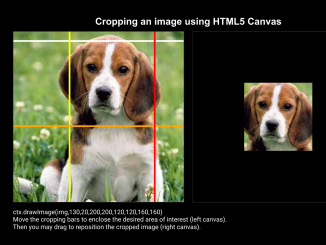
This tutorial will guide you through the process to crop image in canvas using Javascript. This method allows users to dynamically select a portion of an image and display it within a canvas element, offering a flexible and interactive way to manipulate images directly in the browser. You’ll learn how to create the necessary HTML structure, style it with CSS, and implement the core cropping functionality using JavaScript.
Setting up the HTML Structure
First, we need to set up the basic HTML structure for our image cropper. This includes two canvas elements: one for displaying the original image with cropping guides and another for showing the cropped result.
<h1>Cropping an image using HTML5 Canvas</h1>
<div class="wrapper">

  <canvas id='c1'></canvas><!--
--><canvas id='c2'></canvas>
  <p id="output"></p>
  <p>Move the cropping bars to enclose the desired area of interest (left canvas).<br>Then you may drag to reposition the cropped image (right canvas).</p>
</div>
    <script  src="./script.js"></script>
Styling with CSS
Now let’s style our cropper elements with CSS to make it visually appealing and well-organized.
body {
  margin: 0;
  padding: 0;
  background: #eee;
  font-family: Courier, monospace;
  font-size: 16px;
  background-color: #000;
  color: white;
  text-align: center;
  -webkit-font-smoothing: antialiased;
	-moz-osx-font-smoothing: grayscale;
}

.wrapper {
  display: block;
  margin: 0 auto;
  padding: 0;
  width: 844px;
}

canvas {
  margin: 10px;
  padding: 0;
  border: 1px solid #333;
  display: inline-block;
}

p {
  text-align: left;
  margin-left: 10px;
}

h1 {
  font-size: 1.5em;
  font-family: Arial, Helvetica, sans-serif;
  padding: 1em 0 0;
}


/*#c1 {
  background-image: url(https://s3-us-west-2.amazonaws.com/s.cdpn.io/222579/beagle400.jpg)
}*/
Implementing the JavaScript Logic
The JavaScript code will handle the core functionality of the image cropper. This includes drawing the image, implementing the cropping guides, handling mouse events for dragging and resizing, and updating the cropped image in the second canvas.
var proportion = .8; // you may change the proportion for the cropped image.
var theImage = "https://s3-us-west-2.amazonaws.com/s.cdpn.io/222579/beagle400.jpg";
/*
original image:
----------------------------
|     |                    |
|     |sy                  |
|_____|____________        |
| sx  |           |        |
|     |           |        |
|     |           | sh     |
|     |           |        |
|     |___________|        |
|          sw              |
|                          |
|                          |
|__________________________|

cropped image:
----------------------------
|     |                    |
|     |y                   |
|_____|_________           |
|  x  |        |           |
|     |        | h         |
|     |________|           |
|          w               |
|                          |
|                          |
|__________________________|

ctx.drawImage(img,sx,sy,sw,sh,x,y,w,h)

*/


var output = document.getElementById("output");
var c1 = document.getElementById("c1");
var ctx1 = c1.getContext("2d");
var c2 = document.getElementById("c2");
var ctx2 = c2.getContext("2d");

var cw = c1.width = c2.width = 400,
  cx = cw / 2;
var ch = c1.height = c2.height = 400,
  cy = ch / 2;

var isDragging1 = false;
var isDragging2 = false;

var sy = 20;
var sx = 130;
var sw = 200;
var sh = 200;

var r = 4;

var mousePos1 = {
  x: 0,
  y: 0
};
var mousePos2 = {
  x: 0,
  y: 0
};

var o = { // cropping bars
  "sx": {
    color: "white",
    x: 0,
    y: sy,
    w: cw,
    h: r,
    bool: false,
  },
  "sy": {
    color: "yellow",
    x: sx,
    y: 0,
    w: r,
    h: ch,
    bool: false,
  },
  "sw": {
    color: "orange",
    x: 0,
    y: sy + sh,
    w: cw,
    h: r,
    bool: false,
  },
  "sh": {
    color: "red",
    x: sx + sw,
    y: 0,
    w: r,
    h: ch,
    bool: false,
  }
}

function drawGuides(o) {
  for (k in o) {
    ctx1.fillStyle = o[k].color;
    ctx1.beginPath();
    ctx1.fillRect(o[k].x, o[k].y, o[k].w, o[k].h);
  }
}

function Imgo(o, d) { // an object defining the cropped image
  var imgo = {
    sx: o.sy.x,
    sy: o.sx.y,
    sw: o.sh.x - o.sy.x,
    sh: o.sw.y - o.sx.y,
    w: ~~((o.sh.x - o.sy.x) * proportion),
    h: ~~((o.sw.y - o.sx.y) * proportion),
    x: d.x,
    y: d.y
  }
  return imgo;
}

var d = {
  x: ~~(cx - sw * proportion / 2),
  y: ~~(cy - sh * proportion / 2)
}

function Output(Imgo, output) {
  output.innerHTML = "ctx.drawImage(img," + imgo.sx + "," + imgo.sy + "," + imgo.sw + "," + imgo.sh + "," + imgo.x + "," + imgo.y + "," + imgo.w + "," + imgo.h + ")";
}

function drawCroppedImage(imgo) {
  ctx2.drawImage(img, imgo.sx, imgo.sy, imgo.sw, imgo.sh, imgo.x, imgo.y, imgo.w, imgo.h);
}

function outlineImage(imgo) {
  ctx2.beginPath();
  ctx2.rect(imgo.x, imgo.y, imgo.w, imgo.h);
}

function cursorStyleC1() {
  c1.style.cursor = "default";
  for (k in o) { //o[k].bool = false;
    ctx1.beginPath();
    ctx1.rect(o[k].x - 10, o[k].y - 10, o[k].w + 20, o[k].h + 20);
    if (ctx1.isPointInPath(mousePos1.x, mousePos1.y)) {
      if (k == "sx" || k == "sw") {
        c1.style.cursor = "row-resize";
      } else {
        c1.style.cursor = "col-resize";
      }
      break;
    } else {
      c1.style.cursor = "default";
    }
  }
}

function cursorStyleC2() {
  c2.style.cursor = "default";
  outlineImage(imgo);
  if (ctx2.isPointInPath(mousePos2.x, mousePos2.y)) {
    c2.style.cursor = "move";
  } else {
    c2.style.cursor = "default";
  }
}

drawGuides(o);
var imgo = Imgo(o, d); // an object defining the cropped image
Output(Imgo, output); // text: "drawImage(img,130,10,200,220,150,145,100,110)";

var img = new Image();
img.src = theImage;
img.onload = function() {
  c1.style.backgroundImage = "url("+theImage+")";
  drawCroppedImage(imgo);
}

// mousedown ***************************

c1.addEventListener('mousedown', function(evt) {
  isDragging1 = true;

  mousePos1 = oMousePos(c1, evt);
  for (k in o) {
    ctx1.beginPath();
    ctx1.rect(o[k].x - 10, o[k].y - 10, o[k].w + 20, o[k].h + 20);
    if (ctx1.isPointInPath(mousePos1.x, mousePos1.y)) {
      o[k].bool = true;
      if (k == "sx" || k == "sw") {
        o[k].y = mousePos1.y;
      } else {
        o[k].x = mousePos1.x;
      }
      break;
    } else {
      o[k].bool = false;
    }
  }

  Output(Imgo, output);

}, false);

c2.addEventListener('mousedown', function(evt) {
  mousePos2 = oMousePos(c2, evt);
  outlineImage(imgo)
  if (ctx2.isPointInPath(mousePos2.x, mousePos2.y)) {
    isDragging2 = true;

    deltaX = mousePos2.x - imgo.x;
    deltaY = mousePos2.y - imgo.y;

    Output(Imgo, output);
  }
}, false);

// mousemove ***************************
c1.addEventListener('mousemove', function(evt) {
  mousePos1 = oMousePos(c1, evt); //console.log(mousePos)
  cursorStyleC1();

  if (isDragging1 == true) {
    ctx1.clearRect(0, 0, cw, ch);

    for (k in o) {
      if (o[k].bool) {
        if (k == "sx" || k == "sw") {
          o[k].y = mousePos1.y;
        } else {
          o[k].x = mousePos1.x;
        }
        break;
      }
    }

    drawGuides(o);
    ctx2.clearRect(0, 0, cw, ch);
    imgo = Imgo(o, d);
    drawCroppedImage(imgo);
    Output(Imgo, output);
  }
}, false);

c2.addEventListener('mousemove', function(evt) {
  mousePos2 = oMousePos(c2, evt);

  if (isDragging2 == true) {
    ctx2.clearRect(0, 0, cw, ch);
    d.x = mousePos2.x - deltaX;
    d.y = mousePos2.y - deltaY;
    imgo = Imgo(o, d);
    drawCroppedImage(imgo);
    Output(Imgo, output);
  }
  cursorStyleC2();
}, false);

// mouseup ***************************
c1.addEventListener('mouseup', function(evt) {
  isDragging1 = false;
  for (k in o) {
    o[k].bool = false;
  }
}, false);

c2.addEventListener('mouseup', function(evt) {
  isDragging2 = false;

}, false);

// mouseout ***************************
c1.addEventListener('mouseout', function(evt) {
  isDragging1 = false;
  for (k in o) {
    o[k].bool = false;
  }
}, false);

c2.addEventListener('mouseout', function(evt) {
  isDragging2 = false;

}, false);

function oMousePos(canvas, evt) {
  var rect = canvas.getBoundingClientRect();
  return {
    x: Math.round(evt.clientX - rect.left),
    y: Math.round(evt.clientY - rect.top)
  }
}
Adding header assets
Add CDN links to assets like css libraries, javascript libraries, etc.
Adding footer assets
Add javascript file that includes code implementation.
With these steps, you can successfully create a functional image cropper using HTML, CSS, and JavaScript. You now have a tool that allows users to dynamically crop image in canvas using Javascript. If you have any questions or suggestions, feel free to comment below.


