

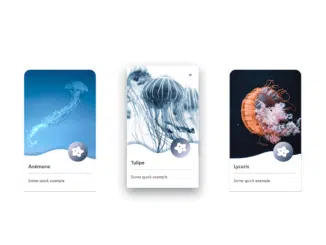
Here’s a comprehensive tutorial on how to create a Bootstrap 5 Card With Shadow On Hover effect. This tutorial will guide you through setting up the necessary HTML structure, applying CSS styling to achieve the desired visual appeal, and incorporating any relevant JavaScript functionality.
Step 1: Include Header Assets
First, you need to include the necessary CSS libraries in the section of your HTML document. These libraries include Bootstrap 5 for styling and Font Awesome for icons.
<link rel='stylesheet' href='https://cdn.jsdelivr.net/npm/bootstrap@5.0.1/dist/css/bootstrap.min.css'>
<link rel='stylesheet' href='https://static.fontawesome.com/css/fontawesome-app.css'>
<link rel='stylesheet' href='https://cdnjs.cloudflare.com/ajax/libs/font-awesome/5.15.3/css/all.min.css'>
Step 2: Create the HTML Structure
Next, create the basic HTML structure for the Bootstrap 5 cards within a container and row. This structure includes the card, image, card body, title, and text.
<div class="container py-5">
  <div class="row justify-content-center">

    <div class="col-12 col-lg-4">
      <div class="card box-shadow mx-auto my-5" style="width: 18rem;">
        <img src="https://www.jellypir.at/CODEPEN/picture/autre/jellyfish_15.jpg" class="card-img-top" alt="...">
        <div class="card-body">
          <h5 class="card-title">Narcisse</h5>
          <hr>
          <p class="card-text">Some quick example</p>
        </div>
<svg xmlns="http://www.w3.org/2000/svg" viewBox="0 0 1440 320"><path fill="#ffffff" fill-opacity="1" d="M0,192L48,197.3C96,203,192,213,288,192C384,171,480,117,576,90.7C672,64,768,64,864,85.3C960,107,1056,149,1152,186.7C1248,224,1344,256,1392,272L1440,288L1440,320L1392,320C1344,320,1248,320,1152,320C1056,320,960,320,864,320C768,320,672,320,576,320C480,320,384,320,288,320C192,320,96,320,48,320L0,320Z"></path></svg>
        <a href=""><i class="fas fa-disease"></i></a>
      </div>
    </div>

    <div class="col-12 col-lg-4">
      <div class="card box-shadow mx-auto my-5" style="width: 18rem;">
        <img src="https://www.jellypir.at/CODEPEN/picture/autre/jellyfish_63.jpg" class="card-img-top" alt="...">
        <div class="card-body">
          <h5 class="card-title">Lycoris</h5>
          <hr>
          <p class="card-text">Some quick example</p>
        </div>
<svg xmlns="http://www.w3.org/2000/svg" viewBox="0 0 1440 320"><path fill="#ffffff" fill-opacity="1" d="M0,256L48,256C96,256,192,256,288,245.3C384,235,480,213,576,181.3C672,149,768,107,864,112C960,117,1056,171,1152,186.7C1248,203,1344,181,1392,170.7L1440,160L1440,320L1392,320C1344,320,1248,320,1152,320C1056,320,960,320,864,320C768,320,672,320,576,320C480,320,384,320,288,320C192,320,96,320,48,320L0,320Z"></path></svg>
        <a href=""><i class="fas fa-disease"></i></a>
      </div>

    </div>

       <div class="col-12 col-lg-4">
      <div class="card box-shadow my-5 mx-auto" style="width: 18rem;">
        <img src="https://www.jellypir.at/CODEPEN/picture/autre/jellyfish_49.jpg" class="card-img-top" alt="...">
        <div class="card-body">
          <h5 class="card-title">Tulipe</h5>
          <hr>
          <p class="card-text">Some quick example</p>
        </div>
<svg xmlns="http://www.w3.org/2000/svg" viewBox="0 0 1440 320"><path fill="#ffffff" fill-opacity="1" d="M0,64L48,53.3C96,43,192,21,288,58.7C384,96,480,192,576,218.7C672,245,768,203,864,154.7C960,107,1056,53,1152,32C1248,11,1344,21,1392,26.7L1440,32L1440,320L1392,320C1344,320,1248,320,1152,320C1056,320,960,320,864,320C768,320,672,320,576,320C480,320,384,320,288,320C192,320,96,320,48,320L0,320Z"></path></svg>
        <a href=""><i class="fas fa-disease"></i></a>
      </div>
    </div>

  </div>
</div>
Step 3: Add CSS Styling
Now, add the custom CSS styles to achieve the shadow on hover effect, card appearance, and icon animations. These styles will enhance the visual appeal and interactivity of the cards.
body
{
	color:#868686;
	background-color: #fafafa;
	opacity: 1;
	background-image: url("data:image/svg+xml,<svg id='patternId' width='100%' height='100%' xmlns='http://www.w3.org/2000/svg'><defs><pattern id='a' patternUnits='userSpaceOnUse' width='150' height='150' patternTransform='scale(3) rotate(180)'><rect x='0' y='0' width='100%' height='100%' fill='hsla(0,0%,100%,1)'/><path d='M60.92 130.73a6.5 6.5 0 00-8.94-.27l-6.94-7.37a10.67 10.67 0 00-14.66-15.5l-6.9-7.32a6.5 6.5 0 00-.08-9.16 6.52 6.52 0 10-9.24 9.23 6.5 6.5 0 008.9.3l6.9 7.34a10.67 10.67 0 0014.66 15.5l6.94 7.36a6.52 6.52 0 009.36 9.12 6.52 6.52 0 000-9.23zm-42.1-33.29a3.49 3.49 0 01-3.48-3.47c0-1.9 1.57-3.47 3.48-3.47 1.9 0 3.47 1.56 3.47 3.47a3.51 3.51 0 01-3.47 3.47zm19.77 26.99a7.5 7.5 0 010-14.96 7.5 7.5 0 010 14.96zm16.9 13.01a3.49 3.49 0 01-3.47-3.47c0-1.9 1.57-3.47 3.48-3.47 1.9 0 3.47 1.56 3.47 3.47a3.46 3.46 0 01-3.47 3.47zm80.43-6.71a6.53 6.53 0 00-9.16-.08l-6.99-7.33c.08-.08.2-.15.27-.27a10.67 10.67 0 000-15.07 10.61 10.61 0 00-14.89-.16l-6.9-7.32c.07-.04.1-.12.19-.16a6.52 6.52 0 10-9.24-9.23 6.52 6.52 0 008.62 9.77l6.95 7.36a10.67 10.67 0 00.23 14.85 10.64 10.64 0 0014.39.61l6.98 7.4a6.52 6.52 0 009.58 8.85 6.63 6.63 0 00-.03-9.22zM94.8 100.57a3.49 3.49 0 01-3.47-3.47c0-1.9 1.56-3.47 3.47-3.47 1.9 0 3.47 1.56 3.47 3.47a3.51 3.51 0 01-3.47 3.47zm17.67 23.7a7.5 7.5 0 010-14.96 7.5 7.5 0 010 14.96zm18.9 16.3a3.49 3.49 0 01-3.48-3.47c0-1.9 1.57-3.47 3.47-3.47 1.91 0 3.48 1.56 3.48 3.47a3.51 3.51 0 01-3.48 3.47zm-48.82-32.6a10.67 10.67 0 10-15.08 15.1 10.67 10.67 0 0015.08-15.1zm-7.52 16.65a7.5 7.5 0 010-14.96 7.5 7.5 0 010 14.96zm37.44-62.02a12.44 12.44 0 100 24.89 12.44 12.44 0 000-24.9zm-2.21 22.02a7.5 7.5 0 010-14.96 7.5 7.5 0 017.48 7.48 7.52 7.52 0 01-7.48 7.48zm25.65-34.93a6.55 6.55 0 00-8.94-.26l-6.94-7.37a10.67 10.67 0 00-14.66-15.5l-6.9-7.32a6.5 6.5 0 00-.08-9.16 6.52 6.52 0 10-9.24 9.23 6.5 6.5 0 008.9.3l6.9 7.34a10.67 10.67 0 0014.66 15.5l6.94 7.36a6.52 6.52 0 109.36-.12zM92.14 18.13a3.49 3.49 0 01-3.48-3.47c0-1.91 1.57-3.48 3.48-3.48 1.9 0 3.47 1.57 3.47 3.48a3.49 3.49 0 01-3.47 3.47zm21.33 25.04a7.5 7.5 0 010-14.96 7.5 7.5 0 010 14.96zm16.11 14.62a3.49 3.49 0 01-3.47-3.48c0-1.9 1.56-3.47 3.47-3.47 1.9 0 3.47 1.56 3.47 3.47a3.46 3.46 0 01-3.47 3.48zM23.44 130.73a6.52 6.52 0 10-9.24 9.23 6.52 6.52 0 109.24-9.23zm-5.7 9.5a3.49 3.49 0 01-3.47-3.47c0-1.91 1.57-3.48 3.48-3.48 1.9 0 3.47 1.57 3.47 3.48 0 1.9-1.56 3.47-3.47 3.47zm5.7-90.54a6.52 6.52 0 10-9.24 9.24 6.52 6.52 0 109.24-9.24zm-6.46 7.9a3.49 3.49 0 01-3.47-3.47c0-1.9 1.57-3.47 3.47-3.47 1.91 0 3.48 1.56 3.48 3.47 0 1.91-1.57 3.48-3.48 3.48zm43.94-7.9a6.54 6.54 0 00-8.9-.3l-6.94-7.37a10.67 10.67 0 00-14.62-15.5l-6.91-7.32a6.53 6.53 0 10-.42.38l6.9 7.33s-.03 0-.03.04A10.67 10.67 0 0044.66 42.4l6.94 7.37a6.52 6.52 0 109.31-.08zM20.15 19.43a3.49 3.49 0 01-3.47-3.48c0-1.9 1.56-3.47 3.47-3.47 1.91 0 3.48 1.57 3.48 3.47 0 1.91-1.57 3.48-3.48 3.48zM36.41 40.6a7.5 7.5 0 010-14.96 7.5 7.5 0 010 14.96zm20.5 15.42a3.49 3.49 0 01-3.47-3.47c0-1.91 1.56-3.48 3.47-3.48 1.9 0 3.47 1.57 3.47 3.48 0 1.9-1.56 3.47-3.47 3.47zm79 35.08a6.52 6.52 0 10-9.23 9.23 6.52 6.52 0 109.24-9.23zm-4.54 6.49a3.49 3.49 0 01-3.47-3.48c0-1.9 1.57-3.47 3.47-3.47 1.91 0 3.48 1.56 3.48 3.47a3.49 3.49 0 01-3.48 3.48zm4.55-87.56a6.52 6.52 0 10-9.24 9.23 6.52 6.52 0 109.24-9.23zm-3.21 7.02a3.49 3.49 0 01-3.47-3.47c0-1.91 1.56-3.48 3.47-3.48 1.9 0 3.47 1.57 3.47 3.48 0 1.9-1.56 3.47-3.47 3.47zM98.4 49.7a6.52 6.52 0 10-9.24 9.24l.11.12-6.1 6.6a12.44 12.44 0 00-16.9 18.24l-6.12 6.6a6.52 6.52 0 10.76 9.89 6.52 6.52 0 00-.3-9.5l6.1-6.57a12.44 12.44 0 0020.76-9.24c.01-3.54-1.48-6.71-3.84-8.96l6.14-6.6a6.5 6.5 0 008.67-.5 6.65 6.65 0 00-.04-9.32zM61.07 96.76c0 1.9-1.57 3.47-3.47 3.47a3.49 3.49 0 01-3.48-3.47c0-1.91 1.57-3.48 3.48-3.48a3.44 3.44 0 013.47 3.48zM72.9 79.73a7.5 7.5 0 010-14.96 7.5 7.5 0 010 14.96zM94.8 56.5a3.49 3.49 0 01-3.46-3.47c0-1.91 1.56-3.48 3.47-3.48 1.9 0 3.47 1.57 3.47 3.48 0 1.9-1.56 3.47-3.47 3.47zm3.6 74.24a6.52 6.52 0 10-9.24 9.23 6.52 6.52 0 109.24-9.23zm-4.62 6.37a3.49 3.49 0 01-3.47-3.47c0-1.91 1.56-3.48 3.47-3.48 1.9 0 3.47 1.57 3.47 3.48 0 1.9-1.56 3.47-3.47 3.47zM60.92 10.04a6.52 6.52 0 10-9.24 9.23 6.52 6.52 0 109.24-9.23zm-4.62 6.22a3.49 3.49 0 01-3.48-3.47c0-1.91 1.57-3.48 3.48-3.48 1.9 0 3.47 1.57 3.47 3.48 0 1.9-1.56 3.47-3.47 3.47zm26.26 10.69a10.67 10.67 0 10-15.08 15.09 10.67 10.67 0 0015.08-15.1zm-6.64 14.08a7.5 7.5 0 010-14.96 7.5 7.5 0 010 14.96zM37.52 62.6a12.44 12.44 0 100 24.89 12.44 12.44 0 000-24.9zM35.42 85a7.5 7.5 0 010-14.96 7.5 7.5 0 010 14.96zm102.14-10c0 6.87 5.57 12.44 12.44 12.44V62.6A12.44 12.44 0 00137.56 75zM0 62.6v24.84c6.87 0 12.63-5.57 12.63-12.44A12.63 12.63 0 000 62.6zM116.37 3.9a5.49 5.49 0 001.6-3.9h-10.95a5.49 5.49 0 009.35 3.9zm-37.48 0A5.49 5.49 0 0080.5 0H69.55a5.49 5.49 0 009.35 3.9zm-37.52 0a5.49 5.49 0 001.6-3.9H32.03a5.49 5.49 0 009.35 3.9zM144.5 0a5.49 5.49 0 005.5 5.53V0zM5.5 0H0v5.53A5.52 5.52 0 005.5 0zm2.06 26.95c-2.1-2.1-4.85-3.1-7.56-3.1V45.2c2.75 0 5.5-1.07 7.56-3.17a10.67 10.67 0 000-15.07zm134.88 15.11c2.06 2.1 4.81 3.13 7.56 3.13V23.86a10.67 10.67 0 00-7.56 18.2zm-33.81 104.05a5.49 5.49 0 00-1.6 3.89h10.95a5.49 5.49 0 00-9.35-3.9zm-37.48 0a5.49 5.49 0 00-1.6 3.89H80.5a5.49 5.49 0 00-9.35-3.9zm-37.52 0a5.49 5.49 0 00-1.6 3.89h10.95a5.49 5.49 0 00-9.35-3.9zM144.5 150h5.5v-5.5a5.49 5.49 0 00-5.5 5.5zM0 144.5v5.5h5.53c0-1.41-.53-2.79-1.6-3.9A5.71 5.71 0 000 144.5zm0-39.61v21.33a10.67 10.67 0 100-21.34zm142.44 18.2a10.6 10.6 0 007.56 3.13V104.9a10.67 10.67 0 00-7.56 18.2z'  stroke-width='1' stroke='none' fill='hsla(176,62.5%,87.5%,1)'/></pattern></defs><rect width='800%' height='800%' transform='translate(-81,-57)' fill='url(%23a)'/></svg>");
	background-size: 100%;
  overflow:scroll;
}

a
{
	cursor:pointer;
}

p
{
	padding-bottom:1rem;
}

h5
{
  text-transform:uppercase;
	font-weight:bold;
	color:#2b2b2b;
}

.box-shadow
{
	-webkit-box-shadow: 0 1px 1px rgba(72,78,85,.6);
	box-shadow: 0 1px 1px rgba(72,78,85,.6);
	-webkit-transition: all .2s ease-out;
	-moz-transition: all .2s ease-out;
	-ms-transition: all .2s ease-out;
	-o-transition: all .2s ease-out;
	transition: all .2s ease-out;
}

.box-shadow:hover
{
	-webkit-box-shadow: 0 20px 40px rgba(72,78,85,.6);
	box-shadow: 0 20px 40px rgba(72,78,85,.6);
	-webkit-transform: translateY(-15px);
	-moz-transform: translateY(-15px);
	-ms-transform: translateY(-15px);
	-o-transform: translateY(-15px);
	transform: translateY(-15px);
}

.card
{
	border-radius: 25px;

}

.card img
{
	border-top-left-radius: 25px;
	border-top-right-radius: 25px;
}

.card svg
{
	position:absolute;
	top:19rem;
  -webkit-transition: all .2s ease-out;
	-moz-transition: all .2s ease-out;
	-ms-transition: all .2s ease-out;
	-o-transition: all .2s ease-out;
	transition: all .2s ease-out;
	filter:drop-shadow(2px -9px 4px rgba(0, 69, 134, 0.2));
}
.card:hover svg
{
	filter:drop-shadow(2px -9px 4px rgba(0, 69, 134, 0.4));
}

i
{
	position:absolute;
	top: 18rem;
	right: 2rem;
	color:white;
	font-size:3rem;
	background: rgb(238,174,202);
	background: linear-gradient(133deg, rgba(255,255,255,1) 0%, rgba(211,210,231,1) 19%, rgba(11,39,73,1) 100%);
	padding: 1rem;
	border-radius: 100%;
	transition: all .6s ease-in-out;
}

.card:hover i
{
	transform: rotate(-180deg);
}

i:hover
{
	box-shadow: rgba(2, 196, 255, 0.25) 0px 30px 60px -12px inset, rgba(255, 2, 204, 0.7) 0px 18px 36px -18px inset;
}
Step 4: Add JavaScript
This step is for include JavaScript file if required.
import fontAwesome from "https://cdn.skypack.dev/font-awesome@4.7.0";
That’s it! You have successfully created a Bootstrap 5 Card With Shadow On Hover effect.


