Here’s a comprehensive tutorial on how to create a visually appealing and functional Bootstrap 5 Product Card Template. This guide will walk you through the necessary steps, from setting up your HTML structure to styling your card with CSS.
Setting Up Your Project
Before diving into the code, you’ll need to include the Bootstrap 5 CSS in your project. This can be done by adding a link to a CDN in the `<head>` section of your HTML document.
<link rel=’stylesheet’ href=’https://cdnjs.cloudflare.com/ajax/libs/twitter-bootstrap/5.0.2/css/bootstrap.min.css’>
Creating the HTML Structure
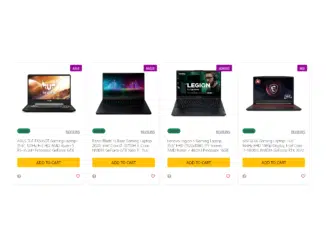
The foundation of our product card is built using Bootstrap’s grid system and card components. This structure provides a responsive and organized layout for your product information. The following HTML code defines the container, rows, and individual product cards:
html
<div class="container-fluid bg-trasparent my-4 p-3" style="position: relative">
  <div class="row row-cols-1 row-cols-xs-2 row-cols-sm-2 row-cols-lg-4 g-3">
    <div class="col hp">
      <div class="card h-100 shadow-sm">
        <a target="_blank" href="https://amzn.to/3qeS1Fe">
          <img src="https://m.media-amazon.com/images/I/81gK08T6tYL._AC_SL1500_.jpg" class="card-img-top" alt="product.title" />
        </a>

        <div class="label-top shadow-sm">
          <a class="text-white" target="_blank" href="https://amzn.to/3qeS1Fe">asus</a>
        </div>
        <div class="card-body">
          <div class="clearfix mb-3">
            <span class="float-start badge rounded-pill bg-success">1.245{{HTML_CODE}}lt;/span>

            <span class="float-end"><a href="#" class="small text-muted text-uppercase aff-link">reviews</a></span>
          </div>
          <h5 class="card-title">
            <a target="_blank" href="#">ASUS TUF FX505DT Gaming Laptop- 15.6", 120Hz Full HD, AMD Ryzen 5 R5-3550H Processor, GeForce GTX 1650 Graphics, 8GB DDR4, 256GB PCIe SSD, RGB Keyboard, Windows 10 64-bit - FX505DT-AH51</a>
          </h5>

          <div class="d-grid gap-2 my-4">

            <a href="#" class="btn btn-warning bold-btn">add to cart</a>

          </div>
          <div class="clearfix mb-1">

            <span class="float-start"><a href="#"><i class="fas fa-question-circle"></i></a></span>

            <span class="float-end">
              <i class="far fa-heart" style="cursor: pointer"></i>

            </span>
          </div>
        </div>
      </div>
    </div>
    <div class="col hp">
      <div class="card h-100 shadow-sm">
        <a href="https://amzn.to/42dsdGC" target="_blank">
          <img src="https://m.media-amazon.com/images/I/71wF7YDIQkL._AC_SL1500_.jpg" class="card-img-top" alt="product.title" />
        </a>

        <div class="label-top shadow-sm">
          <a class="text-white" href="https://amzn.to/42dsdGC" target="_blank">razer</a>
        </div>
        <div class="card-body">
          <div class="clearfix mb-3">
            <span class="float-start badge rounded-pill bg-success">2.345{{HTML_CODE}}lt;/span>

            <span class="float-end"><a href="#" class="small text-muted text-uppercase aff-link">reviews</a></span>
          </div>
          <h5 class="card-title">
            <a target="_blank" href="#">Razer Blade 15 Base Gaming Laptop 2020: Intel Core i7-10750H 6-Core, NVIDIA GeForce GTX 1660 Ti, 15.6" FHD 1080p 120Hz, 16GB RAM, 256GB SSD, CNC Aluminum, Chroma RGB Lighting, Black</a>
          </h5>

          <div class="d-grid gap-2 my-4">

            <a href="#" class="btn btn-warning bold-btn">add to cart</a>

          </div>
          <div class="clearfix mb-1">

            <span class="float-start"><a href="#"><i class="fas fa-question-circle"></i></a></span>

            <span class="float-end">
              <i class="far fa-heart" style="cursor: pointer"></i>

            </span>
          </div>
        </div>
      </div>
    </div>
    <div class="col hp">
      <div class="card h-100 shadow-sm">
        <a href="https://amzn.to/3os2Nrc" target="_blank">
          <img src="https://m.media-amazon.com/images/I/81w+3k4U8PL._AC_SL1500_.jpg" class="card-img-top" alt="product.title" />
        </a>

        <div class="label-top shadow-sm">
          <a class="text-white" href="https://amzn.to/3os2Nrc" target="_blank">lenovo</a>
        </div>
        <div class="card-body">
          <div class="clearfix mb-3">
            <span class="float-start badge rounded-pill bg-success">1.020{{HTML_CODE}}lt;/span>

            <span class="float-end"><a href="#" class="small text-muted text-uppercase aff-link">reviews</a></span>
          </div>
          <h5 class="card-title">
            <a target="_blank" href="#">Lenovo Legion 5 Gaming Laptop, 15.6" FHD (1920x1080) IPS Screen, AMD Ryzen 7 4800H Processor, 16GB DDR4, 512GB SSD, NVIDIA GTX 1660Ti, Windows 10, 82B1000AUS, Phantom Black</a>
          </h5>

          <div class="d-grid gap-2 my-4">

            <a href="#" class="btn btn-warning bold-btn">add to cart</a>

          </div>
          <div class="clearfix mb-1">

            <span class="float-start"><a href="#"><i class="fas fa-question-circle"></i></a></span>

            <span class="float-end">
              <i class="far fa-heart" style="cursor: pointer"></i>

            </span>
          </div>
        </div>
      </div>
    </div>
    <div class="col hp">
      <div class="card h-100 shadow-sm">
        <a href="https://amzn.to/43tMNDW" target="_blank">
          <img src="https://m.media-amazon.com/images/I/61Ze2wc9nyS._AC_SL1500_.jpg" class="card-img-top" alt="product.title" />
        </a>
        <!-- <div class="label-top shadow-sm">Asus Rog</div>  -->
        <div class="label-top shadow-sm">
          <a class="text-white" href="https://amzn.to/43tMNDW" target="_blank">msi</a>
        </div>
        <div class="card-body">
          <div class="clearfix mb-3">
            <span class="float-start badge rounded-pill bg-success">2.245{{HTML_CODE}}lt;/span>

            <span class="float-end"><a href="#" class="small text-muted text-uppercase aff-link">reviews</a></span>
          </div>
          <h5 class="card-title">
            <a target="_blank" href="#">MSI GL66 Gaming Laptop: 15.6" 144Hz FHD 1080p Display, Intel Core i7-11800H, NVIDIA GeForce RTX 3070, 16GB, 512GB SSD, Win10, Black (11UGK-001)</a>
          </h5>

          <div class="d-grid gap-2 my-4">

            <a href="#" class="btn btn-warning bold-btn">add to cart</a>

          </div>
          <div class="clearfix mb-1">

            <span class="float-start"><a href="#"><i class="fas fa-question-circle"></i></a></span>

            <span class="float-end">

<i class="far fa-heart" style="cursor: pointer"></i>

            </span>
          </div>
        </div>
      </div>
    </div>
  </div>
</div>

<div class="small text-muted my-4">Images by <a target="_blank" href="https://www.amazon.com/">Amazon</a></div>
Styling the Product Card with CSS
To enhance the visual appeal of your product card, we’ll use CSS to customize the appearance. This includes setting fonts, colors, and overall layout to create a polished and engaging design. These styles are crucial for making your product cards stand out.
css
@import url('https://fonts.googleapis.com/css2?family=Fira+Sans+Extra+Condensed:ital,wght@0,100;0,200;0,300;0,400;0,500;0,600;0,700;0,800;0,900;1,100;1,200;1,300;1,400;1,500;1,600;1,700;1,800;1,900&display=swap');
@import url('https://fonts.googleapis.com/css2?family=Heebo:wght@100;200;300;400;500;600;700;800;900&display=swap');
@import url('https://fonts.googleapis.com/css2?family=Roboto:ital,wght@0,100;0,300;0,400;0,500;0,700;0,900;1,100;1,300;1,400;1,500;1,700;1,900&display=swap');
@import url("https://use.fontawesome.com/releases/v5.13.0/css/all.css");

:root {
    --font1: 'Heebo', sans-serif;
    --font2: 'Fira Sans Extra Condensed', sans-serif;
    --font3: 'Roboto', sans-serif;

    --btnbg: #ffcc00;
    --btnfontcolor: rgb(61, 61, 61);
    --btnfontcolorhover: rgb(255, 255, 255);
    --btnbghover: #ffc116;
    --btnactivefs: rgb(241, 195, 46);


    --label-index: #960796;
    --danger-index: #5bc257;
/* PAGINATE */
    --link-color: #000;
    --link-color-hover: #fff;
    --bg-content-color: #ffcc00;

}

.container-fluid {
    max-width: 1400px;

}

.card {
    background: #fff;
    box-shadow: 0 6px 10px rgba(0, 0, 0, .08), 0 0 6px rgba(0, 0, 0, .05);
    transition: .3s transform cubic-bezier(.155, 1.105, .295, 1.12), .3s box-shadow, .3s -webkit-transform cubic-bezier(.155, 1.105, .295, 1.12);
    border: 0;
    border-radius: 1rem;
}

.card-img,
.card-img-top {
    border-top-left-radius: calc(1rem - 1px);
    border-top-right-radius: calc(1rem - 1px);
}


.card h5 {
    overflow: hidden;
    height: 55px;
    font-weight: 300;
    font-size: 1rem;
}

.card h5 a {
  color: black;
  text-decoration: none;
}

.card-img-top {
    width: 100%;
    min-height: 250px;
    max-height: 250px;
    object-fit: contain;
    padding: 30px;
}

.card h2 {
    font-size: 1rem;
}


.card:hover {
    transform: scale(1.02);
    box-shadow: 0 10px 20px rgba(0, 0, 0, .12), 0 4px 8px rgba(0, 0, 0, .06);
}

/* Centered text */
.label-top {
    position: absolute;
    background-color: var(--label-index);
    color: #fff;
    top: 8px;
    right: 8px;
    padding: 5px 10px 5px 10px;
    font-size: .7rem;
    font-weight: 600;
    border-radius: 3px;
    text-transform: uppercase;
}

.top-right {
    position: absolute;
    top: 24px;
    left: 24px;

    width: 90px;
    height: 90px;
    border-radius: 50%;
    font-size: 1rem;
    font-weight: 900;
    background: #8bc34a;
    line-height: 90px;
    text-align: center;
    color: white;
}

.top-right span {
    display: inline-block;
    vertical-align: middle;
    /* line-height: normal; */
    /* padding: 0 25px; */
}

.aff-link {
    /* text-decoration: overline; */
    font-weight: 500;
}

.over-bg {
    background: rgba(53, 53, 53, 0.85);
    box-shadow: 0 8px 32px 0 rgba(31, 38, 135, 0.37);
    backdrop-filter: blur(0.0px);
    -webkit-backdrop-filter: blur(0.0px);
    border-radius: 10px;
}
.bold-btn {

    font-size: 1rem;
    font-weight: 500;
    text-transform: uppercase;
    padding: 5px 50px 5px 50px;
}
.box .btn {
    font-size: 1.5rem;
}

@media (max-width: 1025px) {
    .btn {
        padding: 5px 40px 5px 40px;
    }
}
@media (max-width: 250px) {
    .btn {
        padding: 5px 30px 5px 30px;
    }
}

/* START BUTTON */
.btn-warning {
    background: var(--btnbg);
    color: var(--btnfontcolor);
    fill: #ffffff;
    border: none;
    text-decoration: none;
    outline: 0;
    /* box-shadow: -1px 6px 19px rgba(247, 129, 10, 0.25); */
    border-radius: 100px;
}
.btn-warning:hover {
    background: var(--btnbghover);
    color: var(--btnfontcolorhover);
    /* box-shadow: -1px 6px 13px rgba(255, 150, 43, 0.35); */
}
.btn-check:focus + .btn-warning, .btn-warning:focus {
    background: var(--btnbghover);
    color: var(--btnfontcolorhover);
    /* box-shadow: -1px 6px 13px rgba(255, 150, 43, 0.35); */
}
.btn-warning:active:focus {
    box-shadow: 0 0 0 0.25rem var(--btnactivefs);
}
.btn-warning:active {
    background: var(--btnbghover);
    color: var(--btnfontcolorhover);
    /* box-shadow: -1px 6px 13px rgba(255, 150, 43, 0.35); */
}

/* END BUTTON */

.bg-success {
    font-size: 1rem;
    background-color: var(--btnbg)!important;
    color: var(--btnfontcolor)!important;
}
.bg-danger {
    font-size: 1rem;
}


.price-hp {
    font-size: 1rem;
    font-weight: 600;
    color: darkgray;
}

.amz-hp {
    font-size: .7rem;
    font-weight: 600;
    color: darkgray;
}

.fa-question-circle:before {
    /* content: "\f059"; */
    color: darkgray;
}

.fa-heart:before {
    color:crimson;
}
.fa-chevron-circle-right:before {
    color: darkgray;
}