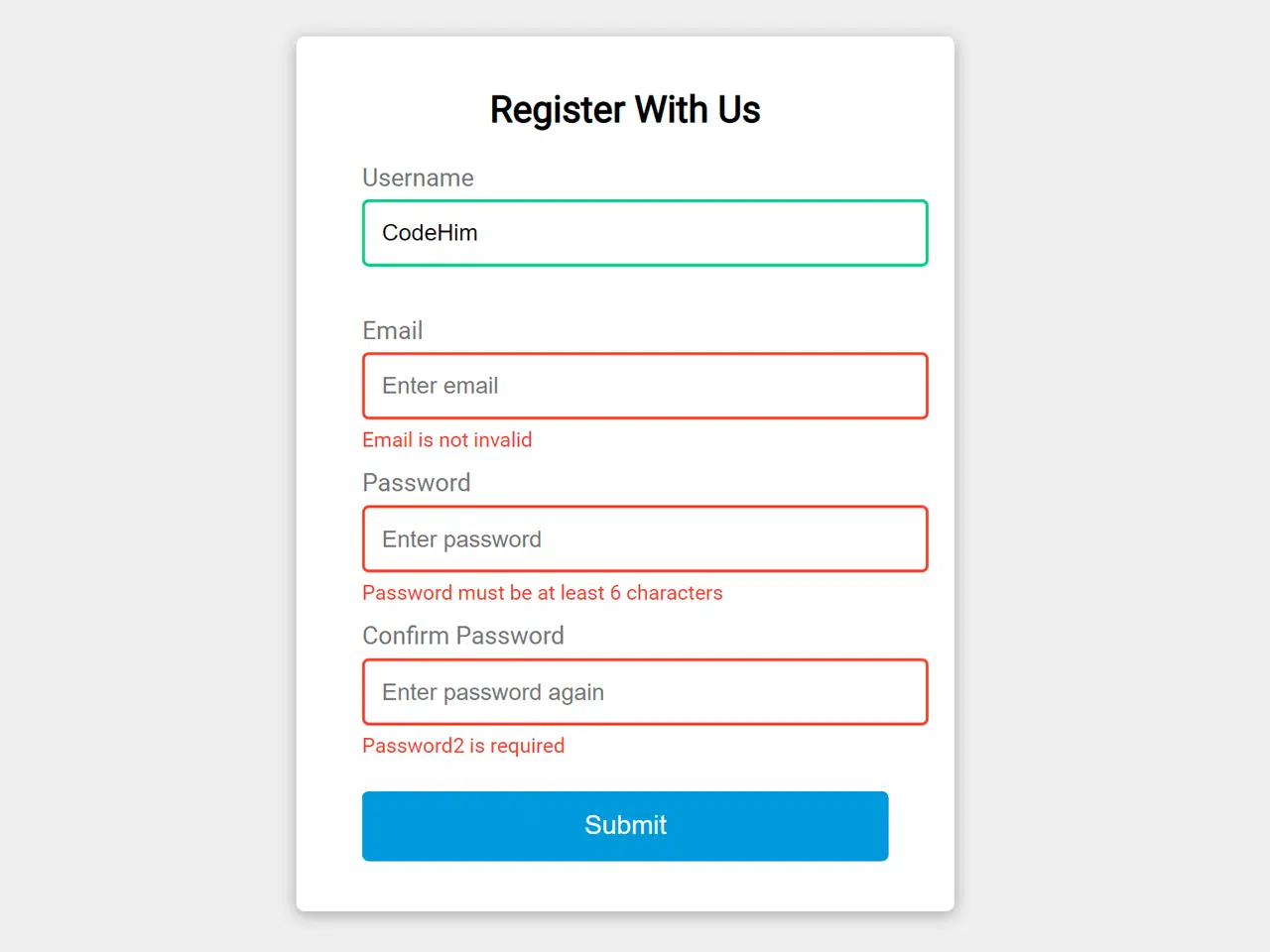
Here’s a comprehensive tutorial on how to implement form validation in Javascript code. This process is crucial for ensuring data integrity and providing a better user experience by catching errors before submission to a server. We will walk through the steps to create a simple registration form and validate its inputs using Javascript.
Setting Up the HTML Structure
First, we need to create the basic HTML structure for our registration form. This includes input fields for username, email, password, and password confirmation, along with appropriate labels and error message placeholders.
<div class="container">
        <form id="form" class="form">
            <h2>Register With Us</h2>
            <div class="form-control">
                <label for="username">Username</label>
                <input type="text" id="username" placeholder="Enter Username">
                <small>Error Message</small>
            </div>
            <div class="form-control">
                <label for="email">Email</label>
                <input type="text" id="email" placeholder="Enter email">
                <small>Error Message</small>
            </div>
            <div class="form-control">
                <label for="password">Password</label>
                <input type="password" id="password" placeholder="Enter password">
                <small>Error Message</small>
            </div>
            <div class="form-control">
                <label for="password2">Confirm Password</label>
                <input type="password" id="password2" placeholder="Enter password again">
                <small>Error Message</small>
            </div>
            <button>Submit</button>
        </form>
    </div>
    <script  src="./script.js"></script>
@import url('https://fonts.googleapis.com/css?family=Open+Sans&display=swap');

:root{
    --succes-color: #2ecc71;;
    --error-color: #e74c3c;
}


*{
    box-sizing: border-box;
}

body{

    background-color: #f9fafb;
    font-family: 'Open Sans', sans-serif;
    display: flex;
    align-items: center;
    justify-content: center;
    min-height: 100vh;
    margin: 0;
}

.container{
    background-color: #fff;
    border-radius: 5px;
    box-shadow: 0 2px 10px rgba(0,0,0,0.3);
    width: 400px;
}

h2{
    text-align: center;
    margin: 0 0 20px;
}

.form{
    padding: 30px 40px;
}

.form-control{
    margin-bottom: 10px;
    padding-bottom: 20px;
    position: relative;
}

.form-control label{
    color:#777;
    display: block;
    margin-bottom: 5px;
}

.form-control input
{
    border: 2px solid #f0f0f0;
    border-radius: 4px;
    display: block;
    width: 100%;
    padding: 10px;
    font-size: 14px;
}

.form-control input:focus{
    outline: 0;
    border-color: #777;

}

.form-control.success input {
    border-color: var(--succes-color);
}

.form-control.error input {
    border-color: var(--error-color);
}

.form-control small{
    color: var(--error-color);
    position: absolute;
    bottom: 0;
    left: 0;
    visibility: hidden;
}

.form-control.error small{
    visibility: visible;
}
.form button {
    cursor: pointer;
    background-color: #3498db;
    border: 2px solid #3498db;
    border-radius: 4px;
    color: #fff;
    display: block;
    padding: 10px;
    font-size: 16px;
    margin-top:20px;
    width:100%;
}
const form = document.getElementById('form');
const username = document.getElementById('username');
const email = document.getElementById('email');
const password = document.getElementById('password');
const password2 = document.getElementById('password2');

//Show input error messages
function showError(input, message) {
    const formControl = input.parentElement;
    formControl.className = 'form-control error';
    const small = formControl.querySelector('small');
    small.innerText = message;
}

//show success colour
function showSucces(input) {
    const formControl = input.parentElement;
    formControl.className = 'form-control success';
}

//check email is valid
function checkEmail(input) {
    const re = /^(([^<>()\[\]\\.,;:\s@"]+(\.[^<>()\[\]\\.,;:\s@"]+)*)|(".+"))@((\[[0-9]{1,3}\.[0-9]{1,3}\.[0-9]{1,3}\.[0-9]{1,3}\])|(([a-zA-Z\-0-9]+\.)+[a-zA-Z]{2,}))$/;
    if(re.test(input.value.trim())) {
        showSucces(input)
    }else {
        showError(input,'Email is not invalid');
    }
}


//checkRequired fields
function checkRequired(inputArr) {
    inputArr.forEach(function(input){
        if(input.value.trim() === ''){
            showError(input,`${getFieldName(input)} is required`)
        }else {
            showSucces(input);
        }
    });
}


//check input Length
function checkLength(input, min ,max) {
    if(input.value.length < min) {
        showError(input, `${getFieldName(input)} must be at least ${min} characters`);
    }else if(input.value.length > max) {
        showError(input, `${getFieldName(input)} must be les than ${max} characters`);
    }else {
        showSucces(input);
    }
}

//get FieldName
function getFieldName(input) {
    return input.id.charAt(0).toUpperCase() + input.id.slice(1);
}

// check passwords match
function checkPasswordMatch(input1, input2) {
    if(input1.value !== input2.value) {
        showError(input2, 'Passwords do not match');
    }
}


//Event Listeners
form.addEventListener('submit',function(e) {
    e.preventDefault();

    checkRequired([username, email, password, password2]);
    checkLength(username,3,15);
    checkLength(password,6,25);
    checkEmail(email);
    checkPasswordMatch(password, password2);
});