

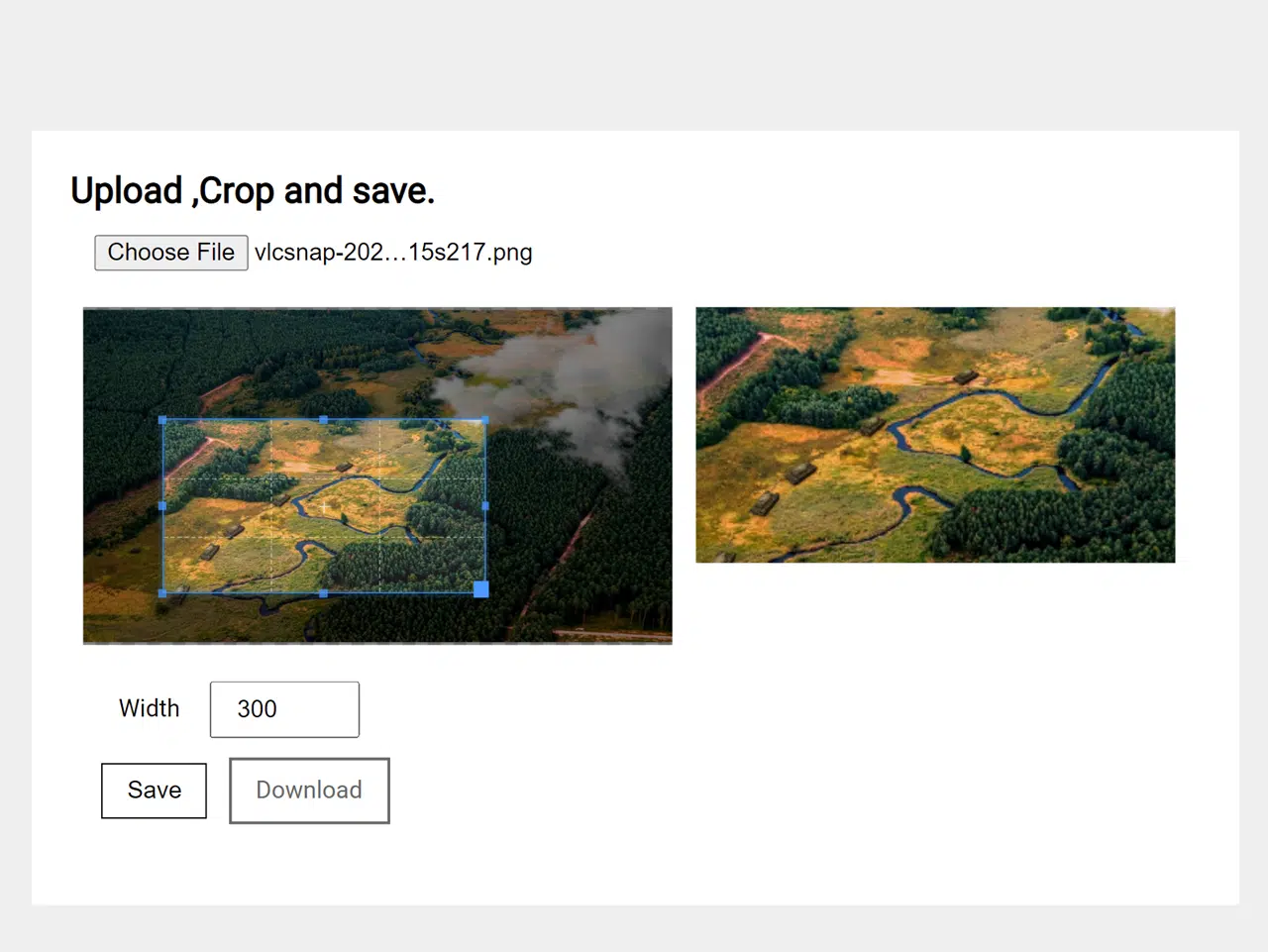
This tutorial provides a step-by-step guide on how to implement a Javascript Crop Image Before Upload feature. This feature allows users to crop images directly in the browser before uploading them to a server, ensuring that only the desired portion of the image is sent and saving bandwidth. This 100% working solution enhances user experience and optimizes image uploads.
Setting Up the Project
Including Header Assets
To begin, you need to include the necessary CSS libraries in the <head> section of your HTML document. These libraries provide the styling and functionality for the cropping tool.
<link rel="stylesheet" href="https://public.codepenassets.com/css/normalize-5.0.0.min.css">
<link rel='stylesheet' href='https://cdnjs.cloudflare.com/ajax/libs/cropper/2.3.4/cropper.min.css'>
Creating the HTML Structure
Next, create the basic HTML structure for the image cropping interface. This includes elements for file input, displaying the image, showing the cropped result, and providing options for adjusting the crop area.
<main class="page">
	<h2>Upload ,Crop and save.</h2>
	<!-- input file -->
	<div class="box">
		<input type="file" id="file-input"/>
	</div>
	<!-- leftbox -->
	<div class="box-2">
		<div class="result"></div>
	</div>
	<!--rightbox-->
	<div class="box-2 img-result hide">
		<!-- result of crop -->
		<img class="cropped" src="" alt="">
	</div>
	<!-- input file -->
	<div class="box">
		<div class="options hide">
			<label> Width</label>
			<input type="number" class="img-w" value="300" min="100" max="1200" />
		</div>
		<!-- save btn -->
		<button class="btn save hide">Save</button>
		<!-- download btn -->
		<a href="" class="btn download hide">Download</a>
	</div>
</main>
    <script src='https://cdnjs.cloudflare.com/ajax/libs/cropperjs/0.8.1/cropper.min.js'></script><script  src="./script.js"></script>
.page {
	margin: 1em auto;
	max-width: 768px;
	display: flex;
	align-items: flex-start;
	flex-wrap: wrap;
	height: 100%;
}

.box {
	padding: 0.5em;
	width: 100%;
	margin:0.5em;
}

.box-2 {
	padding: 0.5em;
	width: calc(100%/2 - 1em);
}

.options label,
.options input{
	width:4em;
	padding:0.5em 1em;
}
.btn{
	background:white;
	color:black;
	border:1px solid black;
	padding: 0.5em 1em;
	text-decoration:none;
	margin:0.8em 0.3em;
	display:inline-block;
	cursor:pointer;
}

.hide {
	display: none;
}

img {
	max-width: 100%;
}
// vars
let result = document.querySelector('.result'),
img_result = document.querySelector('.img-result'),
img_w = document.querySelector('.img-w'),
img_h = document.querySelector('.img-h'),
options = document.querySelector('.options'),
save = document.querySelector('.save'),
cropped = document.querySelector('.cropped'),
dwn = document.querySelector('.download'),
upload = document.querySelector('#file-input'),
cropper = '';

// on change show image with crop options
upload.addEventListener('change', e => {
  if (e.target.files.length) {
    // start file reader
    const reader = new FileReader();
    reader.onload = e => {
      if (e.target.result) {
        // create new image
        let img = document.createElement('img');
        img.id = 'image';
        img.src = e.target.result;
        // clean result before
        result.innerHTML = '';
        // append new image
        result.appendChild(img);
        // show save btn and options
        save.classList.remove('hide');
        options.classList.remove('hide');
        // init cropper
        cropper = new Cropper(img);
      }
    };
    reader.readAsDataURL(e.target.files[0]);
  }
});

// save on click
save.addEventListener('click', e => {
  e.preventDefault();
  // get result to data uri
  let imgSrc = cropper.getCroppedCanvas({
    width: img_w.value // input value
  }).toDataURL();
  // remove hide class of img
  cropped.classList.remove('hide');
  img_result.classList.remove('hide');
  // show image cropped
  cropped.src = imgSrc;
  dwn.classList.remove('hide');
  dwn.download = 'imagename.png';
  dwn.setAttribute('href', imgSrc);
});


