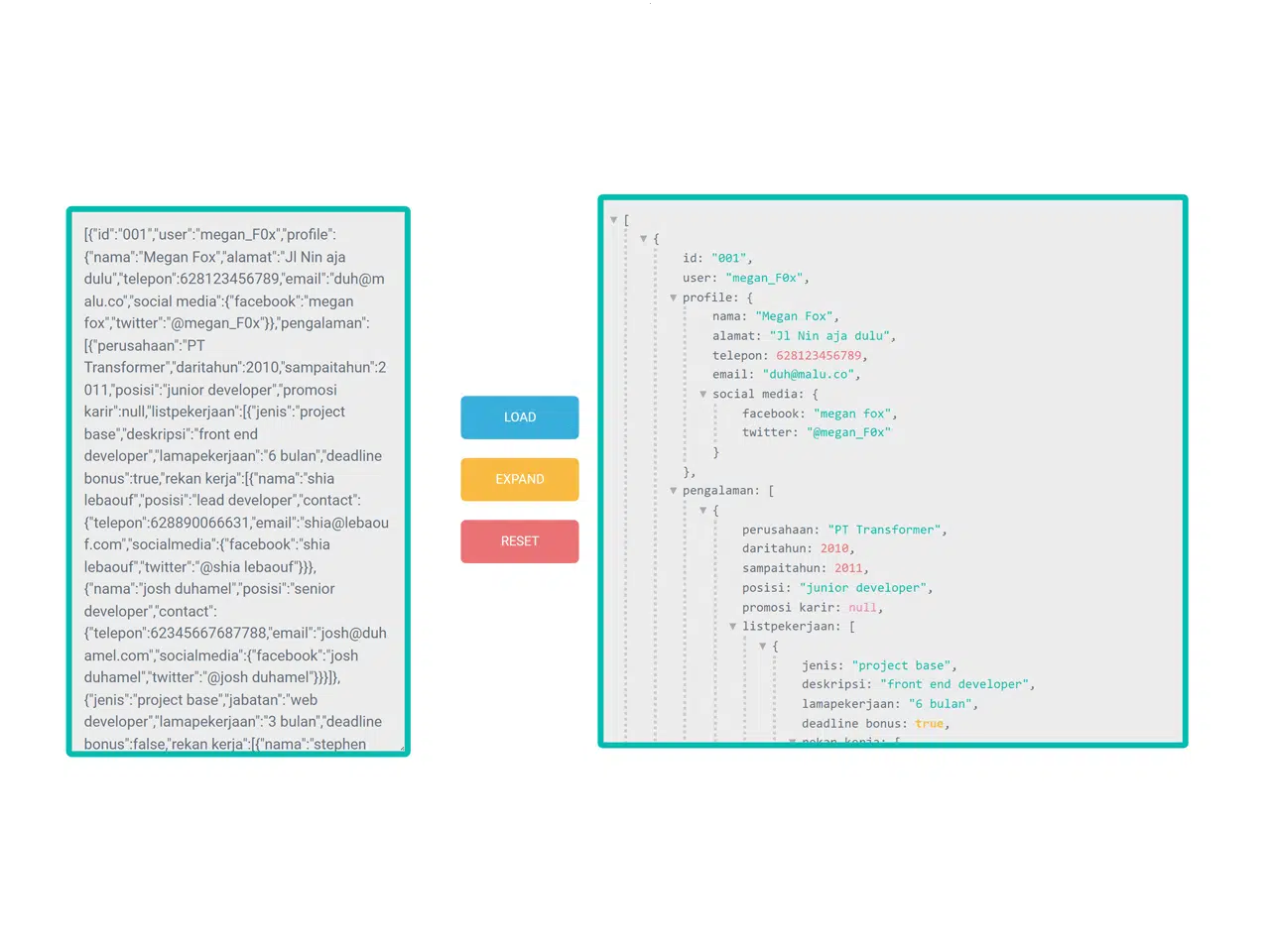
This JavaScript code snippet helps you to create a JSON Formatter with Tree View. It it incredibly useful for developers who need to visualize JSON data in a readable, hierarchical format. The tree view structure allows for easy navigation and understanding of complex JSON objects, making debugging and data analysis much more efficient.
Setting Up the HTML Structure
This section focuses on building the basic HTML layout for our JSON formatter. We’ll create a container with a textarea for inputting JSON, buttons for loading, collapsing, expanding, and resetting the view, and a dedicated div to display the formatted JSON.
<html>

<head>
  <script>
  JSONViewer = (function() {
	var JSONViewer = function() {
		this._dom = {};
		this._dom.container = document.createElement("pre");
		this._dom.container.classList.add("json-viewer");
	};
	JSONViewer.prototype.showJSON = function(json, maxLvl, colAt) {
		maxLvl = typeof maxLvl === "number" ? maxLvl : -1; // max level
		colAt = typeof colAt === "number" ? colAt : -1; // collapse at

		var jsonData = this._processInput(json);
		var walkEl = this._walk(jsonData, maxLvl, colAt, 0);

		this._dom.container.innerHTML = "";
		this._dom.container.appendChild(walkEl);
	};

	/**
	 * Get container with pre object - this container is used for visualise JSON data.
	 *
	 * @return {Element}
	 */
	JSONViewer.prototype.getContainer = function() {
		return this._dom.container;
	};

	/**
	 * Process input JSON - throws exception for unrecognized input.
	 *
	 * @param {Object|Array} json Input value
	 * @return {Object|Array}
	 */
	JSONViewer.prototype._processInput = function(json) {
		if (json && typeof json === "object") {
			return json;
		}
		else {
			throw "Input value is not object or array!";
		}
	};

	/**
	 * Recursive walk for input value.
	 *
	 * @param {Object|Array} value Input value
	 * @param {Number} maxLvl Process only to max level, where 0..n, -1 unlimited
	 * @param {Number} colAt Collapse at level, where 0..n, -1 unlimited
	 * @param {Number} lvl Current level
	 */
	JSONViewer.prototype._walk = function(value, maxLvl, colAt, lvl) {
		var frag = document.createDocumentFragment();
		var isMaxLvl = maxLvl >= 0 && lvl >= maxLvl;
		var isCollapse = colAt >= 0 && lvl >= colAt;

		switch (typeof value) {
			case "object":
				if (value) {
					var isArray = Array.isArray(value);
					var items = isArray ? value : Object.keys(value);

					if (lvl === 0) {
						// root level
						var rootCount = this._createItemsCount(items.length);
						// hide/show
						var rootLink = this._createLink(isArray ? "[" : "{");

						if (items.length) {
							rootLink.addEventListener("click", function() {
								if (isMaxLvl) return;

								rootLink.classList.toggle("collapsed");
								rootCount.classList.toggle("hide");

								// main list
								this._dom.container.querySelector("ul").classList.toggle("hide");
							}.bind(this));

							if (isCollapse) {
								rootLink.classList.add("collapsed");
								rootCount.classList.remove("hide");
							}
						}
						else {
							rootLink.classList.add("empty");
						}

						rootLink.appendChild(rootCount);
						frag.appendChild(rootLink);
					}

					if (items.length && !isMaxLvl) {
						var len = items.length - 1;
						var ulList = document.createElement("ul");
						ulList.setAttribute("data-level", lvl);
						ulList.classList.add("type-" + (isArray ? "array" : "object"));

						items.forEach(function(key, ind) {
							var item = isArray ? key : value[key];
							var li = document.createElement("li");

							if (typeof item === "object") {
								var isEmpty = false;

								// null && date
								if (!item || item instanceof Date) {
									li.appendChild(document.createTextNode(isArray ? "" : key + ": "));
									li.appendChild(this._createSimple(item ? item : null));
								}
								// array & object
								else {
									var itemIsArray = Array.isArray(item);
									var itemLen = itemIsArray ? item.length : Object.keys(item).length;

									// empty
									if (!itemLen) {
										li.appendChild(document.createTextNode(key + ": " + (itemIsArray ? "[]" : "{}")));
									}
									else {
										// 1+ items
										var itemTitle = (typeof key === "string" ? key + ": " : "") + (itemIsArray ? "[" : "{");
										var itemLink = this._createLink(itemTitle);
										var itemsCount = this._createItemsCount(itemLen);

										// maxLvl - only text, no link
										if (maxLvl >= 0 && lvl + 1 >= maxLvl) {
											li.appendChild(document.createTextNode(itemTitle));
										}
										else {
											itemLink.appendChild(itemsCount);
											li.appendChild(itemLink);
										}

										li.appendChild(this._walk(item, maxLvl, colAt, lvl + 1));
										li.appendChild(document.createTextNode(itemIsArray ? "]" : "}"));

										var list = li.querySelector("ul");
										var itemLinkCb = function() {
											itemLink.classList.toggle("collapsed");
											itemsCount.classList.toggle("hide");
											list.classList.toggle("hide");
										};

										// hide/show
										itemLink.addEventListener("click", itemLinkCb);

										// collapse lower level
										if (colAt >= 0 && lvl + 1 >= colAt) {
											itemLinkCb();
										}
									}
								}
							}
							// simple values
							else {
								// object keys with key:
								if (!isArray) {
									li.appendChild(document.createTextNode(key + ": "));
								}

								// recursive
								li.appendChild(this._walk(item, maxLvl, colAt, lvl + 1));
							}

							// add comma to the end
							if (ind < len) {
								li.appendChild(document.createTextNode(","));
							}

							ulList.appendChild(li);
						}, this);

						frag.appendChild(ulList);
					}
					else if (items.length && isMaxLvl) {
						var itemsCount = this._createItemsCount(items.length);
						itemsCount.classList.remove("hide");

						frag.appendChild(itemsCount);
					}

					if (lvl === 0) {
						// empty root
						if (!items.length) {
							var itemsCount = this._createItemsCount(0);
							itemsCount.classList.remove("hide");

							frag.appendChild(itemsCount);
						}

						// root cover
						frag.appendChild(document.createTextNode(isArray ? "]" : "}"));

						// collapse
						if (isCollapse) {
							frag.querySelector("ul").classList.add("hide");
						}
					}
					break;
				}

			default:
				// simple values
				frag.appendChild(this._createSimple(value));
				break;
		}

		return frag;
	};

	/**
	 * Create simple value (no object|array).
	 *
	 * @param  {Number|String|null|undefined|Date} value Input value
	 * @return {Element}
	 */
	JSONViewer.prototype._createSimple = function(value) {
		var spanEl = document.createElement("span");
		var type = typeof value;
		var txt = value;

		if (type === "string") {
			txt = '"' + value + '"';
		}
		else if (value === null) {
			type = "null";
			txt = "null";
		}
		else if (value === undefined) {
			txt = "undefined";
		}
		else if (value instanceof Date) {
			type = "date";
			txt = value.toString();
		}

		spanEl.classList.add("type-" + type);
		spanEl.innerHTML = txt;

		return spanEl;
	};

	/**
	 * Create items count element.
	 *
	 * @param  {Number} count Items count
	 * @return {Element}
	 */
	JSONViewer.prototype._createItemsCount = function(count) {
		var itemsCount = document.createElement("span");
		itemsCount.classList.add("items-ph");
		itemsCount.classList.add("hide");
		itemsCount.innerHTML = this._getItemsTitle(count);

		return itemsCount;
	};

	/**
	 * Create clickable link.
	 *
	 * @param  {String} title Link title
	 * @return {Element}
	 */
	JSONViewer.prototype._createLink = function(title) {
		var linkEl = document.createElement("a");
		linkEl.classList.add("list-link");
		linkEl.href = "javascript:void(0)";
		linkEl.innerHTML = title || "";

		return linkEl;
	};

	/**
	 * Get correct item|s title for count.
	 *
	 * @param  {Number} count Items count
	 * @return {String}
	 */
	JSONViewer.prototype._getItemsTitle = function(count) {
		var itemsTxt = count > 1 || count === 0 ? "items" : "item";

		return (count + " " + itemsTxt);
	};

	return JSONViewer;
})();
  </script>

</head>


<body>
  <div class="container">
    <div id="first">
      <form class="form">
        <label class="form__label--hidden" for="msg">Input json:</label>
        <textarea class="form__input" class="form__input" id="msg" placeholder="Input json..." rows="6"></textarea>
      </form>
    </div>
    <div id="two">
      <button type="button" class="load-json">Load</button>
      <button type="button" class="collapse">Collapse</button>
      <button type="button" class="expand">Expand</button>
      <button type="button" class="reset">Reset</button>
    </div>
    <div id="three">
      <div id="json"></div>
    </div>
  </div>
Now, style the tool by adding the following CSS styles. You can customize it according to your needs.
input, textarea {
  display: block;
  outline: 0;
  border: 0;
}
input:focus, textarea:focus {
  transition: 0.2s;
}
body {
  background-color: #fff;
  font-family: 'Open Sans', Helvetica, sans-serif;
}
.container {
  width: 100%;
  margin: 30px auto;
}
#first {
  width: 350px;
  float: left;
  margin-left: 2%;
  margin-right: 2%;
}
#two {
  width: 100px;
  float: left;
  margin-right: 2%;
  margin-left: 2%;
  padding-top: 15%;
}
#three {
  width: 680px;
  float: left;
  margin-left: 1%;
   margin-top: -12px;
}
.form__label {
  display: block;
  margin-bottom: 0.625em;
}
.form__label--hidden {
  border: 0;
  clip: rect(0 0 0 0);
  height: 1px;
  margin: -1px;
  overflow: hidden;
  padding: 0;
  position: absolute;
  width: 1px;
}
.form__input {
  width: 100%;
   height: 560px;
  font-size: 1em;
  padding: 0.83333em;
  margin-bottom: 5px;
  border: 6px solid #05bcaf;
  border-radius: 0.4em;
  background: #ebecec;
  color: #656D78;
  font-weight: 300;
}
.form__modal {
  width: 83%;
  font-size: 1em;
  padding: 0.83333em;
  margin-bottom: 5px;
  border-bottom: 6px solid #05bcaf;
  border-radius: 0.4em;
  background: #ebecec;
  color: #656D78;
  font-weight: 300;
}

.load-json, .reset, .collapse, .expand, [type^="button"] {
  padding: 0.9375em 1.875em;
  border: 0;
  border-radius: 0.4em;
  color: #fff;
  text-transform: uppercase;
  font-size: 0.875em;
  font-weight: 400;
  transition: opacity 0.2s;
  display: block;
  width: 100%;
}
.load-json:hover, .reset:hover, .collapse:hover, .expand:hover, [type^="button"]:hover {
  opacity: 0.75;
  cursor: pointer;
}
.load-json {
  background-color:  #3BAFDA;
}
.reset {
  background-color: #e87376;
}
.collapse {
  background-color: #D770AD;
}
.expand {
  background-color: #F6BB42;
}
[type^="button"] {
   margin-bottom: 1.42857em;
  width: 120px;
  margin-right: 0.625em;
  outline:none;
}
.json-viewer {
  display: inline-block;
  overflow: scroll;
  height:  563px;
  width: 710px;
	color: #656D78;
  padding: 10px 10px 10px 20px;
  background-color: #ebecec;
  border: 6px solid #05bcaf;
  border-radius: 0.4em;
  margin-bottom: 3px;
}

.json-viewer ul {
	list-style-type: none;
	margin: 0;
	margin: 0 0 0 1px;
	border-left: 3px dotted #ccc;
	padding-left: 2em;
}

.json-viewer .hide {
	display: none;
}

.json-viewer ul li .type-string,
.json-viewer ul li .type-date {
	color:  #05bcaf;
}

.json-viewer ul li .type-boolean {
	color: #F6BB42;
	font-weight: bold;
}

.json-viewer ul li .type-number {
	color:   #e87376;
}

.json-viewer ul li .type-null {
	color: #EC87C0;
}

.json-viewer a.list-link {
	color: #656D78;
	text-decoration: none;
	position: relative;
}

.json-viewer a.list-link:before {
	color: #aaa;
	content: "\25BC";
	position: absolute;
	display: inline-block;
	width: 1em;
	left: -1em;
}

.json-viewer a.list-link.collapsed:before {
	content: "\25B6";
}

.json-viewer a.list-link.empty:before {
	content: "";
}

.json-viewer .items-ph {
	color: #aaa;
	padding: 0 1em;
}

.json-viewer .items-ph:hover {
	text-decoration: underline;
}
Finally, add the following JavaScript code to intilize JSONViewer app. You can place your JSON code inside the textarea that will display on page load.
var jsonObj = {};
var jsonViewer = new JSONViewer();
document.querySelector("#json").appendChild(jsonViewer.getContainer());

var textarea = document.querySelector("textarea");
textarea.value = JSON.stringify([
  {
    "id": "001",
    "user": "megan_F0x",
    "profile":
      {
          "nama":"Megan Fox",
          "alamat":"Jl Nin aja dulu",
          "telepon":628123456789,
          "email":"duh@malu.co",
          "social media":
            {
              "facebook":"megan fox",
              "twitter":"@megan_F0x"
            }
      },
    "pengalaman":[
            {
              "perusahaan":"PT Transformer",
              "daritahun": 2010,
              "sampaitahun": 2011,
              "posisi": "junior developer",
              "promosi karir": null,
              "listpekerjaan": [
                {
                  "jenis": "project base",
                  "deskripsi": "front end developer",
                  "lamapekerjaan": "6 bulan",
                  "deadline bonus": true,
                  "rekan kerja": [
                    {
                      "nama": "shia lebaouf",
                      "posisi": "lead developer",
                      "contact":
                        {
                          "telepon" : 628890066631,
                          "email": "shia@lebaouf.com",
                          "socialmedia": {
                            "facebook": "shia lebaouf",
                            "twitter": "@shia lebaouf"
                          }
                        }
                    },
                    {
                      "nama": "josh duhamel",
                      "posisi": "senior developer",
                      "contact":
                        {
                          "telepon" : 62345667687788,
                          "email": "josh@duhamel.com",
                          "socialmedia": {
                            "facebook": "josh duhamel",
                            "twitter": "@josh duhamel"
                          }
                        }
                    }]
                },
                {
                  "jenis": "project base",
                  "jabatan": "web developer",
                  "lamapekerjaan": "3 bulan",
                  "deadline bonus": false,
                  "rekan kerja": [
                    {
                      "nama": "stephen amell",
                      "posisi": "lead developer",
                      "contact":
                        {
                          "telepon" : 629485765690,
                          "email": "stephen@amell.com",
                          "socialmedia": {
                            "facebook": "stephen amell",
                            "twitter": "@stephen_amell"
                          }
                        }
                    },
                    {
                      "nama": "tyler perry",
                      "posisi": "senior developer",
                      "contact":
                        {
                          "telepon" : 62948453666,
                          "email": "tyler@perry.com",
                          "socialmedia": {
                            "facebook": "tyler perry",
                            "twitter": "@tyler perry"
                          }
                        }
                    }]
                }]
            }]
  }
]);

// textarea value to JSON object
var setJSON = function () {
  try {
    var value = textarea.value;
    jsonObj = JSON.parse(value);
  }
  catch (err) {
    alert(err);
  }
};

// load default value
setJSON();

var loadJsonBtn = document.querySelector("button.load-json");
var collapseBtn = document.querySelector("button.collapse");
var expandBtn = document.querySelector("button.expand");
var resetBtn = document.querySelector("button.reset");

loadJsonBtn.addEventListener("click", function () {
  setJSON();
  jsonViewer.showJSON(jsonObj);
});

collapseBtn.addEventListener("click", function () {
  jsonViewer.showJSON(jsonObj, null, 1);
});

expandBtn.addEventListener("click", function () {
  setJSON();
  jsonViewer.showJSON(jsonObj);
});

resetBtn.addEventListener("click", function () {
  document.getElementById("msg").value = "";
});
That’s all! Hopefully, you have successfully integrated this JSON formatter into your web/app project. If you have any questions or need help, feel free to comment below.