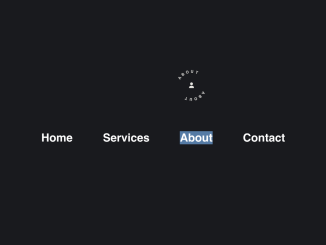
Here’s a guide on how to create a Javascript Custom Cursor With Icon And Text. This technique enhances user experience by replacing the standard mouse cursor with a custom design, including an icon and text that change dynamically based on the element the cursor hovers over. This provides visual feedback and can make your website more engaging and interactive.
Adding Header Assets
First, you’ll need to add the following to your HTML document’s <head> section. This will include the necessary Font Awesome library for the icons.
<link rel='stylesheet' href='https://cdnjs.cloudflare.com/ajax/libs/font-awesome/6.4.2/css/all.min.css'>
Creating the HTML Structure
Now, set up the HTML structure for the custom cursor and some interactive elements, like navigation links. This involves creating the cursor element itself and some basic navigation links that will trigger the cursor’s dynamic behavior.
<div class="cursor">
  <div class="icon"></div>
  <div class="link"></div>
</div>
<nav>
  <a href="" id="home">Home</a>
  <a href="">Services</a>
  <a href="">About</a>
  <a href="">Contact</a>
</nav>
    <script  src="./script.js"></script>
Styling the Cursor with CSS
Next, define the visual appearance of the cursor, its icon, and text using CSS. This includes setting the size, colors, animations, and positioning of the cursor elements.
:root {
  --circle-size: 25px;
  --letter-width: 14px;
  --letter-space: 60px;
  --font-size: 10px;
  --letter-spacing-x: 20;
  --second-circle-border: 4px;
  --second-circle-size: 35px;
}

body {
  font-family: 'Ubuntu', sans-serif;
  margin: 0 auto;
  background-color: #191a1e;
  color: white;
  min-height: 100vh;
  display: flex;
  align-items: center;
  justify-content: center;
}

.cursor {
  position: absolute;
  width: 25px;
  height: 25px;
  background: white;
  border-radius: 100%;
  cursor: none;
  z-index: 100;
  transition: background .1s ease;
  mix-blend-mode: difference;
}

.cursor .link {
  position: absolute;
  top: 0;
  color: white;
  animation: spin 5s infinite linear;
  transform-origin: center center;
  width: 25px;
  height: 25px;
}

.cursor .icon {
  width: var(--circle-size);
  height: var(--circle-size);
  line-height: var(--circle-size);
  position: absolute;
  top: 0;
  text-align: center;
}

.cursor:after {
  display: block;
  content: '';
  width: 35px;
  height: 35px;
  border-radius: 100%;
  z-index: -1;
  border: var(--second-circle-border) solid white;
  left: -9px;
  top: -9px;
  position: relative;
  transition: opacity .2s ease, transform .3s ease;
}

.cursor.active {
  background: rgba(0,0,0,0);
}

.cursor.active:after {
  opacity: 0;
  transform: scale(2);
}

nav {
  display: flex;
}

nav a {
  text-decoration: none !important;
  color: white;
  font-weight: 700;
  font-size: 30px;
  padding: 20px 40px;
}


.circle-letter {
  position: absolute;
  width: var(--letter-width);
  text-align: center;
  height: calc(var(--circle-size) + var(--letter-space));
  left: calc(var(--circle-size) / 2 - var(--letter-width) / 2);
  top: calc(var(--letter-space) / 2 * -1);
  text-transform: uppercase;
  font-weight: 700;
  font-size: var(--font-size);
}

.circle-letter-bottom {
  width: var(--letter-width);
  height: var(--letter-width);
  text-align: center;
  position: absolute;
  bottom: 0;
  transform: rotate(180deg);
}

@keyframes spin {
  0% {
    transform: rotate(0deg);
  }
  100% {
    transform: rotate(360deg);
  }
}
Implementing the JavaScript Logic
Finally, implement the JavaScript code to dynamically update the cursor’s position, icon, and text based on mouse movements and the elements being hovered over.
const letterSpacing = getComputedStyle(
  document.querySelector(":root")
).getPropertyValue("--letter-spacing-x");

var cursor = document.querySelector(".cursor");
var cursorLink = document.querySelector(".link");
var cursorIcon = document.querySelector(".icon");

var iconMap = {
  Home: "fa-house",
  Services: "fa-bell",
  About: "fa-user",
  Contact: "fa-envelope"
};

document.addEventListener("mousemove", (event) => {
  cursor.style.left = event.clientX - cursor.offsetWidth / 2 + "px";
  cursor.style.top = event.clientY - cursor.offsetHeight / 2 + "px";

  cursor.classList.remove("active");
  cursorLink.innerHTML = "";
  cursorIcon.innerHTML = "";

  let elements = document.elementsFromPoint(event.clientX, event.clientY);
  elements.forEach((elem) => {
    if (elem.tagName == "A") {
      cursor.classList.add("active");

      elem.innerHTML.split("").forEach((letter, i) => {
        var circleLetter = document.createElement("div");
        circleLetter.classList.add("circle-letter");
        circleLetter.innerHTML = letter;
        circleLetter.style.transform = "rotate(" + i * letterSpacing + "deg)";

        var circleLetterBottom = document.createElement("div");
        circleLetterBottom.classList.add("circle-letter-bottom");
        circleLetterBottom.innerHTML = letter;
        circleLetter.appendChild(circleLetterBottom);

        cursorLink.appendChild(circleLetter);
      });

      if (iconMap[elem.innerHTML]) {
        var circleIcon = document.createElement("i");
        circleIcon.classList.add("fa");
        circleIcon.classList.add(iconMap[elem.innerHTML]);
        cursorIcon.appendChild(circleIcon);
      }
    }
  });
});
Adding Footer Assets
If necessary, include any JavaScript libraries or scripts just before the closing <body> tag.
With these steps, you should now have a fully functional Javascript Custom Cursor With Icon And Text on your website. This enhances user interaction and provides a unique visual experience for your visitors.