

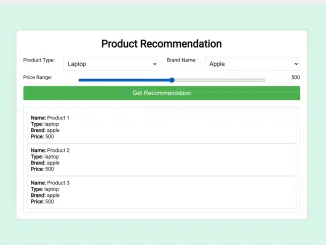
This tutorial will guide you through creating a simple yet effective product recommendation system based on user selection using JavaScript. This type of system is incredibly useful for e-commerce websites, allowing you to suggest relevant products to your customers based on their preferences, ultimately enhancing their shopping experience and potentially increasing sales. We will be creating a basic system that allows a user to select product type, brand and price range. Then, our Javascript code will generate product recommendations for them.
Setting Up the HTML Structure
First, we need to create the basic HTML structure for our product recommendation system. This includes the form where users can select their preferences and the area where the recommendations will be displayed.
<!DOCTYPE html>
<html lang="en">
<head>
    <meta charset="UTF-8">
    <meta name="viewport" content="width=device-width, initial-scale=1.0">
    <title>Product Recommendation</title>
    <link rel="stylesheet" href="styles.css"> <!-- You can add additional styling if needed -->
</head>
<body>

<div class="container">
    <h1>Product Recommendation</h1>

    <form id="productForm" onsubmit="getRecommendation(); return false;">
        <label for="productType">Product Type:</label>
        <select id="productType">
            <option value="laptop">Laptop</option>
            <option value="phone">Phone</option>
            <option value="camera">Camera</option>
            <!-- Add more product types as needed -->
        </select>

        <label for="brandName">Brand Name:</label>
        <select id="brandName">
            <option value="apple">Apple</option>
            <option value="samsung">Samsung</option>
            <option value="sony">Sony</option>
            <!-- Add more brand names as needed -->
        </select>

        <label for="priceRange">Price Range:</label>
        <input type="range" id="priceRange" min="0" max="1000" step="50" value="500">
        <span id="priceValue">500</span>

        <button type="submit">Get Recommendation</button>
    </form>

    <div id="recommendationResult" class="result-container"></div>
</div>

<script src="script.js"></script> <!-- You can add JavaScript functionality in a separate script file -->
Styling with CSS
Now, let’s add some CSS to make our product recommendation system visually appealing and user-friendly.
body {
    font-family: 'Arial', sans-serif;
    margin: 0;
    padding: 0;
    background-color: #f5f5f5;
}

.container {
    max-width: 800px;
    margin: 50px auto;
    background-color: #fff;
    padding: 20px;
    border-radius: 8px;
    box-shadow: 0 0 10px rgba(0, 0, 0, 0.1);
}

h1 {
    text-align: center;
    margin-bottom: 20px;
}

form {
    display: flex;
    flex-wrap: wrap;
    justify-content: space-between;
    margin-bottom: 20px;
}

label {
    margin-bottom: 10px;
}

select,
input[type="range"] {
    width: calc(33.33% - 10px);
    padding: 8px;
    margin-bottom: 10px;
    border: 1px solid #ddd;
    border-radius: 4px;
}

input[type="range"] {
    width: calc(66.66% - 10px);
    margin-bottom: 0;
}

button {
    width: 100%;
    padding: 10px;
    background-color: #4caf50;
    color: #fff;
    border: none;
    border-radius: 4px;
    cursor: pointer;
}

button:hover {
    background-color: #45a049;
}

#recommendationResult {
    margin-top: 20px;
}

.result-container {
    padding: 10px;
    border: 1px solid #ddd;
    border-radius: 4px;
}
Adding JavaScript Functionality
Now we’ll create Javascript function to handle user selections and display the resulting recommendations.
function getRecommendation() {
    // Get selected values from the form
    const productType = document.getElementById('productType').value;
    const brandName = document.getElementById('brandName').value;
    const priceRange = document.getElementById('priceRange').value;

    // Replace this with your logic or API call to get recommendations
    const recommendations = generateHardcodedRecommendations(productType, brandName, priceRange);

    // Display recommendations
    displayRecommendations(recommendations);
}

function generateHardcodedRecommendations(productType, brandName, priceRange) {
    // Replace this with your logic or API call to generate recommendations
    // For demonstration purposes, using hardcoded recommendations
    const recommendations = [
        { name: 'Product 1', type: productType, brand: brandName, price: priceRange },
        { name: 'Product 2', type: productType, brand: brandName, price: priceRange },
        { name: 'Product 3', type: productType, brand: brandName, price: priceRange }
    ];

    return recommendations;
}

function displayRecommendations(recommendations) {
    const resultContainer = document.getElementById('recommendationResult');
    resultContainer.innerHTML = '';

    if (recommendations.length === 0) {
        resultContainer.innerHTML = '<p>No recommendations found.</p>';
    } else {
        recommendations.forEach(product => {
            const productCard = document.createElement('div');
            productCard.classList.add('result-container');

            const details = document.createElement('p');
            details.innerHTML = `<strong>Name:</strong> ${product.name}<br>
                                 <strong>Type:</strong> ${product.type}<br>
                                 <strong>Brand:</strong> ${product.brand}<br>
                                 <strong>Price:</strong> ${product.price}`;

            productCard.appendChild(details);
            resultContainer.appendChild(productCard);
        });
    }
}
Header Assets
Include the following assets in the <head> section of your HTML to link CSS.
Footer Assets
Include the following assets right before the closing <body> tag in your HTML to link JavaScript.
You have successfully created a basic product recommendation system based on user selection in JavaScript. Remember that this is a simplified example. You can extend this by connecting to a real database or API to fetch more accurate and diverse product recommendations.


