

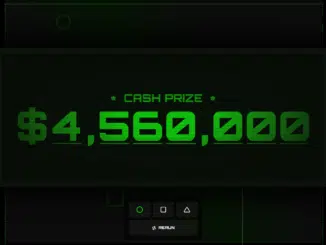
This tutorial will guide you through creating a dynamic and visually engaging Squid Game Prize Counter using Javascript. This project is perfect for showcasing your Javascript skills, especially if you are interested in DOM manipulation, CSS animations, and creating interactive web elements. You can customize the prize amount, theme, and animation to fit your specific needs and aesthetic preferences.
Add Header Assets
First, you will need to include the necessary assets in the “ section of your HTML document. This includes the Google Fonts link to use the “Orbitron” font, which is visually appealing and fits the theme.
<link rel="preconnect" href="https://fonts.googleapis.com">
<link rel="preconnect" href="https://fonts.gstatic.com" crossorigin>
<link href="https://fonts.googleapis.com/css2?family=Orbitron:wght@900&display=swap" rel="stylesheet">
Create the HTML Structure
Next, you will define the HTML structure for your prize counter. This includes the main container (`#app`), the prize display area (`#prize`), shape elements for visual flair (`#shapes`), and interactive action buttons (`#actions`).
<div id="app">
  <div id="prize">
    <div id="prize-lines" class="prize-filter"></div>
    <div id="prize-shadow" class="prize-filter"></div>
    <h2 id="prize-label">
      <span class="asterisk">*</span>
      <span>CASH PRIZE</span>
      <span class="asterisk">*</span>
    </h2>
    <h1 id="prize-text"></h1>
  </div>

  <div id="shapes">
    <i class="fa-regular fa-circle"></i>
    <i class="fa-regular fa-square"></i>
    <i class="fa-regular fa-triangle"></i>
  </div>

  <div id="actions-wrapper">
    <div id="actions">
      <div id="theme-actions">
        <button class="theme-button" data-theme="green" data-selected="true" onclick="handleChangeTheme(event)">
          <i class="fa-regular fa-circle"></i>
        </button>
        <button class="theme-button" data-theme="blue" onclick="handleChangeTheme(event)">
          <i class="fa-regular fa-square"></i>
        </button>
        <button class="theme-button" data-theme="pink" onclick="handleChangeTheme(event)">
          <i class="fa-regular fa-triangle"></i>
        </button>
      </div>
      <button id="redo-button" type="button" onclick="handleRedo()">
        <i class="fa-solid fa-arrows-repeat"></i>
        <span>Rerun</span>
      </button>
    </div>
  </div>
</div>
    <script src='https://codepen.io/Hyperplexed/pen/xxYJYjM/54407644e24173ad6019b766443bf2a6.js'></script><script  src="./script.js"></script>
Apply CSS Styling
Now, it’s time to add the CSS styles to create the visual appeal of the Squid Game Prize Counter. The CSS code defines the overall layout, color scheme, animations, and responsive behavior of the counter. Pay attention to the use of CSS variables (`–theme-rgb`) to easily change the theme colors.
:root {
  --dark-rgb: 23 28 28;
  --darker-rgb: 8 13 7;

  --green: 9 252 8;
  --blue: 59 130 246;
  --pink: 231 60 126;

  --background-rgb: 12 12 12;
  --theme-rgb: var(--green);
}

body {
  background-color: black;
  height: 100vh;
  overflow: hidden;
  font-family: "Orbitron", sans-serif;
}

button {
  font-family: "Orbitron", sans-serif;
}

* {
  box-sizing: border-box;
  margin: 0;
  padding: 0;
}

#app {
  height: 100%;
  width: 100%;
  position: relative;
  display: flex;
  align-items: center;
  justify-content: center;
  background: linear-gradient(
    60deg,
    rgb(var(--background-rgb)) 30%,
    rgb(var(--theme-rgb) / 8%) 50%,
    rgb(var(--background-rgb)) 70%
  );
}

#shapes {
  height: calc(100% - 2rem);
  width: calc(100% - 2rem);
  position: fixed;
  left: 0%;
  top: 0%;
  z-index: 1;
  margin: 1rem;
  border: 0.15rem dashed rgb(var(--theme-rgb) / 30%);
  pointer-events: none;
}

#shapes:before,
#shapes:after {
  content: "";
  position: absolute;
  background-color: rgb(255 255 255 / 15%);
}

#shapes:before {
  height: 0.2rem;
  width: 30%;
  min-width: 10rem;
  left: 10%;
  top: 20%;
}

#shapes:after {
  width: 0.2rem;
  height: 20%;
  min-height: 14rem;
  right: 25%;
  bottom: -2rem;
}

@keyframes float {
  from, to {
    translate: 0% 0%;
  }

  50% {
    translate: 0% 10%;
  }
}

#shapes > i {
  position: absolute;
  color: white;
  opacity: 0.1;
  animation: float 6000ms infinite;
  color: rgb(var(--theme-rgb));
}

#shapes > i.fa-circle {
  font-size: 3rem;
  left: 16%;
  top: 4%;
}

#shapes > i.fa-triangle {
  font-size: 8rem;
  right: 8%;
  top: 16%;
  rotate: 4deg;
  animation-delay: -2000ms;
}

#shapes > i.fa-square {
  font-size: 4rem;
  left: 32%;
  bottom: 16%;
  rotate: -2deg;
  animation-delay: -4000ms;
}

#prize {
  width: 88rem;
  display: flex;
  flex-direction: column;
  align-items: center;
  gap: 0.5rem;
  position: relative;
  z-index: 2;
  background-color: rgb(var(--darker-rgb));
  border: 1.5rem solid rgb(255 255 255 / 2.5%);
  padding: 10rem 4rem;
  box-shadow: 0rem 0rem 10rem 4rem rgb(0 0 0 / 75%);
  backdrop-filter: blur(1rem);
}

#prize-label,
#prize-text {
  color: rgb(var(--theme-rgb));
  text-align: center;
}

#prize-label {
  display: flex;
  align-items: center;
  justify-content: center;
  gap: 2rem;
  font-size: 3rem;
  opacity: 0.75;
}

#prize-label > span {
  display: inline-flex;
}

#prize-label > .asterisk {
  padding-top: 0.25em;
  line-height: 0.5em;
}

#prize-text {
  display: flex;
  gap: 1rem;
  height: 10rem;
  line-height: 10rem;
  font-size: 11rem;
}

#prize-text > .digit {
  width: 8rem;
  position: relative;
  overflow: hidden;
  border-bottom: 0.25rem solid rgb(var(--theme-rgb));
}

#prize-text > .digit > .digit-track {
  width: 100%;
  display: flex;
  flex-direction: column;
  align-items: center;
  position: absolute;
  left: 0%;
  top: 0%;
  translate: 0% 0%;
  transition: translate 3000ms cubic-bezier(.1,.67,0,1);
}

.prize-filter {
  height: 100%;
  width: 100%;
  position: absolute;
  left: 0%;
  top: 0%;
  pointer-events: none;
}

@keyframes pan-lines {
  from {
    background-position: 0% 0%;
  }

  to {
    background-position: 0% -100%;
  }
}

#prize-lines {
  background: linear-gradient(
    rgb(var(--darker-rgb) / 15%) 0%,
    rgb(var(--darker-rgb) / 75%) 28%,
    rgb(var(--darker-rgb) / 15%) 56%,
    rgb(var(--darker-rgb) / 5%) 56%,
    rgb(var(--darker-rgb) / 5%) 100%
  );
  background-size: 100% 7px;
  z-index: 2;
  animation: pan-lines 360s infinite linear;
}

#prize-shadow {
  background: radial-gradient(
    rgb(var(--theme-rgb) / 1%) 20%,
    rgb(var(--darker-rgb) / 80%) 70%
  );
  z-index: 3;
}

#actions-wrapper {
  width: 100%;
  display: flex;
  flex-direction: column;
  align-items: center;
  gap: 1rem;
  position: fixed;
  bottom: 2rem;
  z-index: 10;
}

#actions {
  display: flex;
  flex-direction: column;
  gap: 0.5rem;
  padding: 1rem;
  background-color: rgb(0 0 0 / 50%);
  border: 1px solid rgb(255 255 255 / 5%);
  border-radius: 0.5rem;
  backdrop-filter: blur(1rem);
}

#actions button {
  height: 3rem;
  display: flex;
  align-items: center;
  justify-content: center;
  gap: 0.5rem;
  padding: 0rem 1.5rem;
  background-color: rgb(255 255 255 / 5%);
  border-radius: 0.25rem;
  border: 1px solid rgb(255 255 255 / 5%);
  color: white;
  font-size: 0.8rem;
  text-transform: uppercase;
  outline: none;
  cursor: pointer;
}

#actions button:is(:hover, :focus-visible) {
  background-color: rgb(255 255 255 / 7%);
}

#actions button:focus-visible {
  border-color: rgb(255 255 255 / 15%);
}

#redo-button > i {
  padding-top: 0.2rem;
}

#theme-actions {
  display: flex;
  gap: 0.5rem;
}

#theme-actions > .theme-button > i {
  color: white;
  font-size: 1.25rem;
}

#theme-actions > .theme-button[data-theme="green"][data-selected="true"] > i {
  color: rgb(var(--green));
}

#theme-actions > .theme-button[data-theme="blue"][data-selected="true"] > i {
  color: rgb(var(--blue));
}

#theme-actions > .theme-button[data-theme="pink"][data-selected="true"] > i {
  color: rgb(var(--pink));
}

@media(max-width: 1700px) {
  #prize {
    scale: 0.75;
  }
}

@media(max-width: 1300px) {
  #prize {
    scale: 0.5;
  }
}

@media(max-width: 900px) {
  #prize {
    scale: 0.3;
  }
}

@media(max-width: 600px) {
  #prize {
    scale: 0.2;
  }
}
Implement JavaScript Functionality
In this step, you’ll write the JavaScript code to handle the prize counter’s logic, animations, and theme changes. This includes setting up the prize amount, creating the digit elements, animating the digit tracks, and handling user interactions for theme selection and re-running the animation.
const MINIMUM_ADDITIONAL_ITERATION_COUNT = 2;

const config = {
  additionalIterationCount: Math.max(MINIMUM_ADDITIONAL_ITERATION_COUNT, 3),
  transitionDuration: 3000,
  prize: 4560000,
  digits: [0, 1, 2, 3, 4, 5, 6, 7, 8, 9]
}

const USD = new Intl.NumberFormat("en-US", {
  style: "currency",
  currency: "USD",
  maximumFractionDigits: 0
});

const getPrizeText = () => document.getElementById("prize-text"),
      getTracks = () => document.querySelectorAll(".digit > .digit-track");

const getFormattedPrize = () => USD.format(config.prize),
      getPrizeDigitByIndex = index => parseInt(config.prize.toString()[index]),
      determineIterations = index => index + config.additionalIterationCount;

const createElement = (type, className, text) => {
  const element = document.createElement(type);
  element.className = className;
  if(text !== undefined) element.innerText = text;
  return element;
}

const createCharacter = character => createElement("span", "character", character);

const createDigit = (digit, trackIndex) => {
  const digitElement = createElement("span", "digit"),
        trackElement = createElement("span", "digit-track");

  let digits = [],
      iterations = determineIterations(trackIndex);

  for(let i = 0; i < iterations; i++) {
    digits = [...digits, ...config.digits];
  }

  trackElement.innerText = digits.join(" ");

  trackElement.style.transitionDuration = `${config.transitionDuration}ms`;

  digitElement.appendChild(trackElement);

  return digitElement;
}

const setup = () => {
  let index = 0;

  const prizeText = getPrizeText();

  for(const character of getFormattedPrize()) {
    const element = isNaN(character)
      ? createCharacter(character) : createDigit(character, index++);

    prizeText.appendChild(element);
  }
}

const animate = () => {
  getTracks().forEach((track, index) => {
    const digit = getPrizeDigitByIndex(index),
          iterations = determineIterations(index),
          activeDigit = ((iterations - 1) * 10) + digit;

    track.style.translate = `0rem ${activeDigit * -10}rem`;
  });
}

const resetTrackPosition = track => {
  track.style.transitionDuration = "0ms";
  track.style.translate = "0rem 0rem";
  track.offsetHeight;
  track.style.transitionDuration = `${config.transitionDuration}ms`;
}

const resetAnimation = () => {
  for(const track of getTracks()) resetTrackPosition(track);
}

window.onload = () => {
  setup();

  setTimeout(animate);
};

const handleRedo = () => {
  resetAnimation();

  animate();
}

const updateTheme = theme => {
  document.documentElement.style.setProperty("--theme-rgb", `var(--${theme})`);

  for(const button of document.querySelectorAll(".theme-button")) {
    button.dataset.selected = theme === button.dataset.theme;
  }
}

const handleChangeTheme = e => updateTheme(e.currentTarget.dataset.theme);

updateTheme("green");
Conclusion
Congratulations! You have successfully created a Squid Game Prize Counter using Javascript. This project demonstrates the use of HTML, CSS, and Javascript to create dynamic and visually appealing web content. You can further customize the code to add more features and enhance its functionality.


