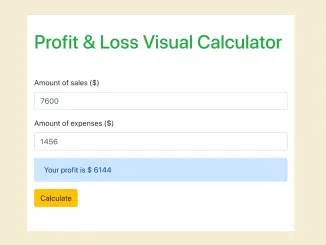
Here’s a tutorial focused on building a practical Profit & Loss Calculator In Javascript. This tool is valuable for businesses and individuals to quickly assess their financial standing by calculating the difference between income and expenses, displaying either a profit or a loss. This calculator streamlines financial analysis and decision-making processes.
Setting Up the HTML Structure
This section guides you on structuring the HTML for our Profit & Loss Calculator, including input fields for sales and expenses, a display area for results, and a button to trigger the calculation.
<div class="container-fluid">
  <div class="row">
    <div class="col-md"></div>
    <div class="col col-md-6">

      <div class="spacer-0">
        <h1 class="text-success">Profit & Loss Visual Calculator</h1>

        <div class="spacer-2">
          <div class="form-group">
            <label>Amount of sales ($)</label>
            <input id="input-sales" type="number"
                   class="form-control" required />
          </div>
          <div class="form-group">
            <label>Amount of expenses ($)</label>
            <input id="input-losses" type="number"
                   class="form-control" required />
          </div>

          <div id="profit-n-loss-result"
               class="alert alert-primary d-none"></div>

          <button id="calculator-profit-n-loss"
                  class="btn btn-warning">
            Calculate</button>

          <!-- Not functional in codepen --->
          <!--
          <button id="refresh-calculator"
                  class="btn btn-danger text-white float-right">
            Refresh</button>
          -->
        </div>
      </div>
    </div>
    <div class="col-md greyed"></div>
  </div>
</div>
    <script  src="./script.js"></script>
Adding Styles with CSS
Now, let’s add some CSS to style the calculator, making it visually appealing and user-friendly. This involves setting up the basic layout, spacing, and visual cues for different elements.
.greyed {
    background-color: #f8f9fa;
}

.spacer-0 {
    margin: 2rem 0;
}

.spacer-2 {
    margin: 3.2rem 0;
}
Implementing the JavaScript Logic
This is where the magic happens! We’ll add JavaScript to handle user input, perform the profit and loss calculation, and display the result dynamically on the page.
// Profit & Loss Calculator
var calculator = document
    .getElementById('calculator-profit-n-loss')
    .addEventListener('click', profit_N_loss);

var refresh_calculator = document
    .getElementById('refresh-calculator')
    .addEventListener('click', refresh_calc);

function refresh_calc() {
    location.reload();
}

function profit_N_loss(income_raw, loss_raw) {
    var income_raw = document.getElementById('input-sales').value;
    var loss_raw = document.getElementById('input-losses').value;

    income = parseInt(income_raw);
    loss = parseInt(loss_raw);
    var value = income - loss;

    var result_div = document.getElementById('profit-n-loss-result');
    result_div.classList.remove('d-none');
    if (value > 0) {
        result_div.innerHTML = 'Your profit is $ ' + value;
    } else {
        result_div.innerHTML = 'Your loss is $ ' + value;
    }
}
Including Header Assets
To use Bootstrap for styling, we’ll include the necessary CSS link in the <head> section of your HTML. This ensures our calculator looks great.
<link rel='stylesheet' href='https://stackpath.bootstrapcdn.com/bootstrap/4.4.1/css/bootstrap.min.css'>
That’s all! You’ve successfully created a basic Profit & Loss Calculator In Javascript. This tool can be expanded with additional features like saving calculations, detailed breakdowns, and visual charts.