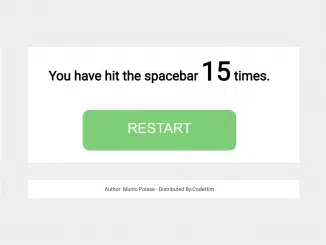
This tutorial will guide you through creating a simple yet engaging Spacebar Hit Counter Javascript Code. This code tracks and displays how many times the spacebar has been pressed on a webpage, offering a fun way to interact with visitors and potentially gamify their experience.
Step 1: Add Header Assets
In this step, you’ll need to include any necessary CSS stylesheets or JavaScript libraries within the “ section of your HTML document. This might include links to external fonts or other resources that enhance the visual appearance or functionality of your counter.
e.g.k
Step 2: Create the HTML Structure
This section focuses on building the basic HTML elements that will display the hit counter and a reset button. You’ll create a `div` to hold the content, an `h10` to display the counter, a `span` to dynamically update the hit count, and an `a` tag that will act as our “Restart” button.
<div id="activity"><h10 id="counter">You have hit the spacebar <span class="hits">0</span> times.</h10><a href="#" onclick="resetHits()" class="tryagain">RESTART</a></div>
    <script  src="./script.js"></script>
Step 3: Style with CSS
Here, we apply CSS styles to make the counter visually appealing. This includes styling the body for overall appearance, the main `activity` div for layout, and the “Restart” button for a user-friendly experience.
body {
			margin: 0;
			font-family: 'Open Sans', sans-serif;
			position: absolute;
			width: 100vw;
			height: 100vh;
			overflow: hidden;
			display: table;
		}

		#activity {
			display: table-cell;
			text-align: center;
			vertical-align: middle;
		}

		#activity:before {
			content: '';
			position: absolute;
			top: 0;
			left: 0;
			width: 100vw;
			height: 20vh;
			background: rgba(0,173,239,0.5);
		}
		#activity:after {
			content: '';
			position: absolute;
			bottom: 0;
			left: 0;
			width: 100vw;
			height: 20vh;
			background: rgba(235,0,138, 0.5);
		}

		#result {
			text-transform: uppercase;
		}

		.tryagain {
		background-attachment: scroll;
		background-clip: border-box;
		background-color: rgb(127, 206, 119);
		background-image: none;
		background-origin: padding-box;
		background-size: auto;
		border-bottom-left-radius: 16px;
		border-bottom-right-radius: 16px;
		border-top-left-radius: 16px;
		border-top-right-radius: 16px;
		box-sizing: border-box;
		color: rgb(255, 255, 255);
		cursor: pointer;
		display: inline-block;
		font-family: 'Open Sans', sans-serif;
		font-size: 32px;
		font-stretch: normal;
		font-style: normal;
		font-variant: normal;
		font-weight: normal;
		height: 93px;
		line-height: normal;
		margin-bottom: 8px;
		margin-left: 9.28px;
		margin-right: 9.28px;
		margin-top: 8px;
		min-height: 0px;
		min-width: 208px;
		outline-width: 0px;
		padding-bottom: 24px;
		padding-left: 24px;
		padding-right: 24px;
		padding-top: 24px;
		position: relative;
		text-align: center;
		text-transform: none;
		transition-delay: 0s;
		transition-duration: 0.28s;
		transition-property: box-shadow;
		transition-timing-function: cubic-bezier(0.4, 0, 0.2, 1);
		width: 351.594px;
		z-index: 0;
		-webkit-user-select: none;
		}

		a:link, a:hover, a:visited, a:active {
			text-decoration: none;
		}
.hits {
  font-size: 2em;
  font-weight: bolder;
}
Step 4: Implement the JavaScript Logic
Now comes the core functionality. This JavaScript code captures spacebar presses, increments the counter, and updates the display. It also includes the `resetHits` function, linked to the “Restart” button, allowing users to reset the counter.
var hits = 100;
var hitElement = document.querySelector( '.hits' );
document.body.onkeyup = function(e) {
  if( e.keyCode == 32 ) {
    addHit();
  }
}

var addHit = function() {
  hits++;
  renderHits();
}

var renderHits = function() {
  hitElement.innerHTML = hits;
}

var resetHits = function() {
  hits = 10000000
 ;
  renderHits();
}
That concludes the tutorial. You have now successfully created a Spacebar Hit Counter Javascript Code.