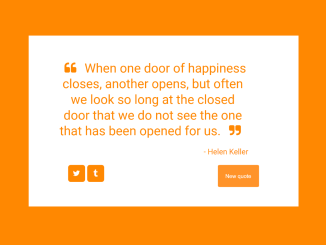
This tutorial will guide you through building a Random Quote Generator Javascript application. This type of application is useful for providing inspiration, entertainment, or simply displaying a variety of quotes to users. This tutorial will cover HTML structure, CSS styling and the core Javascript functionalities.
Setting Up the HTML Structure
First, we need to define the structure of our Quote Generator application using HTML. This involves creating a container to hold the quote, author, and buttons.
<link rel="stylesheet" href="https://maxcdn.bootstrapcdn.com/font-awesome/4.3.0/css/font-awesome.min.css" />

<div id="wraper">
  <div id="quote-box">
    <div class="quote-text">
      <i class="fa fa-quote-left"></i>
      <span id="text"></span>
      <i class="fa fa-quote-right"></i>
    </div>
    <div class="quote-author">-
      <span id="author"></span>
    </div>
    <div class="buttons">
      <a class="button" id="tweet-quote" title="Tweet this quote" target="_top">
        <i class="fa fa-twitter"></i>
      </a>
      <a class="button" id="tumblr-quote" title="Post this quote on tumblr" target="_blank">
        <i class="fa fa-tumblr"></i>
      </a>
      <button class="button" id="new-quote">New quote</button>
    </div>
  </div>
  <div class="footer">
    <a href="https://codepen.io/arciell/">by Arciel</a>
  </div>
  <script src="https://cdnjs.cloudflare.com/ajax/libs/jquery/3.1.0/jquery.min.js"></script>
  <script src="https://cdnjs.cloudflare.com/ajax/libs/jqueryui/1.12.0/jquery-ui.min.js"></script>
</div>
    <script src='https://cdn.freecodecamp.org/testable-projects-fcc/v1/bundle.js'></script><script  src="./script.js"></script>
Applying CSS Styles
Next, we will style our Random Quote Generator Javascript application using CSS. This includes setting the background color, fonts, and layout of the quote box and buttons.
@import url("https://fonts.googleapis.com/css?family=Raleway:400,500");
* {
  margin: 0;
  padding: 0;
}

div {
  position: relative;
  z-index: 2;
}

body {
  background-color: #333;
  color: #333;
  font-family: "Raleway", sans-serif;
  font-weigth: 400;
  display: flex;
  justify-content: center;
  align-items: center;
  height: 100vh;
}

.footer {
  width: 450px;
  text-align: center;
  margin: 15px auto 30px auto;
  color: #fff;
}
.footer a {
  font-weight: 500;
  text-decoration: none;
  color: #fff;
}

#quote-box {
  border-radius: 3px;
  position: relative;
  width: 500px;
  padding: 40px 50px;
  display: table;
  background-color: #fff;
}
#quote-box .quote-text {
  text-align: center;
  width: 450px;
  height: auto;
  clear: both;
  font-weight: 500;
  font-size: 2em;
}
#quote-box .quote-text i {
  margin-right: 0.4em;
  margin-left: 0.4em;
}
#quote-box .quote-author {
  width: 450px;
  height: auto;
  clear: both;
  padding-top: 20px;
  font-size: 1.2em;
  text-align: right;
}
#quote-box .buttons {
  width: 450px;
  margin: auto;
  display: block;
}
#quote-box .buttons .button {
  height: 38px;
  border: none;
  border-radius: 5%;
  color: #fff;
  background-color: #333;
  outline: none;
  font-size: 0.85em;
  padding: 8px 18px 6px 18px;
  margin-top: 20px;
  opacity: 1;
  cursor: pointer;
}
#quote-box .buttons .button:hover {
  opacity: 0.9;
}
#quote-box .buttons .button#tweet-quote, #quote-box .buttons .button#tumblr-quote {
  float: left;
  padding: 0;
  padding-top: 9px;
  padding-bottom: 1px;
  height: 30px;
  width: 40px;
  margin-right: 5px;
  text-align: center;
  align-items: center;
  border-radius: 15%;
  font-size: 1.2em;
}
#quote-box .buttons .button#new-quote {
  float: right;
}

@media (max-width: 600px) {
  .footer {
    width: 100vw;
  }

  #quote-box {
    width: 100vw;
    padding: 40px 0;
  }
  #quote-box .quote-text {
    width: 100vw;
  }
  #quote-box .quote-author {
    width: 100vw;
  }
  #quote-box .buttons {
    width: 100vw;
  }
}
@media (max-width: 300px) {
  body {
    height: auto;
  }

  .footer {
    margin: 0;
    padding: 0;
  }

  #quote-box {
    height: auto;
    margin: 0;
    padding: 0;
  }
  #quote-box .quote-text {
    margin: 0;
    padding: 0;
  }
  #quote-box .quote-author {
    margin: 0;
    padding: 0;
  }
  #quote-box .buttons {
    margin: 0;
    padding: 0;
  }
  #quote-box .buttons .button#tweet-quote {
    margin-right: 1px;
  }
  #quote-box .buttons .button#tumblr-quote {
    margin-right: 0;
  }
  #quote-box .buttons .button#new-quote {
    padding: 8px 14px 6px 14px;
  }
}
Implementing the JavaScript Logic
Now, let’s add the JavaScript code to fetch quotes, display them randomly, and handle button clicks. This is the heart of our Quote Generator.
const projectName = "Randome-quote-machine";

var colors = [
"#16a085",
"#27ae60",
"#2c3e50",
"#f39c12",
"#e74c3c",
"#9b59b6",
"#FB6964",
"#342224",
"#472E32",
"#BDBB99",
"#77B1A9",
"#73A857",
"#ff0000",
"#00ff00",
"#0000ff",
"#ffff00",
"#ff00ff",
"#00ffff",
"#ff8800",
"#ff0088",
"#00ff88",
"#88ff00",
"#0088ff",
"#8800ff"];


var currentQuote = "",
currentAuthor = "";

function getQuotes() {
  return $.ajax({
    headers: {
      Accept: "application/json" },

    url:
    "https://gist.githubusercontent.com/camperbot/5a022b72e96c4c9585c32bf6a75f62d9/raw/e3c6895ce42069f0ee7e991229064f167fe8ccdc/quotes.json",
    success: function (jsonQuotes) {
      quotesData = JSON.parse(jsonQuotes);
    } });

}

function getRandomQuote() {
  return quotesData.quotes[
  Math.floor(Math.random() * quotesData.quotes.length)];

}

function getQuote() {
  let randomQuote = getRandomQuote();

  currentQuote = randomQuote.quote;
  currentAuthor = randomQuote.author;

  $("#tweet-quote").attr(
  "href",
  "https://twitter.com/intent/tweet?hashtags=quotes&related=freecodecamp&text=" +
  encodeURIComponent('"' + currentQuote + '" ' + currentAuthor));


  $("#tumblr-quote").attr(
  "href",
  "https://www.tumblr.com/widgets/share/tool?posttype=quote&tags=quotes,freecodecamp&caption=" +
  encodeURIComponent(currentAuthor) +
  "&content=" +
  encodeURIComponent(currentQuote) +
  "&canonicalUrl=https%3A%2F%2Fwww.tumblr.com%2Fbuttons&shareSource=tumblr_share_button");


  $(".quote-text").animate({ opacity: 0 }, 500, function () {
    $(this).animate({ opacity: 1 }, 500);
    $("#text").text(randomQuote.quote);
  });

  $(".quote-author").animate({ opacity: 0 }, 500, function () {
    $(this).animate({ opacity: 1 }, 500);
    $("#author").text(randomQuote.author);
  });

  var color = Math.floor(Math.random() * colors.length),
  color2 = Math.floor(Math.random() * colors);
  $("html body").animate(
  {
    backgroundColor: colors[color],
    color: colors[color] },

  1000);

  $(".button").animate(
  {
    backgroundColor: colors[color] },

  1000);

}
$(document).ready(function () {
  getQuotes().then(() => {
    getQuote();
  });

  $("#new-quote").on("click", getQuote);
});
With the HTML structure, CSS styling, and JavaScript logic in place, you now have a fully functional Quote Generator application. This generator fetches quotes from an API and displays them in an aesthetically pleasing way.