

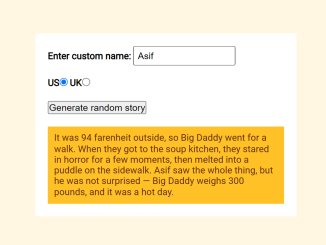
Here’s a tutorial to guide you through creating a short story generator with specific words in JavaScript. This project is a fun and engaging way to learn about string manipulation, event handling, and basic JavaScript logic, allowing you to create personalized and humorous stories with ease.
Setting Up Your Project
Adding Header Assets
First, include the necessary CSS stylesheet in the “ section of your HTML file to ensure consistent styling. This will help normalize styles across different browsers.
<link rel="stylesheet" href="https://public.codepenassets.com/css/normalize-5.0.0.min.css">
Creating the HTML Structure
Designing the User Interface
Next, you’ll create the HTML structure for your short story generator. This includes input fields for custom names, radio buttons for unit selection (US or UK), and a button to generate the story. The generated story will be displayed in a paragraph element.
<div>
  <label for="customname">Enter custom name:</label>
  <input id="customname" type="text" placeholder="">
</div>
<div>
  <label for="us">US</label><input id="us" type="radio" name="ukus" value="us" checked>
  <label for="uk">UK</label><input id="uk" type="radio" name="ukus" value="uk">
</div>
<div>
  <button class="randomize">Generate random story</button>
</div>
<!-- Thanks a lot to Willy Aguirre for his help with the code for this assessment -->
<p class="story"></p>
    <script  src="./script.js"></script>
Styling with CSS
Applying Styles to the HTML Elements
Now, let’s add some CSS to make our short story generator look presentable. We’ll define styles for the body, labels, input fields, and the story paragraph.
body {
  font-family: helvetica, sans-serif;
  width: 350px;
}

label {
  font-weight: bold;
}

div {
  padding-bottom: 20px;
}

input[type="text"] {
  padding: 5px;
  width: 150px;
}

p {
  background: #ffc125;
  color: #5e2612;
  padding: 10px;
  visibility: hidden;
}
Implementing JavaScript Logic
Writing the JavaScript Functionality
This is where the magic happens! Add a JavaScript function to handle user input, generate random story elements, and display the final story.
let customName = document.getElementById("customname");
let randomize = document.querySelector(".randomize");
let story = document.querySelector(".story");

let storyText =
  "It was 94 farenheit outside, so :insertx: went for a walk. When they got to :inserty:, they stared in horror for a few moments, then :insertz:. Bob saw the whole thing, but he was not surprised — :insertx: weighs 300 pounds, and it was a hot day.";
let insertX = ["Willy the Goblin", "Big Daddy", "Father Christmas"];

let insertY = ["the soup kitchen", "Disneyland", "the White House"];

let insertZ = [
  "spontaneously combusted",
  "melted into a puddle on the sidewalk",
  "turned into a slug and crawled away"
];

randomize.addEventListener("click", result);

function result() {
  let newStory = storyText;
  let xItem = randomValueFromArray(insertX);
  let yItem = randomValueFromArray(insertY);
  let zItem = randomValueFromArray(insertZ);

  newStory = newStory.replace(/:insertx:/gi, xItem);
  newStory = newStory.replace(":inserty:", yItem);
  newStory = newStory.replace(":insertz:", zItem);

  if (customName.value != "") {
    var name = customName.value;
    newStory = newStory.replace("Bob", name);
  }

  if (document.getElementById("uk").checked) {
    var weight = Math.round(300 * 0.0714);
    newStory = newStory.replace("300 pounds", weight + " stone");

    var temperature = Math.round((94 - 32) * 0.5556);
    newStory = newStory.replace("94 farenheit", temperature + " celcius");
  }

  story.textContent = newStory;
  story.style.visibility = "visible";
}

function getRandomInt(max) {
  return Math.floor(Math.random() * Math.floor(max));
}

function randomValueFromArray(stringsCollection) {
  const randomIndex = getRandomInt(2);

  return stringsCollection[randomIndex];
}
Footer Assets
That’s all! Hopefully, you have successfully created Short Story Generator With Specific Words In Javascript. If you have any questions or suggestions, feel free to comment below.


