

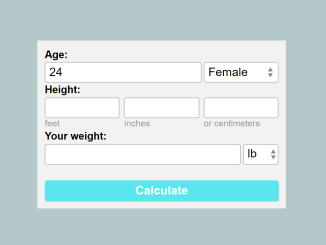
This tutorial guides you through creating a fully functional Calorie Calculator Source Code. This calorie calculator will allow users to estimate their Basal Metabolic Rate (BMR) based on age, gender, height, and weight. This is a fundamental tool for anyone tracking their fitness or dietary needs, offering a simple and effective way to manage caloric intake.
Setting Up the HTML Structure
The first step involves creating the basic HTML structure for the calorie calculator. This includes input fields for age, gender, height (in feet, inches, and centimeters), and weight (in pounds and kilograms), along with a submit button and a results area.
<div class="calc-outer-wrap">
<div id="form-error" style="display:none;"></div>
<form class="calc-form" id="calc-form">
  <div class="form-fields">

    <div class="field-outer">
      <label for="distance" class="top-label">Age:</label>
      <div class="field-items">
        <div class="field field-large">
          <input type="text" name="age" id="age" inputmode="numeric" pattern="[0-9]*">
        </div><!--  /.field-large -->

        <div class="field field-medium">
          <select name="gender">
            <option value="Female">Female</option>
            <option value="Male">Male</option>

          </select>

        </div><!--  /.field-small -->
      </div><!--  /.field-items -->
    </div><!--  /.field-outer -->

    <div class="field-outer">
      <label for="height" class="top-label">Height:</label>
      <div class="field-items">
        <div class="field">
          <input type="text" name="height_ft" id="height-ft" inputmode="numeric" pattern="[0-9]*">
          <label for="height-ft">feet</label>
        </div><!--  /.field -->
        <div class="field">
          <input type="text" name="height_in" id="height-in" inputmode="numeric" pattern="[0-9]*">
          <label for="height-in">inches</label>
        </div><!--  /.field -->
       <div class="field">
          <input type="text" name="height_cm" id="height-cm" inputmode="numeric" pattern="[0-9]*">
          <label for="height-cm">or centimeters</label>
        </div><!--  /.field -->
      </div><!--  /.field-items -->
    </div><!--  /.field-outer -->

    <div class="field-outer">
      <label for="weight" class="top-label">Your weight:</label>
      <div class="field-items">
        <div class="field field-large">
          <input type="text" name="weight" id="weight" inputmode="numeric" pattern="[0-9]*">
        </div><!--  /.field-large -->
        <div class="field field-small">
          <select name="weight_unit">
            <option value="lb">lb</option>
            <option value="kg">kg</option>
          </select>
        </div><!--  /.field-small -->
      </div><!--  /.field-items -->
    </div><!--  /.field-outer -->
   <div class="btn-wrap field-outer">
    <button class="form-submit">Calculate</button>
  </div>
  </div><!--  /.form fields -->


</form>
<div id="results" style="display:none;"></div>
</div><!--  /.calc-outer-wrap -->
    <script  src="./script.js"></script>
Styling with CSS
With the HTML in place, we can add CSS styles to improve the calculator’s appearance and make it more user-friendly. The CSS will define the layout, fonts, colors, and responsiveness of the calculator.
* {
  box-sizing: border-box;
}

html, body {
  margin: 0;
  padding: 0;
}

.calc-outer-wrap {
  margin: 0 auto;
  background: #f3f3f3;
  padding: 0.625rem;
  font-size: 1rem;
  line-height: 1.3;
  font-family: Helvetica Neue, Helvetica, Arial, sans-serif;
}

.form-fields {
  display: flex;
  flex-wrap: wrap;
  justify-content: space-between;
  align-items: top;
}

.field-outer {
  width: 48%;
}

label,
input,
select {
  font-size: 1rem;
  line-height: 1.3;
  display: block;
}

input,
select {
  height: 1.75rem;
  border: 1px solid #bbb;
  width: 100%;
  background: #fff;
  padding: 0 0.325rem;
  border-radius: 0.1875rem;
  transition: box-shadow 200ms ease-in-out;
  box-shadow: inset 0 0 0 0 #59e7ed;
  -webkit-appearance: none;
  -moz-appearance: none;
  appearance: none;
}
input:focus,
select:focus {
  outline: 0;
  box-shadow: inset 0 -3px 0 -1px #59e7ed;
  border-radius: 0.1875rem 0.1875rem 1px 1px;
}

select {
  background: #fff url("data:image/svg+xml;charset=UTF-8,%3csvg width='8px' height='14px' viewBox='0 0 8 17' xmlns='http://www.w3.org/2000/svg' fill='%238A8A8A'%3e%3cpolygon fill='%238A8A8A' points='4 17 0 10 8 10'%3e%3c/polygon%3e%3cpolygon fill='%238A8A8A' points='4 0 0 7 8 7'%3e%3c/polygon%3e%3c/svg%3e") 94% center no-repeat;
}
select:-moz-focusring {
  color: transparent;
  text-shadow: 0 0 0 #000;
}
select::-ms-expand {
  display: none;
}

.field-items {
  display: flex;
  justify-content: space-between;
}
.field-items label {
  font-size: 0.75rem;
  color: #999;
}

.field {
  display: inline-block;
  width: 32%;
}
.field + .field {
  margin-left: 3px;
}

.field-large {
  flex: 1;
  width: 67%;
}

.field-small {
  width: 3em;
}

.top-label {
  font-weight: bold;
  font-size: 0.875rem;
  line-height: 1.4;
  display: block;
}

.btn-wrap {
  align-self: flex-end;
}

.form-submit {
  background: #59e7ed;
  display: block;
  border: 0;
  width: 100%;
  font-size: 1rem;
  border-radius: 0.1875rem;
  height: 1.75rem;
  font-weight: 600;
  color: #fff;
  box-shadow: 1px 1px 1px 0 rgba(0, 0, 0, 0.15);
  cursor: pointer;
}
.form-submit:hover, .form-submit:focus {
  background: #2be0e8;
  box-shadow: 2px 2px 3px 0 rgba(0, 0, 0, 0.3);
  outline: 0;
}
.form-submit:active {
  box-shadow: none;
}

#form-error {
  color: #fff;
  margin-bottom: 0.5rem;
  text-align: center;
  color: #c1000b;
  background-color: #ffd5d5;
  padding: 3px;
  font-size: 0.875rem;
}

#results {
  position: relative;
  width: 100%;
  height: 110px;
  display: flex;
  justify-content: center;
  align-items: center;
}
#results p {
  margin: 0;
}
#results #rs {
  position: absolute;
  bottom: 10px;
  right: 10px;
  font-size: 0.875rem;
  color: #aaa;
}
#results #rs:hover {
  color: #9951FF;
}
Implementing the JavaScript Logic
The final step is to add the JavaScript code that will handle user input, perform the calorie calculation based on the provided formula, and display the results. The JavaScript will also include input validation and error handling.
(function () {
  const form = document.getElementById('calc-form');
  const results = document.getElementById('results');
  const errors = document.getElementById('form-error');

  /**
   * Display a form validation error
   *
   * @param   {String}  msg  The validation message
   * @return  {Boolen}       Returns false
   */
  function errorMessage(msg) {
    errors.innerHTML = msg;
    errors.style.display = '';
    return false;
  }

  /**
   * Display the calculation results
   *
   * @param   {Integer}  calories   The calories burned
   * @param   {Integer}  distance   The distance run
   * @param   {String}   unit       The distance unit (miles or kilometers)
   * @param   {Integer}  burnRate   The calories per distance burn rate
   * @param   {Integer}  calsPerHr  The calories burned per hour
   */
  function showResults(calories) {
    results.innerHTML = `<p>Your basal metabolic rate (BMR) is: <strong>${calories.toFixed(2)} </strong> calories a day.</p><a href="#" id="rs">revise</a>`;
    results.style.display = '';
    form.style.display = 'none';
    errors.style.display = 'none';
  }

  /**
   * Hide the results and reset the form
   */
  function resetForm(e) {
    if (e.target.id = 'rs') {
      e.preventDefault();
      results.style.display = 'none';
      form.style.display = '';
      form.reset();
    }
  }

  /**
   * Handle form submit
   */
  function submitHandler(e) {
    e.preventDefault();

    // Age
    let age = parseFloat(form.age.value);
    //let unit = form.distance_unit.value;
    if (isNaN(age) || age < 0) {
      return errorMessage('Please enter a valid age');
    }

    // Height
    let heightCM = parseFloat(form.height_cm.value);
    if (isNaN(heightCM) || heightCM < 0) {

      let heightFeet = parseFloat(form.height_ft.value);
      if (isNaN(heightFeet) || heightFeet < 0) {
        return errorMessage('Please enter a valid Height in feet or centimeters');
      }
      let heightInches = parseFloat(form.height_in.value);
      if (isNaN(heightInches) || heightInches < 0) {
        heightInches = 0;
      }
      heightCM = 2.54 * heightInches + 30.4 * heightFeet;

    }

    let weight = parseFloat(form.weight.value);
    if (isNaN(weight) || weight < 0) {
      return errorMessage('Please enter a valid weight');
    }

    if (form.weight_unit.value == 'lb') {
      weight = 0.453592 * weight;
    }

    let calories = 0;
    if (form.gender.value == 'Female') {
      //females =  655.09 + 9.56 x (Weight in kg) + 1.84 x (Height in cm) - 4.67 x age
      calories = 655.09 + 9.56 * weight + 1.84 * heightCM - 4.67 * age;
    } else {
      calories = 66.47 + 13.75 * weight + 5 * heightCM - 6.75 * age;
    }

    // Display results
    showResults(calories);
  }

  // Add Event Listeners
  form.addEventListener('submit', submitHandler);
  results.addEventListener('click', resetForm, true);

})();
Adding Header Assets
Include any necessary CSS or JavaScript libraries (e.g., from CDNs) for additional styling or functionality.
Adding Footer Assets
Include any JavaScript libraries just before closing body tag.
By following these steps, you will have created a fully functional Calorie Calculator Source Code that can be used to estimate BMR. This project serves as a great introduction to form handling, basic calculations, and front-end development.


