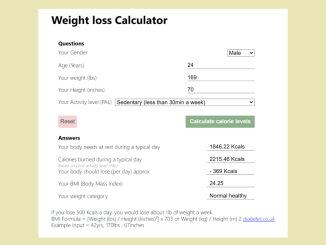
This tutorial provides a step-by-step guide on creating a Weight Loss Calculator using Javascript. This calculator will estimate your daily calorie needs based on your gender, age, weight, height, and activity level, providing valuable insights for your weight loss journey.
Step 1: Add Header Assets
First, include the necessary CSS stylesheet in the <head> section of your HTML document. This stylesheet will help normalize the appearance of your calculator across different browsers.
<link rel="stylesheet" href="https://public.codepenassets.com/css/normalize-5.0.0.min.css">
Step 2: Create the HTML Structure
Next, build the foundation of the calculator with the following HTML code. This includes the form, input fields for user data, and output fields to display the calculated results.
<div class="container">
  <h1>Weight loss Calculator</h1>
  <form name="basalForm" id="basalForm">

    <ul class="questions">
      <h2>Questions</h2>
      <li>Your Gender <select name="sex">
          <option value="male">Male</option>
          <option value="female">Female</option>
        </select></li>
      <li>Age (Years) <input type="number" name="age" maxlength="3" size="3" required></li>
      <li>Your weight (lbs)<input type="number" name="weight" maxlength="3" size="3" required></li>
      <li>Your Height (inches)<input type="number" name="height" maxlength="3" size="3" required></li>
      <li>Your Activity level (PAL)
        <select name="activityLevel">
          <option value="sedentary">Sedentary (less than 30min a week)</option>
          <option value="lightExercise">Light exercise (90min a week) </option>
          <option value="moderateExercise">Moderate exercise (aerobic exercise, 120min a week)</option>
          <option value="veryActive">Very active (150min a week)</option>
          <option value="extreme">Extreme (Athlete status)</option>
        </select>
      </li>
    </ul>
    <div class="buttons">
      <input type="reset" value="Reset" />
      <input type="button" value="Calculate calorie levels" onClick="calculateBasal(); calculatePal(); calculateBmi(); weightCat(); eat();" id="calculate">
    </div>

    <ul class="answers">
      <h2>Answers</h2>
      <li>Your body needs at rest during a typical day <input type="text" name="basal" size="12"></li>
      <li>Calories burned during a typical day<input type="text" name="pal" size="12"><cite>Based on your
          activity
          level (PAL)</cite></li>
      <li>Your body should lose (per day) approx. <input type="text" name="calLose" size="12"></li>

      <li>Your BMI (Body Mass Index) <input type="text" name="bmi" size="12"></li>
      <li>Your weight category <input type="text" name="weightCategory" size="12"></li>
    </ul>

  </form>

  <div class="message" id="message">
    If you lose 500 Kcals a day, you would lose about 1lb of weight a week.<br>

    BMI Formula = [Weight (lbs) / Height (inches)²] x 703 or Weight (kg) / Height (m) 2 <cite><a href="https://www.diabetes.co.uk/bmi.html">diabetes.co.uk</a></cite>
    <br>
    Example Input = 42yrs, 170lbs , 67inches
  </div>
  <!--message-->

</div> <!-- container-->
    <script  src="./script.js"></script>
Step 3: Style with CSS
Apply the following CSS styles to make the calculator visually appealing and user-friendly. These styles control the layout, colors, and fonts of the calculator elements.
*,
html,
body {
  margin: 0;
  padding: 0;
  box-sizing: border-box;
  font-size: 16px;
  font-family: "Segoe UI", Tahoma, Geneva, Verdana, sans-serif;
}

body {
  width: 100%;
  height: 100%;
}

.container {
  padding: 3em;
}
.container form#basalForm {
  width: -webkit-max-content;
  width: -moz-max-content;
  width: max-content;
  height: -webkit-max-content;
  height: -moz-max-content;
  height: max-content;
  display: flex;
  flex-direction: column;
  padding: 20px;
}
.container form#basalForm input[type=button]#calculate {
  background-color: rgba(67, 126, 67, 0.616);
  color: #fff;
  font-weight: 600;
  padding: 8px 12px;
  margin: 20px 0px;
  cursor: pointer;
  border: none;
  border-radius: 2px;
}
.container form#basalForm input[type=button]#calculate:hover {
  background-color: rgba(67, 126, 67, 0.8);
}
.container form#basalForm input:invalid {
  background-color: rgba(240, 119, 119, 0.384);
}
.container form#basalForm input[type=reset] {
  background-color: rgba(238, 176, 176, 0.603);
  width: -webkit-max-content;
  width: -moz-max-content;
  width: max-content;
  color: darkslategray;
  padding: 2px 6px;
  margin: 20px 0px;
  border: none;
  border-radius: 2px;
  cursor: pointer;
}
.container form#basalForm input[type=reset]:hover {
  background-color: rgba(238, 176, 176, 0.9);
}
.container form#basalForm input[type=text] {
  padding-left: 8px;
  margin-left: 8px;
}
.container form#basalForm .buttons {
  display: flex;
  justify-content: space-between;
}
.container form#basalForm ul.questions li,
.container form#basalForm ul.answers li {
  list-style: none;
  width: 100%;
  display: flex;
  position: relative;
  justify-content: space-between;
  padding: 8px 0px;
  margin-right: 10px;
}
.container form#basalForm ul.questions li select,
.container form#basalForm ul.answers li select {
  min-width: 80px;
}
.container form#basalForm ul.questions li input,
.container form#basalForm ul.answers li input {
  min-width: 80px;
  max-width: -webkit-min-content;
  max-width: -moz-min-content;
  max-width: min-content;
  border: none;
  border-bottom: 1px solid grey;
}
.container form#basalForm ul.questions li cite,
.container form#basalForm ul.answers li cite {
  position: absolute;
  width: 100%;
  height: -webkit-max-content;
  height: -moz-max-content;
  height: max-content;
  left: 0;
  bottom: -8px;
  color: grey;
  font-size: 0.8em;
}
Step 4: Implement JavaScript Functionality
Now, add the core logic of the calculator using JavaScript. This script will handle the calculations for basal metabolic rate (BMR), physical activity level (PAL), body mass index (BMI), and weight category.
function calculateBasal() {
    var sex = document.basalForm.sex.value;
    var age = document.basalForm.age.value;
    var weight = document.basalForm.weight.value;
    var height = document.basalForm.height.value;
    var activityLevel = document.basalForm.activityLevel.value;


    if (document.basalForm.sex.value == "female") {
        basal = 655 + (4.35 * weight) + (4.7 * height) - (4.7 * age);
        return document.basalForm.basal.value = basal.toFixed(2) + " Kcals";
    } else {
        basal = 66.47 + (6.23 * weight) + (12.7 * height) - (6.755 * age);
        return document.basalForm.basal.value = basal.toFixed(2) + " Kcals";
    };
}


function calculatePal() {
    var sex = document.basalForm.sex.value;
    var age = document.basalForm.age.value;
    var weight = document.basalForm.weight.value;
    var height = document.basalForm.height.value;
    var activityLevel = document.basalForm.activityLevel.value;


    if (document.basalForm.activityLevel.value == "sedentary") {
        activityLevel = 1.2
        var pal = basal * activityLevel;
        return document.basalForm.pal.value = pal.toFixed(2) + " Kcals";
    } else if (document.basalForm.activityLevel.value == "lightExercise") {
        activityLevel = 1.375
        var pal = basal * activityLevel;
        return document.basalForm.pal.value = pal.toFixed(2) + " Kcals";
    } else if (document.basalForm.activityLevel.value == "moderateExercise") {
        activityLevel = 1.55
        var pal = basal * activityLevel;
        return document.basalForm.pal.value = pal.toFixed(2) + " Kcals";
    } else if (document.basalForm.activityLevel.value == "veryActive") {
        activityLevel = 1.725
        var pal = basal * activityLevel;
        return document.basalForm.pal.value = pal.toFixed(2) + " Kcals";
    } else {
        activityLevel = 1.9
        var pal = basal * activityLevel;
        return document.basalForm.pal.value = pal.toFixed(2) + " Kcals";
    }
}

function calculateBmi() {
    var height = document.basalForm.height.value;
    var weight = document.basalForm.weight.value;
    var bmi = (weight / (height * height)) * 703;
    return document.basalForm.bmi.value = bmi.toFixed(2);
}

function weightCat() {
    bmi = document.basalForm.bmi.value;

    if (bmi > 39.9) {
        return document.basalForm.weightCategory.value = "Morbidly obese";
    } else if (bmi > 29.9) {
        return document.basalForm.weightCategory.value = "Obese";
    } else if (bmi > 24.9) {
        return document.basalForm.weightCategory.value = "Overweight";
    } else if (bmi > 18.5) {
        return document.basalForm.weightCategory.value = "Normal healthy";
    } else {
        return document.basalForm.weightCategory.value = "Underweight";
    };

};

function eat() {
    var pal = document.basalForm.pal.value;
    var palx = parseInt(pal, 10);
    console.log(palx);
    var basal = document.basalForm.basal.value;
    var basalx = parseInt(basal, 10);
    var calLose = palx - basalx;
    return document.basalForm.calLose.value = "- " + calLose + " Kcals";
}
Step 5: Add script tag for JS file
Make sure that the script tag is placed before the closing <body> tag so that all HTML elements are available.
With these steps, you should now have a fully functional Weight Loss Calculator using Javascript. This tool can be a helpful resource for individuals looking to manage their weight by providing estimates of their daily calorie needs and BMI.