

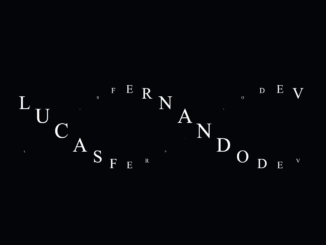
This tutorial guides you through the process of creating cool animated text in Javascript. This effect can be used to add a unique and visually appealing element to your website, capturing user attention and enhancing the overall aesthetic. It is a simple yet elegant way to make your website stand out.
Getting Started
To begin creating this animation, you’ll need to set up the basic HTML structure. This structure will contain the elements that will hold our animated text.
Step 1: HTML Structure
Create two div elements with the class “spiral”. These will hold the characters that will be animated.
<div id="spiral" class="spiral"></div>
<div id="spiral2" class="spiral"></div>
    <script  src="./script.js"></script>
Step 2: CSS Styling
Next, add the following CSS to style the page and the text animation. This CSS will handle the basic layout, colors, and the animation itself. The @property rule is used to define a custom CSS property for the angle, enabling smooth animations. Note that the firefox browsers dont support @property and Javascript will be used instead.
body, html{
  height: 100%;
  margin: 0;
  display: flex;
  justify-content: center;
  align-items: center;
  background: #040509;
  overflow: hidden;
  font-size: 62.5%
}

/* The @property CSS at-rule is part of the CSS Houdini umbrella of APIs. It */
@property --angle {
    syntax: '<angle>';
    initial-value: 0deg;
    inherits: false;
}

.spiral{
  display: flex;
  align-items: center;
  gap: 10px;
  position: absolute;
  color: #e0ecef;
  font-family: "sans-serif";
}

@keyframes spiral{
  0%{
    --angle: 0deg;
  }
  100%{
    --angle: 360deg;
  }
}

.character{
  font-size: 2.8rem;
  color: white;
  text-transform: uppercase;
  transform: translateY(calc(sin(var(--angle)) * 100px)) scale(calc(cos(var(--angle)) * 0.5 + 0.5));
  animation: spiral 4s linear infinite;
}

@media (max-width: 490px){
  .character{
    font-size: 2.2rem
  }
}
Step 3: JavaScript Functionality
Now, incorporate the JavaScript code to dynamically generate the animated text effect. This script splits the input text into individual characters and arranges them in a spiral pattern using dynamic positioning and scaling. The javascript code handles an alternative animation method using JS for FireFox Browser since the CSS animation is not supported.
let isFirefox = typeof InstallTrigger !== 'undefined';
const words = "lucasfernandodev";

let ANGLE = 360;
const ANIMATION_DURATION = 4000;

const animation = () => {
  ANGLE -= 1; // Incremento do ângulo
  document.querySelectorAll(".spiral *").forEach((el, i) => {

    const translateY = Math.sin(ANGLE * (Math.PI / 120)) * 100;
    const scale = Math.cos(ANGLE * (Math.PI / 120)) * 0.5 + 0.5;


    const offset = parseInt(el.dataset.offset);
    const delay = i * (ANIMATION_DURATION / 16) - offset;

    setTimeout(() => {
      el.style.transform = `translateY(${translateY}px) scale(${scale})`;
    }, delay);
  });

  requestAnimationFrame(animation);
};

const characters = words.split("").forEach((char, i) => {
  const createElement = (offset) => {
    const div = document.createElement("div");
    div.innerText = char;
    div.classList.add("character");
    div.setAttribute("data-offset", offset);
    div.style.animationDelay = `-${i * (ANIMATION_DURATION / 16) - offset}ms`
    return div;
  };

  document.querySelector("#spiral").append(createElement(0));
  document
    .querySelector("#spiral2")
    .append(createElement((isFirefox ? 1 : -1) * (ANIMATION_DURATION / 2)));
});


// @property CSS doesn't work in Firefox, so it must be animated using JavaScript.
if(isFirefox){
  animation();
}
Conclusion
By following these steps, you can easily create cool animated text in Javascript to add a touch of sophistication to your web projects. This simple effect can significantly enhance the user experience and make your website more engaging.


