

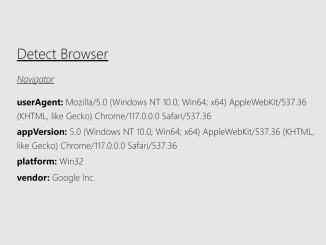
This tutorial will guide you through the process of Javascript Get Browser Name And Version. This information is useful for analytics, conditional loading of resources, and providing browser-specific experiences. By the end of this tutorial, you will have a functional script that can identify the user’s browser and operating system.
Adding Header Assets
First, we’ll add necessary header assets to our HTML document. This may include links to external stylesheets like Tailwind CSS for styling.
<link rel='stylesheet' href='https://unpkg.com/tailwindcss@2.0.1/dist/tailwind.min.css'>
Creating the HTML Structure
Now, we will create the main HTML structure. This will display the browser and OS information we gather using JavaScript.
<div class="max-w-lg my-0 mx-auto">
  <h1 class="text-2xl mb-4 underline">Detect Browser</h1>

  <div class="result">
    <h2 class="text-1xl my-4 italic underline">Navigator</h2>
    <p class="my-1"><span class="font-bold">userAgent:</span> <span id="useragent">-</span></p>
    <p class="my-1"><span class="font-bold">appVersion:</span> <span id="appVersion">-</span></p>
    <p class="my-1"><span class="font-bold">platform:</span> <span id="platform">-</span></p>
    <p class="my-1"><span class="font-bold">vendor:</span> <span id="vendor">-</span></p>

    <h2 class="text-1xl my-4 italic underline">Feature Detection</h2>
    <p class="my-1"><span class="font-bold">Apple OS:</span> <span id="AppleOS">-</span></p>
    <p class="my-1"><span class="font-bold">Apple Device:</span> <span id="AppleDevice">-</span></p>
    <p class="my-1"><span class="font-bold">Device Detection:</span> <span id="DeviceDetection">-</span></p>
    <p class="my-1"><span class="font-bold">Browser:</span> <span id="Browser">-</span></p>
    <p class="my-1"><span class="font-bold">iOS Version:</span> <span id="iOSVersion">-</span></p>
  </div>

  <div class="m-16 text-xs text-center underline"><a href="https://linktr.ee/natterstefan" target="_blank">made with <span aria-label="a red heart" role="img">❤️</span> by @natterstefan</a></div>
</div>
    <script  src="./script.js"></script>
Adding CSS Styling
Next, we’ll style the HTML elements using CSS to improve the visual presentation.
body {
  margin: 1.75rem;
  background: #efefef;
}
Adding the JavaScript Functionality
This is where the core logic resides. We will add JavaScript code to detect the browser name, version, and operating system.
/**
 * # Detect Current Apple Device (macOS or iOS) and Browser
 * (Chrome or not Chrome)
 *
 * Misc Notes
 * - https://github.com/DamonOehlman/detect-browser (not tested)
 */

/**
 * The problem with > iOS 13 in general is that it mimics the user agent of Macs.
 * Therefore it is difficult to get the correct iOS Version >= 13.
 * @see https://stackoverflow.com/a/57838385/1238150
 *
 * inspired by
 * @see https://codepen.io/niggi/pen/DtIfy
 */
function detectIosVersion() {
  if (/iP(hone|od|ad)/.test(navigator.platform)) {
    var v = navigator.appVersion.match(/OS (\d+)_(\d+)_?(\d+)?/);

    const result = [
      parseInt(v[1], 10),
      parseInt(v[2], 10),
      parseInt(v[3] || 0, 10)
    ].join(".");

    return result;
  }

  return "-";
}

/**
 * Detect Apple OS by testing if `window.ontouchstart` exists
 *
 * @see https://stackoverflow.com/q/58019463/1238150
 *
 * Alternatives
 * - https://stackoverflow.com/a/57654258/1238150 (with `TouchEvent`)
 * - https://stackoverflow.com/a/60553965/1238150 (with `Canvas`)
 */
function detectAppleOs() {
  if (/Safari[\/\s](\d+\.\d+)/.test(window.navigator.userAgent)) {
    return "ontouchstart" in window ? "iOS" : "macOS";
  }

  if (window.navigator.platform === "MacIntel") {
    return "macOS";
  }

  return "No Apple Device";
}

/**
 * Apple Device detection with >iOS13 support
 *
 * What is `navigator.standalone`?
 * > Returns a boolean indicating whether the browser is running in standalone mode.
 * > Available on Apple's iOS Safari only.
 * > (https://developer.mozilla.org/de/docs/Web/API/Navigator)
 *
 * @see https://stackoverflow.com/a/62980780/1238150
 * @see https://racase.com.np/javascript-how-to-detect-if-device-is-ios/
 *
 * Misc:
 * - detect if site is running in standalone (added to home screen):
 *   https://stackoverflow.com/a/40932368/1238150
^ */
function detectIosDevices() {
  // devices prior to iOS 13
  if (/iPad|iPhone|iPod/.test(navigator.platform)) {
    return navigator.platform;
  }

  // or with document.createEvent('TouchEvent'), which is only available on iPads (and iPhones)
  return !!(
    navigator.platform === "MacIntel" &&
    typeof navigator.standalone !== "undefined"
  )
    ? "iPad"
    : navigator.platform === "MacIntel"
    ? "Macbook"
    : "No Apple Device";
}

/**
 * Detects iPhone, iPad and Desktop computer
 *
 * inspired by
 * @see https://stackoverflow.com/a/59016446/1238150 (Nov. 2019)
 */
function detectDevice() {
  var agent = window.navigator.userAgent;

  // iPhone
  IsIPhone = agent.match(/iPhone/i) != null;

  // iPad up to IOS12
  IsIPad = agent.match(/iPad/i) != null;

  if (IsIPad) {
    IsIPhone = false;
  }

  // iPad from IOS13
  var macApp = agent.match(/Macintosh/i) != null;

  // also used in https://stackoverflow.com/a/60553965/1238150
  if (macApp) {
    // need to distinguish between Macbook and iPad
    var canvas = document.createElement("canvas");
    if (canvas != null) {
      var context =
        canvas.getContext("webgl") || canvas.getContext("experimental-webgl");
      if (context) {
        var info = context.getExtension("WEBGL_debug_renderer_info");
        if (info) {
          var renderer = context.getParameter(info.UNMASKED_RENDERER_WEBGL);
          if (renderer.indexOf("Apple") != -1) {
            IsIPad = true;
          }
        }
      }
    }
  }

  if (IsIPhone) {
    return "iPhone";
  } else if (IsIPad) {
    return "iPad";
  } else {
    // right now we do not distinguish between the two of them
    return "Desktop computer";
  }
}

/**
 * Detects if current Browser is Chrome. Also works on iOS devices.
 */
function detectChrome() {
  // http://browserhacks.com/
  // https://stackoverflow.com/a/9851769/1238150
  const isChrome =
    !!window.chrome && (!!window.chrome.webstore || !!window.chrome.runtime);

  // https://stackoverflow.com/a/37178303/1238150
  return /Chrome|CriOS/i.test(navigator.userAgent) || isChrome;
}

function detectFirefox() {
  return /Firefox|FxiOS/i.test(navigator.userAgent);
}

function detectBrowser() {
  if (detectChrome()) {
    return "Chrome";
  }
  if (detectFirefox()) {
    return "Firefox";
  }

  // Attention: catchall-fallback with no guarantee
  return "Safari";
}

// DOMContentLoaded
// @see https://developer.mozilla.org/en-US/docs/Web/Events/DOMContentLoaded
document.addEventListener("DOMContentLoaded", function () {
  // navigator
  document.getElementById("useragent").innerText = navigator.userAgent || "-";
  document.getElementById("platform").innerText = navigator.platform || "-";
  document.getElementById("appVersion").innerText = navigator.appVersion || "-";
  document.getElementById("vendor").innerText = navigator.vendor || "-";

  // feature detection
  document.getElementById("AppleOS").innerText = detectAppleOs();
  document.getElementById("AppleDevice").innerText = detectIosDevices();
  document.getElementById("DeviceDetection").innerText = detectDevice();
  document.getElementById("Browser").innerText = detectBrowser();
  document.getElementById("iOSVersion").innerText = detectIosVersion();
});
Final Notes
With the HTML structure, CSS styling, and JavaScript functionality in place, you should now have a working example that can detect the browser and operating system. You can further customize this code to suit your specific needs.
Conclusion:
Hopefully, you have successfully created Javascript Get Browser Name And Version. If you have any questions or suggestions, feel free to comment below.


