

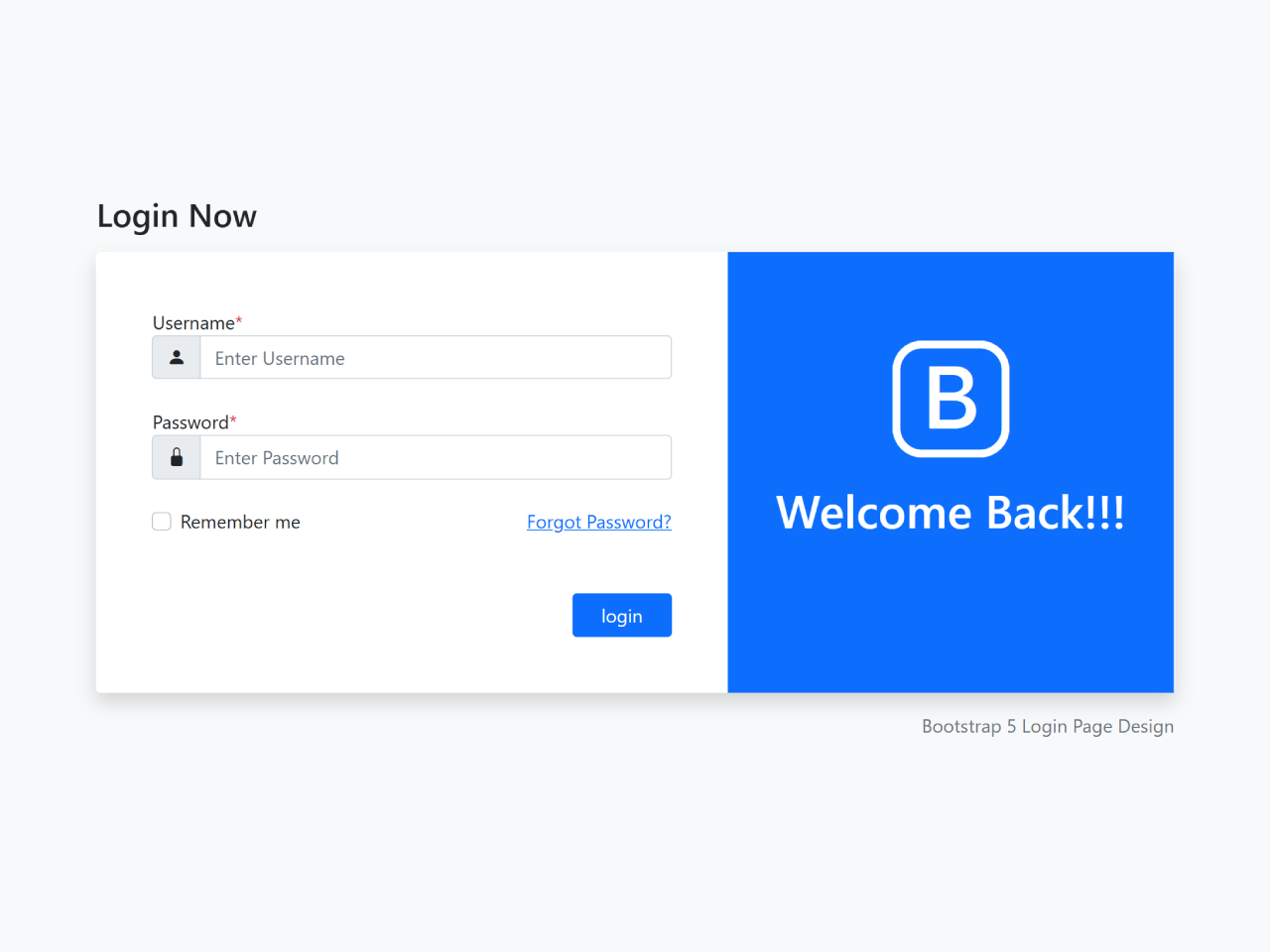
Are you looking to create a modern and responsive login interface for your web application? A well-designed login page is crucial for user experience. This tutorial will guide you through building an appealing Bootstrap 5 Login Page Template. It offers a professional and intuitive design, perfect for secure access to your site. This template is designed with Bootstrap 5, ensuring a mobile-first and visually consistent layout.
How to Create a Bootstrap 5 Login Page Template
1. Add Necessary Header Assets
First, you need to include the Bootstrap 5 CSS and Bootstrap Icons CDN links. Place these links within the head section of your HTML document.
<link rel="stylesheet" href="https://cdn.jsdelivr.net/npm/bootstrap-icons@1.4.1/font/bootstrap-icons.css">
<link href="https://cdn.jsdelivr.net/npm/bootstrap@5.0.2/dist/css/bootstrap.min.css" rel="stylesheet">
2. Create the HTML Structure
Next, define the layout for your login page. This HTML code sets up a responsive form with input fields for username and password, a “Remember me” checkbox, a “Forgot Password” link, and a login button. It also includes a welcome section on the side.
<div class="login-page bg-light">
        <div class="container">
            <div class="row">
                <div class="col-lg-10 offset-lg-1">
                  <h3 class="mb-3">Login Now</h3>
                    <div class="bg-white shadow rounded">
                        <div class="row">
                            <div class="col-md-7 pe-0">
                                <div class="form-left h-100 py-5 px-5">
                                    <form action="" class="row g-4">
                                            <div class="col-12">
                                                <label>Username<span class="text-danger">*</span></label>
                                                <div class="input-group">
                                                    <div class="input-group-text"><i class="bi bi-person-fill"></i></div>
                                                    <input type="text" class="form-control" placeholder="Enter Username">
                                                </div>
                                            </div>

                                            <div class="col-12">
                                                <label>Password<span class="text-danger">*</span></label>
                                                <div class="input-group">
                                                    <div class="input-group-text"><i class="bi bi-lock-fill"></i></div>
                                                    <input type="text" class="form-control" placeholder="Enter Password">
                                                </div>
                                            </div>

                                            <div class="col-sm-6">
                                                <div class="form-check">
                                                    <input class="form-check-input" type="checkbox" id="inlineFormCheck">
                                                    <label class="form-check-label" for="inlineFormCheck">Remember me</label>
                                                </div>
                                            </div>

                                            <div class="col-sm-6">
                                                <a href="#" class="float-end text-primary">Forgot Password?</a>
                                            </div>

                                            <div class="col-12">
                                                <button type="submit" class="btn btn-primary px-4 float-end mt-4">login</button>
                                            </div>
                                    </form>
                                </div>
                            </div>
                            <div class="col-md-5 ps-0 d-none d-md-block">
                                <div class="form-right h-100 bg-primary text-white text-center pt-5">
                                    <i class="bi bi-bootstrap"></i>
                                    <h2 class="fs-1">Welcome Back!!!</h2>
                                </div>
                            </div>
                        </div>
                    </div>
                    <p class="text-end text-secondary mt-3">Bootstrap 5 Login Page Design</p>
                </div>
            </div>
        </div>
    </div>
3. Apply Custom CSS Styles
Now, enhance the appearance of your login page with custom CSS. These styles ensure proper alignment, spacing, and visual appeal, complementing the Bootstrap framework.
a {
    text-decoration: none;
}
.login-page {
    width: 100%;
    height: 100vh;
    display: inline-block;
    display: flex;
    align-items: center;
}
.form-right i {
    font-size: 100px;
}
You have successfully created a modern and responsive Bootstrap 5 Login Page Template.


