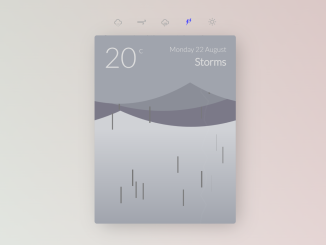
Creating an animated weather card in Vanilla Js offers a dynamic and engaging way to display weather information on your website. This tutorial will guide you through building a visually appealing weather card with animated elements, enhancing the user experience with interactive and informative weather presentation. Let’s dive in and create our animated weather card!
Set Up the HTML Structure
This section focuses on creating the foundation of the weather card using HTML. We’ll structure the content with appropriate
tags and semantic HTML to ensure proper rendering.
Basic HTML Layout
Here’s where you’ll define the basic structure of your weather card.
<div class="background">
<div class="container">
	<svg id="back">
		<radialGradient id="SVGID_1_" cx="0" cy="0" r="320.8304" gradientUnits="userSpaceOnUse">
			<stop  offset="0" style="stop-color:#FFDE17;stop-opacity:0.7"/>
			<stop  offset="1" style="stop-color:#FFF200;stop-opacity:0"/>
		</radialGradient>
		<path id="sunburst" style="fill:url(#SVGID_1_);" d="M0,319.7c-18.6,0-37.3-1.6-55.5-4.8L-7.8,41.4c5.1,0.9,10.6,0.9,15.7,0L56,314.8C37.6,318,18.8,319.7,0,319.7z
	 M-160.8,276.6c-32.5-18.8-61.3-42.9-85.5-71.6L-34,26.2c3.4,4.1,7.4,7.4,12,10.1L-160.8,276.6z M161.3,276.4L22.1,36.2
	c4.5-2.6,8.6-6,12-10.1l212.6,178.5C222.5,233.4,193.8,257.6,161.3,276.4z M-302.5,108.3C-315.4,73-321.9,36-322-1.8l277.6-0.5
	c0,5.3,0.9,10.4,2.7,15.2L-302.5,108.3z M302.6,107.8L41.8,12.8c1.7-4.7,2.6-9.7,2.6-14.9c0-0.3,0-0.6,0-1H322l0-1.3l0,1.9
	C322,35.4,315.5,72.5,302.6,107.8z M-41.8-17.5l-261-94.5c12.8-35.4,31.6-68,55.8-96.9L-34.1-30.8C-37.5-26.8-40.1-22.3-41.8-17.5z
	 M41.7-17.7c-1.8-4.8-4.4-9.3-7.8-13.3l212-179.2c24.3,28.8,43.3,61.3,56.3,96.6L41.7-17.7z M-22.2-40.8l-139.6-240
	c32.7-19,68.1-32,105.2-38.6L-8-46.1C-13-45.2-17.8-43.4-22.2-40.8z M22-40.9c-4.4-2.6-9.2-4.3-14.2-5.1l47.1-273.6
	c37.2,6.4,72.7,19.2,105.4,38L22-40.9z"/>
	</svg>
	<nav>
		<ul>
			<li><a id="button-snow" class="active"><i class="wi wi-snow"></i></a></li>
			<li><a id="button-wind"><i class="wi wi-strong-wind"></i></a></li>
			<li><a id="button-rain"><i class="wi wi-rain"></i></a></li>
			<li><a id="button-thunder"><i class="wi wi-lightning"></i></a></li>
			<li><a id="button-sun"><i class="wi wi-day-sunny"></i></a></li>
		</ul>
	</nav>
	<div id="card" class="weather">
		<svg id="inner">
			<defs>
				<path id="leaf" d="M41.9,56.3l0.1-2.5c0,0,4.6-1.2,5.6-2.2c1-1,3.6-13,12-15.6c9.7-3.1,19.9-2,26.1-2.1c2.7,0-10,23.9-20.5,25 c-7.5,0.8-17.2-5.1-17.2-5.1L41.9,56.3z"/>
			</defs>
			<circle id="sun" style="fill: #F7ED47" cx="0" cy="0" r="50"/>
			<g id="layer3"></g>
			<g id="cloud3" class="cloud"></g>
			<g id="layer2"></g>
			<g id="cloud2" class="cloud"></g>
			<g id="layer1"></g>
			<g id="cloud1" class="cloud"></g>
		</svg>
		<div class="details">
			<div class="temp">20<span>c</span></div>
			<div class="right">
				<div id="date">Monday 22 August</div>
				<div id="summary"></div>
			</div>

		</div>
	</div>
	<svg id="outer"></svg>
</div>
</div>
    <script src='https://code.jquery.com/jquery-2.2.4.min.js'></script>
<script src='https://cdnjs.cloudflare.com/ajax/libs/gsap/1.19.0/TweenMax.min.js'></script>
<script src='https://cdnjs.cloudflare.com/ajax/libs/snap.svg/0.4.1/snap.svg-min.js'></script>
<script src='https://codepen.io/ste-vg/pen/zBVaZw.js'></script><script  src="./script.js"></script>
Apply CSS Styling
With the HTML structure in place, we now turn our attention to styling. CSS will define the visual appearance of our weather card, including colors, fonts, and layout.
Overall Card Appearance
This part is about the general styling to make it visually appealing.
@import 'https://fonts.googleapis.com/css?family=Lato:300';
@import 'https://cdnjs.cloudflare.com/ajax/libs/weather-icons/2.0.9/css/weather-icons.min.css';
html, body, .background {
  width: 100%;
  height: 100%;
  margin: 0;
  padding: 0;
  font-family: "Lato", sans-serif;
}

html {
  background: #fff;
}

body {
  background: #eee;
  background: linear-gradient(0deg, rgba(0, 0, 200, 0.2), rgba(0, 0, 200, 0));
}

.background {
  background: #eee;
  background: linear-gradient(120deg, rgba(50, 150, 100, 0.2), rgba(0, 0, 100, 0));
}

.container {
  display: flex;
  flex-direction: column;
  align-items: center;
  justify-content: center;
  margin: 0;
  padding: 0;
  height: 100%;
  width: 100%;
  overflow: auto;
  position: relative;
  background: #eee;
  background: linear-gradient(240deg, rgba(150, 50, 50, 0.3), rgba(0, 0, 200, 0));
}
nav ul {
  margin: 20px 20px 0 20px;
  list-style-type: none;
  padding: 0;
  display: flex;
  flex-direction: row;
}
nav li a {
  display: block;
  width: 50px;
  text-align: center;
  color: #aaa;
  cursor: pointer;
}
nav li a:hover {
  color: #444;
}
nav li a.active {
  color: #4444ff;
}

#card {
  box-shadow: 9px 7px 40px -6px rgba(0, 0, 0, 0.25);
  overflow: hidden;
  width: 300px;
  padding: 0;
  height: 400px;
  min-height: 300px;
  margin: 20px;
  border-radius: 5px;
  position: relative;
}
#card .details {
  position: absolute;
  top: 0;
  left: 0;
  right: 0;
  padding: 16px 20px;
  color: #888;
  display: flex;
  flex-direction: row;
  justify-content: space-between;
  transition: color 2s ease;
}
.thunder #card .details {
  color: #ddd;
}
#card .details .right {
  text-align: right;
}
#card .details #date {
  margin: 4px 0;
}
#card .details #summary {
  font-weight: 600;
  font-size: 22px;
}
#card .details .temp {
  font-size: 60px;
  line-height: 60px;
}
#card .details .temp span {
  font-size: 18px;
  line-height: 30px;
  vertical-align: top;
  margin-left: 5px;
}

.weather {
  background-color: #DAE3FD;
  transition: background-color 2s ease;
}
.thunder .weather {
  background-color: #9FA4AD;
}
.rain .weather {
  background-color: #D8D8D8;
}
.sun .weather {
  background-color: #ccccff;
}
.weather #inner {
  background-color: white;
  background: linear-gradient(to bottom, rgba(255, 255, 255, 0.5) 50%, rgba(255, 255, 255, 0) 100%);
}
.weather .cloud {
  transition: fill 2s ease;
}
.weather #cloud1 {
  fill: #efefef;
}
.thunder .weather #cloud1 {
  fill: #9FA4AD;
}
.weather #cloud2 {
  fill: #E6E6E6;
}
.thunder .weather #cloud2 {
  fill: #8B8E98;
}
.weather #cloud3 {
  fill: #D5D5D5;
}
.thunder .weather #cloud3 {
  fill: #7B7988;
}

#outer, #back {
  position: fixed;
  pointer-events: none;
}
Implement JavaScript Logic
The JavaScript code adds interactivity and animation to the weather card. It dynamically updates the card based on the selected weather condition.
Core JavaScript Functionality
Implement logic here for animation, weather updates, and overall functionality.
// 📝 Fetch all DOM nodes in jQuery and Snap SVG

var container = $('.container');
var card = $('#card');
var innerSVG = Snap('#inner');
var outerSVG = Snap('#outer');
var backSVG = Snap('#back');
var summary = $('#summary');
var date = $('#date');
var weatherContainer1 = Snap.select('#layer1');
var weatherContainer2 = Snap.select('#layer2');
var weatherContainer3 = Snap.select('#layer3');
var innerRainHolder1 = weatherContainer1.group();
var innerRainHolder2 = weatherContainer2.group();
var innerRainHolder3 = weatherContainer3.group();
var innerLeafHolder = weatherContainer1.group();
var innerSnowHolder = weatherContainer1.group();
var innerLightningHolder = weatherContainer1.group();
var leafMask = outerSVG.rect();
var leaf = Snap.select('#leaf');
var sun = Snap.select('#sun');
var sunburst = Snap.select('#sunburst');
var outerSplashHolder = outerSVG.group();
var outerLeafHolder = outerSVG.group();
var outerSnowHolder = outerSVG.group();

var lightningTimeout;

// Set mask for leaf holder

outerLeafHolder.attr({
	'clip-path': leafMask
});

// create sizes object, we update this later

var sizes = {
	container: {width: 0, height: 0},
	card: {width: 0, height: 0}
}

// grab cloud groups

var clouds = [
	{group: Snap.select('#cloud1')},
	{group: Snap.select('#cloud2')},
	{group: Snap.select('#cloud3')}
]

// set weather types ☁️ 🌬 🌧 ⛈ ☀️

var weather = [
	{ type: 'snow', name: 'Snow'},
	{ type: 'wind', name: 'Windy'},
	{ type: 'rain', name: 'Rain'},
	{ type: 'thunder', name: 'Storms'},
	{ type: 'sun', name: 'Sunny'}
];

// 🛠 app settings
// in an object so the values can be animated in tweenmax

var settings = {
	windSpeed: 2,
	rainCount: 0,
	leafCount: 0,
	snowCount: 0,
	cloudHeight: 100,
	cloudSpace: 30,
	cloudArch: 50,
	renewCheck: 10,
	splashBounce: 80
};

var tickCount = 0;
var rain = [];
var leafs = [];
var snow = [];

// ⚙ initialize app

init();

// 👁 watch for window resize

$(window).resize(onResize);

// 🏃 start animations

requestAnimationFrame(tick);

function init()
{
	onResize();

	// 🖱 bind weather menu buttons

	for(var i = 0; i < weather.length; i++)
	{
		var w = weather[i];
		var b = $('#button-' + w.type);
		w.button = b;
		b.bind('click', w, changeWeather);
	}

	// ☁️ draw clouds

	for(var i = 0; i < clouds.length; i++)
	{
		clouds[i].offset = Math.random() * sizes.card.width;
		drawCloud(clouds[i], i);
	}

	// ☀️ set initial weather

	TweenMax.set(sunburst.node, {opacity: 0})
	changeWeather(weather[0]);
}

function onResize()
{
	// 📏 grab window and card sizes

	sizes.container.width = container.width();
	sizes.container.height = container.height();
	sizes.card.width = card.width();
	sizes.card.height = card.height();
	sizes.card.offset = card.offset();

	// 📐 update svg sizes

	innerSVG.attr({
		width: sizes.card.width,
		height: sizes.card.height
	})

	outerSVG.attr({
		width: sizes.container.width,
		height: sizes.container.height
	})

	backSVG.attr({
		width: sizes.container.width,
		height: sizes.container.height
	})

	TweenMax.set(sunburst.node, {transformOrigin:"50% 50%", x: sizes.container.width / 2, y: (sizes.card.height/2) + sizes.card.offset.top});
	TweenMax.fromTo(sunburst.node, 20, {rotation: 0}, {rotation: 360, repeat: -1, ease: Power0.easeInOut})
	// 🍃 The leaf mask is for the leafs that float out of the
	// container, it is full window height and starts on the left
	// inline with the card

	leafMask.attr({x: sizes.card.offset.left, y: 0, width: sizes.container.width - sizes.card.offset.left,  height: sizes.container.height});
}

function drawCloud(cloud, i)
{
	/*

	☁️ We want to create a shape thats loopable but that can also
	be animated in and out. So we use Snap SVG to draw a shape
	with 4 sections. The 2 ends and 2 arches the same width as
	the card. So the final shape is about 4 x the width of the
	card.

	*/

	var space  = settings.cloudSpace * i;
	var height = space + settings.cloudHeight;
	var arch = height + settings.cloudArch + (Math.random() * settings.cloudArch);
	var width = sizes.card.width;

	var points = [];
	points.push('M' + [-(width), 0].join(','));
	points.push([width, 0].join(','));
	points.push('Q' + [width * 2, height / 2].join(','));
	points.push([width, height].join(','));
	points.push('Q' + [width * 0.5, arch].join(','));
	points.push([0, height].join(','));
	points.push('Q' + [width * -0.5, arch].join(','));
	points.push([-width, height].join(','));
	points.push('Q' + [- (width * 2), height/2].join(','));
	points.push([-(width), 0].join(','));

	var path = points.join(' ');
	if(!cloud.path) cloud.path = cloud.group.path();
	cloud.path.animate({
  		d: path
	}, 0)
}

function makeRain()
{
	// 💧 This is where we draw one drop of rain

	// first we set the line width of the line, we use this
	// to dictate which svg group it'll be added to and
	// whether it'll generate a splash

	var lineWidth = Math.random() * 3;

	// ⛈ line length is made longer for stormy weather

	var lineLength = currentWeather.type == 'thunder' ? 35 : 14;

	// Start the drop at a random point at the top but leaving
	// a 20px margin

	var x = Math.random() * (sizes.card.width - 40) + 20;

	// Draw the line

	var line = this['innerRainHolder' + (3 - Math.floor(lineWidth))].path('M0,0 0,' + lineLength).attr({
		fill: 'none',
		stroke: currentWeather.type == 'thunder' ? '#777' : '#0000ff',
		strokeWidth: lineWidth
	});

	// add the line to an array to we can keep track of how
	// many there are.

	rain.push(line);

	// Start the falling animation, calls onRainEnd when the
	// animation finishes.

	TweenMax.fromTo(line.node, 1, {x: x, y: 0- lineLength}, {delay: Math.random(), y: sizes.card.height, ease: Power2.easeIn, onComplete: onRainEnd, onCompleteParams: [line, lineWidth, x, currentWeather.type]});
}

function onRainEnd(line, width, x, type)
{
	// first lets get rid of the drop of rain 💧

	line.remove();
	line = null;

	// We also remove it from the array

	for(var i in rain)
	{
		if(!rain[i].paper) rain.splice(i, 1);
	}

	// If there is less rain than the rainCount we should
	// make more.

	if(rain.length < settings.rainCount)
	{
		makeRain();

		// 💦 If the line width was more than 2 we also create a
		// splash. This way it looks like the closer (bigger)
		// drops hit the the edge of the card

		if(width > 2) makeSplash(x, type);
	}
}

function makeSplash(x, type)
{
	// 💦 The splash is a single line added to the outer svg.

	// The splashLength is how long the animated line will be
	var splashLength = type == 'thunder' ? 30 : 20;

	// splashBounce is the max height the line will curve up
	// before falling
	var splashBounce = type == 'thunder' ? 120 : 100;

	// this sets how far down the line can fall
	var splashDistance = 80;

	// because the storm rain is longer we want the animation
	// to last slighly longer so the overall speed is roughly
	// the same for both
	var speed = type == 'thunder' ? 0.7 : 0.5;

	// Set a random splash up amount based on the max splash bounce
	var splashUp = 0 - (Math.random() * splashBounce);

	// Sets the end x position, and in turn defines the splash direction
	var randomX = ((Math.random() * splashDistance) - (splashDistance / 2));

	// Now we put the 3 line coordinates into an array.

	var points = [];
	points.push('M' + 0 + ',' + 0);
    points.push('Q' + randomX + ',' + splashUp);
    points.push((randomX * 2) + ',' + splashDistance);

	// Draw the line with Snap SVG

	var splash = outerSplashHolder.path(points.join(' ')).attr({
      	fill: "none",
      	stroke: type == 'thunder' ? '#777' : '#0000ff',
      	strokeWidth: 1
    });

	// We animate the dasharray to have the line travel along the path

	var pathLength = Snap.path.getTotalLength(splash);
	var xOffset = sizes.card.offset.left;//(sizes.container.width - sizes.card.width) / 2
	var yOffset = sizes.card.offset.top + sizes.card.height;
    splash.node.style.strokeDasharray = splashLength + ' ' + pathLength;

	// Start the splash animation, calling onSplashComplete when finished
	TweenMax.fromTo(splash.node, speed, {strokeWidth: 2, y: yOffset, x: xOffset + 20 + x, opacity: 1, strokeDashoffset: splashLength}, {strokeWidth: 0, strokeDashoffset: - pathLength, opacity: 1, onComplete: onSplashComplete, onCompleteParams: [splash], ease:  SlowMo.ease.config(0.4, 0.1, false)})
}

function onSplashComplete(splash)
{
	// 💦 The splash has finished animating, we need to get rid of it

	splash.remove();
	splash = null;
}

function makeLeaf()
{
	var scale = 0.5 + (Math.random() * 0.5);
	var newLeaf;

	var areaY = sizes.card.height/2;
	var y = areaY + (Math.random() * areaY);
	var endY = y - ((Math.random() * (areaY * 2)) - areaY)
	var x;
	var endX;
	var colors = ['#76993E', '#4A5E23', '#6D632F'];
	var color = colors[Math.floor(Math.random() * colors.length)];
	var xBezier;

	if(scale > 0.8)
	{
		newLeaf = leaf.clone().appendTo(outerLeafHolder)
		.attr({
			fill: color
		})
		y = y + sizes.card.offset.top / 2;
		endY = endY + sizes.card.offset.top / 2;

		x = sizes.card.offset.left - 100;
		xBezier = x + (sizes.container.width - sizes.card.offset.left) / 2;
		endX = sizes.container.width + 50;
	}
	else
	{
		newLeaf = leaf.clone().appendTo(innerLeafHolder)
		.attr({
			fill: color
		})
		x = -100;
		xBezier = sizes.card.width / 2;
		endX = sizes.card.width + 50;

	}

	leafs.push(newLeaf);


	var bezier = [{x:x, y:y}, {x: xBezier, y:(Math.random() * endY) + (endY / 3)}, {x: endX, y:endY}]
	TweenMax.fromTo(newLeaf.node, 2, {rotation: Math.random()* 180, x: x, y: y, scale:scale}, {rotation: Math.random()* 360, bezier: bezier, onComplete: onLeafEnd, onCompleteParams: [newLeaf], ease: Power0.easeIn})
}

function onLeafEnd(leaf)
{
	leaf.remove();
	leaf = null;

	for(var i in leafs)
	{
		if(!leafs[i].paper) leafs.splice(i, 1);
	}

	if(leafs.length < settings.leafCount)
	{
		makeLeaf();
	}
}

function makeSnow()
{
	var scale = 0.5 + (Math.random() * 0.5);
	var newSnow;

	var x = 20 + (Math.random() * (sizes.card.width - 40));
	var endX; // = x - ((Math.random() * (areaX * 2)) - areaX)
	var y = -10;
	var endY;

	if(scale > 0.8)
	{
		newSnow = outerSnowHolder.circle(0, 0, 5)
			.attr({
				fill: 'white'
			})
		endY = sizes.container.height + 10;
		y = sizes.card.offset.top + settings.cloudHeight;
		x =  x + sizes.card.offset.left;
		//xBezier = x + (sizes.container.width - sizes.card.offset.left) / 2;
		//endX = sizes.container.width + 50;
	}
	else
	{
		newSnow = innerSnowHolder.circle(0, 0 ,5)
		.attr({
			fill: 'white'
		})
		endY = sizes.card.height + 10;
		//x = -100;
		//xBezier = sizes.card.width / 2;
		//endX = sizes.card.width + 50;

	}

	snow.push(newSnow);


	TweenMax.fromTo(newSnow.node, 3 + (Math.random() * 5), {x: x, y: y}, {y: endY, onComplete: onSnowEnd, onCompleteParams: [newSnow], ease: Power0.easeIn})
	TweenMax.fromTo(newSnow.node, 1,{scale: 0}, {scale: scale, ease: Power1.easeInOut})
	TweenMax.to(newSnow.node, 3, {x: x+((Math.random() * 150)-75), repeat: -1, yoyo: true, ease: Power1.easeInOut})
}

function onSnowEnd(flake)
{
	flake.remove();
	flake = null;

	for(var i in snow)
	{
		if(!snow[i].paper) snow.splice(i, 1);
	}

	if(snow.length < settings.snowCount)
	{
		makeSnow();
	}
}

function tick()
{
	tickCount++;
	var check = tickCount % settings.renewCheck;

	if(check)
	{
		if(rain.length < settings.rainCount) makeRain();
		if(leafs.length < settings.leafCount) makeLeaf();
		if(snow.length < settings.snowCount) makeSnow();
	}

	for(var i = 0; i < clouds.length; i++)
	{
		if(currentWeather.type == 'sun')
		{
			if(clouds[i].offset > -(sizes.card.width * 1.5)) clouds[i].offset += settings.windSpeed / (i + 1);
			if(clouds[i].offset > sizes.card.width * 2.5) clouds[i].offset = -(sizes.card.width * 1.5);
			clouds[i].group.transform('t' + clouds[i].offset + ',' + 0);
		}
		else
		{
			clouds[i].offset += settings.windSpeed / (i + 1);
			if(clouds[i].offset > sizes.card.width) clouds[i].offset = 0 + (clouds[i].offset - sizes.card.width);
			clouds[i].group.transform('t' + clouds[i].offset + ',' + 0);
		}
	}

	requestAnimationFrame(tick);
}

function reset()
{
	for(var i = 0; i < weather.length; i++)
	{
		container.removeClass(weather[i].type);
		weather[i].button.removeClass('active');
	}
}

function updateSummaryText()
{
	summary.html(currentWeather.name);
	TweenMax.fromTo(summary, 1.5, {x: 30}, {opacity: 1, x: 0, ease: Power4.easeOut});
}

function startLightningTimer()
{
	if(lightningTimeout) clearTimeout(lightningTimeout);
	if(currentWeather.type == 'thunder')
	{
		lightningTimeout = setTimeout(lightning, Math.random()*6000);
	}
}

function lightning()
{
	startLightningTimer();
	TweenMax.fromTo(card, 0.75, {y: -30}, {y:0, ease:Elastic.easeOut});

	var pathX = 30 + Math.random() * (sizes.card.width - 60);
	var yOffset = 20;
	var steps = 20;
	var points = [pathX + ',0'];
	for(var i = 0; i < steps; i++)
	{
		var x = pathX + (Math.random() * yOffset - (yOffset / 2));
		var y = (sizes.card.height / steps) * (i + 1)
		points.push(x + ',' + y);
	}

	var strike = weatherContainer1.path('M' + points.join(' '))
	.attr({
		fill: 'none',
		stroke: 'white',
		strokeWidth: 2 + Math.random()
	})

	TweenMax.to(strike.node, 1, {opacity: 0, ease:Power4.easeOut, onComplete: function(){ strike.remove(); strike = null}})
}

function changeWeather(weather)
{
	if(weather.data) weather = weather.data;
	reset();

	currentWeather = weather;

	TweenMax.killTweensOf(summary);
	TweenMax.to(summary, 1, {opacity: 0, x: -30, onComplete: updateSummaryText, ease: Power4.easeIn})

	container.addClass(weather.type);
	weather.button.addClass('active');

	// windSpeed

	switch(weather.type)
	{
		case 'wind':
			TweenMax.to(settings, 3, {windSpeed: 3, ease: Power2.easeInOut});
			break;
		case 'sun':
			TweenMax.to(settings, 3, {windSpeed: 20, ease: Power2.easeInOut});
			break;
		default:
			TweenMax.to(settings, 3, {windSpeed: 0.5, ease: Power2.easeOut});
			break;
	}

	// rainCount

	switch(weather.type)
	{
		case 'rain':
			TweenMax.to(settings, 3, {rainCount: 10, ease: Power2.easeInOut});
			break;
		case 'thunder':
			TweenMax.to(settings, 3, {rainCount: 60, ease: Power2.easeInOut});
			break;
		default:
			TweenMax.to(settings, 1, {rainCount: 0, ease: Power2.easeOut});
			break;
	}

	// leafCount

	switch(weather.type)
	{
		case 'wind':
			TweenMax.to(settings, 3, {leafCount: 5, ease: Power2.easeInOut});
			break;
		default:
			TweenMax.to(settings, 1, {leafCount: 0, ease: Power2.easeOut});
			break;
	}

	// snowCount

	switch(weather.type)
	{
		case 'snow':
			TweenMax.to(settings, 3, {snowCount: 40, ease: Power2.easeInOut});
			break;
		default:
			TweenMax.to(settings, 1, {snowCount: 0, ease: Power2.easeOut});
			break;
	}

	// sun position

	switch(weather.type)
	{
		case 'sun':
			TweenMax.to(sun.node, 4, {x: sizes.card.width / 2, y: sizes.card.height / 2, ease: Power2.easeInOut});
			TweenMax.to(sunburst.node, 4, {scale: 1, opacity: 0.8, y: (sizes.card.height/2) + (sizes.card.offset.top), ease: Power2.easeInOut});
			break;
		default:
			TweenMax.to(sun.node, 2, {x: sizes.card.width / 2, y: -100, leafCount: 0, ease: Power2.easeInOut});
			TweenMax.to(sunburst.node, 2, {scale: 0.4, opacity: 0, y: (sizes.container.height/2)-50, ease: Power2.easeInOut});
			break;
	}

	// lightning

	startLightningTimer();
}
In conclusion, following this tutorial, you’ve learned how to create an animated weather card in Vanilla JavaScript. This project demonstrates how to combine HTML, CSS, and JavaScript to create a dynamic and interactive user interface.